
ParkMobile: Park. Pay. Go. review
 Analysis by Appsdrops
Finding parking is often less about locating an empty space than deciding whether you can trust it to be available when you arrive. I see ParkMobile as most useful when the parking decision can be made before the drive: you can look for a reservable spot, plan around it, and avoid leaving the search until the last few minutes. That makes it a practical option for city visits and other trips where uncertainty about parking would complicate the whole outing.
Choose it for the kind of parking problem you have
This is a free Auto & Vehicles app from Parkmobile, LLC, built around paying for parking and reserving a place ahead of time. It is not simply a map for discovering where to leave a car, nor does it replace every local parking system. Its value depends on whether the places you need are represented in the app and whether advance planning helps in your situation.
That distinction matters. If I am heading somewhere familiar with dependable parking, opening a dedicated app may add an unnecessary step. If I am going to an unfamiliar area, arriving near a fixed appointment, or traveling with passengers who cannot wait while I circle, the ability to arrange parking earlier has more value. The app is strongest when parking is part of the plan rather than a small errand to solve after arrival.
For a first-time user, I would begin by checking the destination and the likely arrival window before relying on the app. A result that looks convenient on a screen is only helpful if its location and timing suit the actual trip. I would also leave enough time to compare the options rather than treating the first appealing choice as an automatic decision.
Why advance planning can make the difference
Imagine driving into a busy area for an appointment. You know when you need to be there, but you do not know which nearby parking option will work. Searching once you arrive means making that choice under pressure, possibly while dealing with traffic or watching the clock. Checking in advance lets you consider parking as part of the route and arrive with a clearer plan.
The less obvious benefit is not just saving a few minutes. It is reducing the number of decisions you have to make at the most inconvenient point in the trip. I find that especially relevant when the driver is unfamiliar with the area or when arriving late would create a larger problem than a slightly longer walk from the car.
There is a trade-off: planning ahead only helps if the chosen option is suitable for the real visit. Before committing, I would compare the location with the destination, consider how much walking is reasonable, and think about whether the schedule could change. A convenient parking choice can become less convenient if the meeting moves or the planned stop takes longer than expected.
Where ParkMobile earns its place
In my view, its clearest advantage over a general-purpose map is focus. A map can help me navigate and may show parking-related places, but finding a place to park is not the same as arranging one. ParkMobile puts parking and advance reservation at the centre of the task, so it is worth checking when I want to make that decision before setting off.
That makes it a good fit for occasional city drivers as well as people who visit the same destination periodically. A visitor can use it to plan an unfamiliar stop; someone returning to a regular venue can check whether the app offers a workable option for that particular visit. I would not assume that a previous choice will suit every later trip, though. Rechecking the destination and timing is a sensible habit whenever the plans differ.
There is also a useful planning workflow here: search before departure, compare the parking location with the destination, and then keep the chosen option in mind while setting the route. This is more reliable than opening a parking app only after reaching a congested block. It also gives you time to decide whether the app’s option is actually better than a public lot, a familiar garage, or another local choice.
The app has a 4.3 average from around 89,000 ratings, and it has been installed over 10 million times. Those figures suggest that it is widely used, but they do not tell me whether a particular place will have a suitable option for an individual trip. I would treat broad popularity as reassurance that the app is established, not as a promise about local coverage or availability.
When another approach may suit you better
ParkMobile is not the right answer to every parking question. If you already know a reliable public lot near your destination, going directly there may be simpler than comparing app options. If your main need is turn-by-turn navigation or a broad search for businesses and landmarks, a navigation or map app is a more natural starting point. Those tools address a different part of the journey, and using them alongside a parking-focused app can make more sense than expecting one to do everything.
Likewise, someone who prefers to make decisions only after seeing the street may not benefit much from reserving in advance. A fixed plan can feel restrictive if the destination or arrival time is likely to change. In that case, it is better to compare the app’s choices with local parking signs and other available options than to commit simply because advance booking is possible.
Coverage is another practical consideration. Parking choices are local, so I would check the exact destination rather than assume that an app useful in one part of a trip will be equally helpful elsewhere. If the location does not offer an option that fits your needs, a municipal parking resource, a venue’s own guidance, or a conventional public lot may be the better route. That is not a failure of the app; it is a reminder that parking depends on the place.
For people who rarely drive into unfamiliar areas, the app may not earn a permanent place in their routine. A driver who parks at home, at work, or in a familiar lot most of the time has less reason to keep a dedicated parking workflow close at hand. I would still consider it for a specific trip with uncertain parking, but I would not install it expecting it to improve every ordinary journey.
What to consider before changing your routine
Switching from a familiar method is not difficult in principle, but it does mean changing when you make the parking decision. Instead of waiting until arrival, you need to check options while planning the trip. That small change is worthwhile when the destination is busy or time-sensitive; it may feel like extra administration for a short, spontaneous stop.
I would avoid making the app the only part of the plan. Keep the destination and arrival time clear, and have a reasonable alternative in mind if the displayed choice does not work for the visit. This is particularly useful when the schedule is uncertain. A backup could simply be a known public lot or another parking area you are willing to use, rather than a second app.
Another practical point is to evaluate the full trip, not just the parking result. A spot that looks close may involve a walk that is inconvenient for your group, while a slightly less convenient location may be easier to reach or leave. Thinking about who is traveling, what they are carrying, and how fixed the appointment is can prevent a poor choice made solely for proximity.
The app is free, carries an Everyone age rating, and its current version is 26.40.1, with Android support beginning at version 8.0. It was released on November 28, 2011, and has accumulated around 26,000 written reviews. I regard its long presence and substantial user activity as context, but the practical test remains whether it helps with the specific parking decisions you face.
My recommendation for everyday use
I would recommend ParkMobile to drivers who regularly visit unfamiliar or busy destinations and want to sort out parking before they arrive. It is particularly sensible when being late, circling for a space, or making a rushed choice would spoil the trip. The best results come from using it as a planning tool: check early, judge the location against your actual destination, and keep a backup in mind when the schedule is uncertain.
I would be more cautious about recommending it to someone who parks in the same dependable place every day, dislikes planning ahead, or needs a broad navigation tool rather than a parking-specific one. For those users, a familiar local option or a general map may be enough. The app’s purpose is narrower, and that focus is both its appeal and its limitation.
Overall, I think ParkMobile is worth trying when parking is a genuine source of uncertainty, not merely because a dedicated app sounds convenient. It gives you a way to consider a reservable place before the drive, which can make a busy outing feel more organized. Just treat each result as one option to evaluate, not a guarantee that every destination or plan will be covered.
What we like
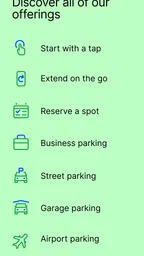
- Reserve parking before arriving at busy destinations.
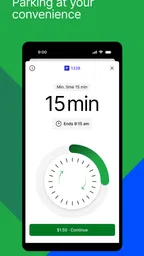
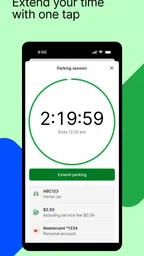
- Extend a parking session remotely when plans change.
- Save vehicle and payment details for faster checkout.
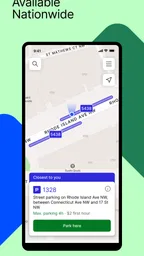
- Find participating parking locations through the app.
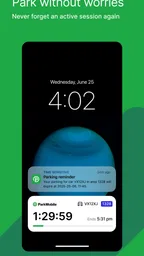
- Receive reminders before a parking session expires.
What could be better
- Only works at participating parking locations.
- Convenience fees may apply to some transactions.
- Parking availability can change before you arrive.
- Location access may be needed for nearby parking searches.
- App features and coverage vary by city.





