

Android Auto review
 Analysis by Appsdrops
For me, the most useful thing about Android Auto is not that it puts a map on a car screen; it is that it brings navigation, audio, and messages into one driving-oriented place. That changes a familiar, slightly risky habit—glancing between a phone and the road—into a more focused routine. Android Auto is a free app from Google LLC in the Auto & Vehicles category, and its central promise is practical: handle common phone tasks from the car display or by voice rather than reaching for the handset.
One driving interface, fewer reasons to touch your phone
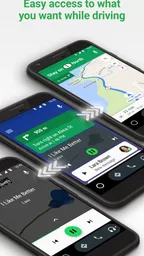
In use, Android Auto is best understood as a companion interface, not a replacement for the phone or the car’s built-in systems. When a compatible phone and vehicle are connected, supported navigation, media, and messaging options can be presented in a layout intended for driving. The benefit is not simply having more information on screen. It is being able to move between a route, audio, and a message without repeatedly picking up the phone.
That focus also sets a sensible limit. This is not an app for browsing every phone feature from the dashboard. The driving context calls for simplified choices, and the experience is most valuable when I decide what I need before setting off, then make only brief adjustments on the move. If I expect to read long messages, explore menus, or do anything that needs sustained attention, I should wait until I am parked.
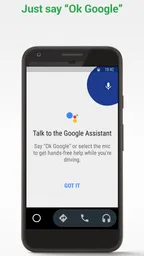
Google’s store summary highlights Gemini while driving, alongside maps, media, and messaging. The useful idea is hands-free interaction: where supported, speaking a request can be more convenient than navigating a screen. I still treat voice control as an aid rather than a guarantee. Road noise, unclear wording, or a request that needs a lot of follow-up can make it less efficient than setting things up before departure.
A practical routine from driveway to destination
A good way to use Android Auto is to prepare in a short sequence. Before moving, choose the destination, select audio, and check that the phone has connected to the car. Once underway, keep changes simple: ask for a route adjustment, switch to a different audio source, or handle a short message through the available hands-free options. This approach reduces the temptation to treat the car display like a phone-sized tablet.
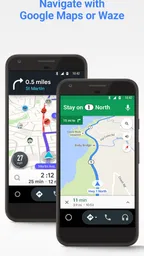
Consider a weekday trip to an unfamiliar appointment. I can start navigation before pulling away, then let the route remain visible while audio continues in the background. If a message arrives, I can decide whether it is worth responding now or can wait. The value is the continuity: the map does not have to become a separate task from listening, and a quick voice interaction may avoid a manual detour into the phone.
One less obvious benefit is how this can make small changes feel less disruptive. When a route needs adjusting, the car interface gives navigation a natural place in the driving routine; I do not have to pick up the phone, unlock it, and switch away from whatever was playing. That is especially useful on an unfamiliar road, where even a brief phone interaction can be distracting. It does not make every adjustment safe, though. If a request needs thought or several steps, I pull over rather than trying to finish it at a stoplight.
Another useful habit is to make the audio choice early. A driver who waits until the trip is underway to search through options can end up tapping around more than expected. I find the better pattern is to start a familiar playlist, station, or other preferred audio before driving and use the dashboard interaction for only occasional changes. Android Auto’s value is strongest when it shortens routine actions, not when it encourages constant screen use.
Where the experience depends on the setup
Android Auto is only as convenient as the connection between the phone, car, and the features each supports. Compatibility matters: a driver should check whether the vehicle and phone work with the experience before building a daily routine around it. If the car’s display or connection behaves inconsistently, the app can feel like another thing to troubleshoot rather than a simpler way to drive.
The interface also depends on the apps and services available on the phone. Navigation and media choices are not all interchangeable, and a person with a settled preference for a particular car system may find little reason to change. I would not assume that every app behaves identically on the dashboard or that every phone task can be handled there. The point is a selected set of driving-relevant activities, not complete access to everything on the handset.
There is a real trade-off between convenience and attention. A large screen and voice controls can reduce the need to handle a phone, but they do not remove distraction altogether. A complicated voice request can still take attention away from traffic, and a screen full of prompts can invite a glance at the wrong moment. My rule is simple: if I cannot complete an action with a quick glance or a short, clear voice request, I leave it for later.
Drivers should also be comfortable with the phone being part of the car setup. Android Auto is designed around bringing phone functions into the vehicle, so it is not the best fit for someone who wants to keep all driving information exclusively within the car’s built-in system. Nor is it a substitute for learning the vehicle’s own controls. For climate settings, vehicle status, or other car-specific functions, the manufacturer’s interface may remain the more appropriate place.
How it compares with the usual alternatives
The everyday alternative is to use the phone directly, rely on the car’s built-in navigation and media tools, or combine both. Using a phone alone may offer a familiar interface, but it can leave the driver handling a small screen and switching between apps. A built-in system can be a better choice for someone who prefers a consistent car interface and already finds its navigation and audio controls sufficient. Android Auto is most compelling when the driver wants phone-based services presented in a more car-oriented way.
That distinction matters more than a broad claim that one approach is always better. If I mainly drive short, familiar routes and rarely need messages or phone audio, the car’s existing controls may be enough. If I often move between destinations, want navigation and audio together, and value voice interaction, Android Auto has a clearer role. A passenger can also help with more involved changes, which is often safer and less frustrating than asking the driver to manage them.
For a driver whose car does not offer a compatible setup, the app cannot solve that limitation by itself. In that case, using a phone safely mounted and configured before starting, or sticking with the car’s available system, may be more practical. I would check compatibility first, rather than assume the app will work simply because the phone runs Android.
Who is likely to get the most from it
I would recommend Android Auto to people who regularly use navigation and audio on their phone and want those activities organized around the car display. It is especially useful for commuting, unfamiliar trips, and days when a driver needs to stay reachable without making every message a reason to handle the phone. The interface makes more sense when the user has a few repeated tasks and uses voice or brief controls for them.
It is less appealing for drivers who dislike voice interaction, have no compatible vehicle setup, or already prefer their car’s own navigation and media tools. It is also a poor excuse to multitask behind the wheel. If someone expects the system to make messaging effortless enough to do constantly, I would encourage a different habit: let non-urgent communication wait and keep attention on driving.
Android Auto has a 4.1 average from around 6.3 million ratings, with about 498,000 reviews, and it has been installed over 10 billion times. It is rated for Everyone, first released in March 2015, and requires Android 9 or later. Those figures suggest a widely used app, but they do not guarantee a smooth experience in every car; the individual setup still matters more than popularity.
My overall view is that Android Auto earns its place by making a narrow set of phone tasks easier to manage while driving, especially navigation, audio, and simple communication. Its strongest use is a prepared, low-interaction routine—not constant control from the dashboard. If your vehicle and phone are compatible and you want those functions together, I think it is worth trying. If the connection is unreliable or your car’s own system already does what you need, there is no reason to force a change.
What we like
- Large touch targets make key controls easier to use while driving.
- Voice commands help reduce the need to handle your phone.
- Compatible apps provide convenient access to navigation and audio.
- The familiar interface can make switching between supported cars easier.
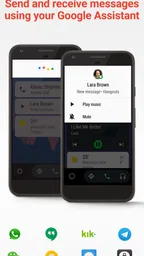
- Calls and messages can be handled through supported voice features.
What could be better
- Availability depends on your phone model and Android version.
- Some features require a compatible car or aftermarket head unit.
- Only selected apps can appear on the in-car display.
- Wireless use may drain your phone battery quickly.
- Connectivity issues can interrupt navigation or audio playback.





