


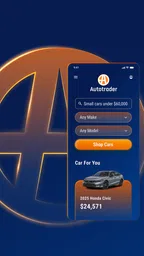



Autotrader: Shop Cars For Sale review
 Analysis by Appsdrops
When I’m looking for a car, the hard part isn’t finding listings; it’s turning a pile of possibilities into a shortlist I can actually inspect. Autotrader is most useful as a place to bring new and used cars into one search, compare candidates, and decide which ones deserve a closer look. I wouldn’t treat an app listing as a substitute for seeing a vehicle or checking its history, but it can make the first stage of a search feel far less scattered.
One search for new and used cars
Autotrader is a free auto and vehicle shopping app from Autotrader, Inc. Its focus is straightforward: help people shop for cars for sale, whether they are considering new or used vehicles. That broad scope matters because many buyers begin with a budget or a practical need, not a firm choice between a dealership-new car and a pre-owned one.
Instead of starting separate searches in several places, I can use one app as a working space for comparing options. That doesn’t mean every vehicle will be directly comparable, of course. A newer car and an older used one may differ in condition, equipment, and expected ownership costs even if their asking prices look close. The app helps bring candidates together; the judgment about whether they are genuinely equivalent is still mine.
Its appeal is easy to understand: the car market is fragmented, and browsing listings can quickly turn into a jumble of tabs, remembered prices, and half-forgotten details. Autotrader gives that initial search a clearer center. The useful outcome isn’t simply seeing many cars. It’s being able to narrow my attention to a manageable set and move from casual browsing toward specific questions for a seller.
From broad browsing to a useful shortlist
I get the most from a car-search app when I begin with a short list of priorities rather than a dream vehicle. For example, I might decide that I need enough room for a family, want to stay within a particular budget, and am open to either a new or used option. Searching with those needs in mind makes it easier to recognize a promising listing without getting sidetracked by every appealing model.
A practical tip is to keep a small comparison note outside the search itself: the vehicle, its asking price, its age or condition as described, and the questions I need answered. That simple habit matters because listings can blur together during a long session. I also try to compare cars in groups that make sense—similar body styles or intended uses—before weighing a very different alternative. This prevents a low price from dominating a decision when the car may not suit the same job.
When a candidate catches my eye, I treat the listing as a starting point for due diligence. I would ask the seller about service records, ownership history, known problems, and what is included in the sale, then verify important details independently. For a used car, an in-person inspection and a suitable vehicle-history check can reveal issues that no shopping interface can settle. For a new car, I would confirm the exact specification and final terms directly before making plans.
A realistic way to use it
Imagine that my current car has become unreliable and I need a replacement soon, but I’m not sure whether buying used is the right compromise. I could use Autotrader to look at new and used candidates against the same basic needs, then save my attention for listings that fit my budget and daily routine. The key is not to decide from the first attractive photo. I’d make a shortlist, compare the details that matter, and contact sellers only after identifying what remains uncertain.
That workflow is especially helpful if I’m balancing an immediate need with a longer-term preference. A used car might seem like the sensible choice at first, while a new one may offer a different ownership proposition. The app can help me see what is available across both sides of that decision, but it cannot tell me which one is financially wiser for my circumstances. I still need to account for insurance, maintenance, financing, and how long I expect to keep the vehicle.
Another useful approach is to search with flexibility in mind. If I insist on one exact model and configuration, I may overlook an alternative that meets the same practical need. Conversely, broadening a search too much can produce a stream of irrelevant choices. I’d adjust one preference at a time and notice whether the new results are genuinely useful. That keeps the process deliberate instead of turning it into endless scrolling.
Where it fits among other ways to shop
Compared with searching one dealer’s inventory, Autotrader has a wider role: it is oriented toward shopping for cars rather than only browsing a single seller’s selection. That makes it a sensible first stop when I’m still deciding what kind of vehicle to pursue. A dealer’s own inventory can be more useful later, once I know which specific cars I want to inspect or when I need details about a particular purchase.
Compared with general classified listings, a car-focused search is more naturally suited to narrowing down vehicle candidates. General marketplaces can be handy for local listings and informal seller-to-buyer browsing, but they may put cars alongside a much broader range of unrelated items. I’d still consider more than one source before committing, since no single marketplace should be assumed to show every relevant vehicle in an area.
The tradeoff is that a centralized search can create a sense of completeness that no search tool should promise. Results are only useful when the listing information is current and accurate, and a vehicle that looks ideal on screen may not be available or may differ from what I expected when I see it. I would confirm availability, condition, and sale terms with the seller before arranging travel or making a decision.
The limits that matter before you commit
Browsing is the easy part; evaluating a car is where the real work begins. A listing can help me spot a possible match, but it can’t replace a mechanical inspection, a test drive, or careful paperwork review. For a used vehicle in particular, I would not let an attractive asking price or polished presentation stand in for evidence about its condition. If I’m not comfortable assessing a car myself, I’d ask a qualified mechanic to inspect it before buying.
There is also a personal limit to any broad shopping app: it may not be the best tool once I have a narrow, time-sensitive task. If I already know the exact vehicle I want from a particular dealer, contacting that dealer directly may be quicker. If I’m only interested in private local listings, a local classified service may better match how I want to search. Autotrader makes more sense when I value a broad car-shopping starting point over a single seller or a narrowly defined source.
I’d also avoid treating a displayed listing as a complete picture of the cost. The asking price is only one part of owning a car. Before making a choice, I’d work through likely insurance, fuel, maintenance, financing, and registration costs relevant to my situation. Those can change which option is affordable, even when two cars appear close in price. The app can support the search, but a personal budget is still essential.
Who is likely to get the most from it?
I think Autotrader is best for people who are early or middle in the buying process: they know they need a car, but still want to compare different vehicles and decide whether new or used better fits. It can also help a busy shopper maintain focus by turning a vague “I need a car” search into a handful of candidates to investigate. The strongest use is as a discovery and comparison aid, not as the final authority on a vehicle’s quality.
It is less compelling for someone who has already settled on one exact car and only needs the seller’s latest availability or paperwork. It may also disappoint anyone expecting a listing app to answer mechanical questions or guarantee that a car is right for them. Those buyers will still need direct contact, independent checks, and an inspection. In my view, the app is valuable precisely when I remember where its job ends: it helps me find what to investigate, not decide what to buy for me.
The app has an average rating of 4.5 from around 50,000 ratings, and it has been installed over 5 million times. It is rated for Everyone, costs nothing to download, and its current version is 4.37.0; it first appeared on October 6, 2011. Those details suggest a long-running, widely used shopping option, but I would judge it by whether its search helps me make a clearer shortlist for my own needs.
My recommendation
I’d recommend Autotrader to a friend who wants to compare new and used cars without beginning from a single dealership’s inventory. Its real strength is giving the early search a practical direction: define what matters, gather plausible candidates, and use the shortlist to guide questions and inspections. That approach can save time and reduce impulsive browsing, especially when the buyer is open to more than one kind of vehicle.
I would not recommend relying on it alone to validate a car or make a purchase decision. Confirm the listing with the seller, check the vehicle carefully, and compare the full ownership cost before committing. If you go in expecting a useful shopping starting point rather than a complete buying service, Autotrader is a sensible free app to keep in your toolkit while you work out which car is genuinely right for you.
What we like
- Save searches to keep track of cars that match your needs.
- Contact sellers directly from vehicle listings.
- Compare listings using price and mileage details.
- Browse vehicles from dealerships and private sellers.
- Get alerts when new matches appear in saved searches.
What could be better
- Listing details may vary between sellers.
- Some vehicles may sell before listings are removed.
- Search results depend on the accuracy of seller information.
- Not every listing includes a vehicle history report.
- Availability and features may differ by location.





