

PayByPhone review
 Analysis by Appsdrops
Parking is usually the least interesting part of a trip, but the payment step can still derail a smooth arrival. I see PayByPhone as most useful when the place where you park accepts it: it can make paying from your phone feel simpler than searching for a meter or handling coins. The important decision is not whether an app sounds convenient, but whether it covers the locations you actually use and fits the way you manage a parking session.
Start with the parking locations you use
PayByPhone is an Auto & Vehicles app from PayByPhone Technologies Inc., built around paying for parking. That focused purpose is a strength. Rather than asking you to learn a broad travel service, it gives you a phone-based option for a specific errand: settling a parking charge. I would judge it first by checking whether the lots, streets, or other parking areas in my regular routine support it.
This distinction matters because a parking payment app is only helpful where it is accepted. If your commute involves a familiar pay station that already works quickly, changing your routine may not buy you much. If you often arrive somewhere unfamiliar, or would rather avoid handling a meter while watching traffic and keeping track of your belongings, paying by phone can be a more comfortable workflow.
The app is free, has an Everyone age rating, and is currently at version 26.11.1. Its long-running presence is reflected in its release date of July 6, 2011, while its average rating is 4.9 from around 272,000 ratings. Those figures suggest a widely used service, but they cannot tell you whether it covers the particular parking spaces you need; local acceptance remains the practical test.
I would also think about how often I park and how much I value keeping payment tasks on my phone. For an occasional visitor, a meter or the payment method posted at the location may be perfectly adequate. For someone who parks in supported areas repeatedly, an app can reduce small bits of friction. The difference is less about replacing every parking method and more about having a convenient option when the location supports it.
Why phone payment can make a real difference
The main advantage is the change in routine. Instead of treating payment as a separate stop at a machine, you can handle it as part of arriving and parking. That is especially useful when it is raining, when you have children or bags with you, or when stepping away from the car to find a payment point would be awkward. These are modest conveniences, but they are exactly the kind that can make a recurring errand feel easier.
A useful habit is to confirm the parking area's instructions before walking away. Phone payment does not remove the need to follow local signs or verify that you selected the correct place and session. I would take a moment to check the location details shown in the app against the information at the space or lot, particularly in a large facility where nearby zones might be easy to confuse.
That simple check is one of the most valuable parts of using any parking app: convenience is only a win if the payment is attached to the right place. When I am in a hurry, I would rather spend a few seconds confirming the details than assume that a familiar-looking location is the right one. The app can streamline the payment step, but attention to the signs still belongs to the driver.
Where PayByPhone is strongest
The strongest case for PayByPhone is a repeatable routine in places that accept it. Imagine arriving near a busy appointment with a few minutes to spare. Instead of searching for a machine, waiting behind another driver, and returning to the car, you can use your phone for the payment task and get on with the visit. That is a realistic benefit, not a promise that every parking situation will become effortless.
It can also be useful when plans are uncertain. If a visit may run longer than expected, a phone-based parking workflow can feel less rigid than paying at a machine and then having to return to it. Still, I would not assume that every location offers the same choices or that an app can change the rules of a particular parking area. Check what the site permits and what the session controls actually allow before relying on flexibility.
Another practical tip is to make the app part of your arrival checklist rather than something you open only after you have walked away. Read the signs, identify the supported payment method, and complete the relevant steps while the parking details are still in front of you. This order helps reduce the risk of mixing up neighboring spaces or forgetting that payment is required.
The app has more than 10 million installs and around 10,000 written reviews, which indicates that many people have chosen to use it. I treat that as context rather than proof that it will suit every driver. A high average rating can reflect a smooth experience in supported areas, but the value for any one person still depends on local availability and how well phone payment matches their habits.
When another option is the better fit
A physical meter may be a better choice if you park somewhere that does not accept PayByPhone, if the posted instructions direct you to another payment method, or if you prefer not to rely on your phone during the parking process. The same goes for drivers who rarely encounter supported locations: adding an app to a one-off routine may create more setup than convenience.
Other parking apps can make more sense in areas where a different service is the one drivers are asked to use. I would not choose between them based on general claims about which is best. Compare the instructions at the locations you visit, then prioritize the method that is actually accepted there. In parking, local coverage matters more than a broad feature checklist.
Phone payment also has an everyday trade-off: it depends on being able to use your device at the moment you need to pay. If your phone is unavailable or you do not want to manage parking through it, a posted alternative may be more dependable for you. Keeping the location’s non-app payment instructions in mind is sensible, especially when travelling somewhere unfamiliar.
There is also a learning cost. The first time you use a parking app, you need to pay attention to its prompts and the location information rather than treating the process as automatic. That effort is small for many drivers, but it may not be worthwhile if you already have a quick, reliable method at your usual destination. I would avoid switching simply because an app exists; switch when it solves a recurring inconvenience.
What switching into an app routine involves
If you currently pay at a meter, the biggest change is where you complete the task: on your phone rather than at the payment point. Before depending on it for an important appointment, I would try the process at a familiar, supported location when I have time to read the instructions carefully. A low-pressure first use is a better way to learn the routine than figuring it out while holding up traffic or rushing into a meeting.
For recurring visits, it helps to create a consistent personal check: confirm the posted area, match it to the app, verify the payment details, and then leave the vehicle. This is not a special trick so much as a way to avoid the most consequential mistake in a phone-payment workflow—paying for the wrong place. I would use that same discipline even after becoming familiar with the app.
Before replacing a method that already works, consider where you park most often and what happens when your preferred option is unavailable. If PayByPhone is accepted across your regular stops, learning it may be worthwhile. If support is occasional, keeping it as an additional option is more sensible than treating it as a universal substitute for meters or other local payment systems.
One more useful habit is to make the payment step part of the parking decision itself. Check the signs before choosing a space if you have a choice, rather than assuming every nearby area uses the same system. This is particularly helpful in busy streets or large lots, where adjacent sections may have different instructions. A few seconds spent confirming the setup can prevent an avoidable detour back to the car.
My recommendation
I recommend PayByPhone to drivers who regularly park in places that accept it and want a phone-based alternative to paying at a machine. Its focused purpose, free price, broad adoption, and high average rating make it a reasonable option to try, but none of those points replace checking local coverage. The app is most convincing when it removes a repeated annoyance from a familiar parking routine.
I would skip it as a primary solution if your usual locations do not support it, if you rarely pay for parking, or if you prefer a non-phone method. In those cases, the local meter or the payment option named on the signs is the better guide. You do not need to force a new routine where the existing one is already simple.
My bottom line is straightforward: treat PayByPhone as a useful, location-dependent tool rather than a universal parking pass. Check that your destinations accept it, take care to match the app’s location to the signs, and try it first somewhere familiar. If those conditions fit your routine, it can make paying for parking feel like one less errand; if they do not, another locally accepted method will serve you better.
What we like
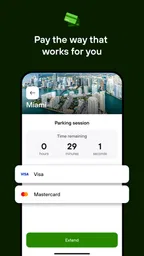
- Quickly extend a parking session from your phone.
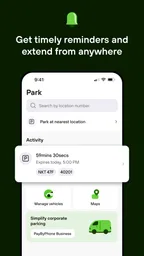
- Receive reminders before your parking time expires.
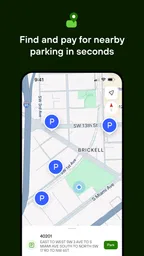
- Find participating parking locations in the app.
- Save vehicle details for faster repeat payments.
- View parking receipts and payment history.
What could be better
- Availability depends on whether your location supports the service.
- Convenience fees may apply to some parking transactions.
- Mobile data or Wi-Fi is needed to manage sessions.
- Incorrect vehicle details can lead to parking penalties.
- Payment methods and features may vary by region.





