Camera for Android - HD Camera review
 Analysis by Appsdrops
When I choose a camera app, I care less about a long list of effects than about whether it helps me get the shot without slowing me down. Camera for Android - HD Camera is aimed at that practical middle ground: a photography app from Bright Solved that brings quick capture, selfie effects, and video recording together. My impression is that it makes the most sense for casual shooting, when the phone’s default camera feels a little plain but a full editing workflow would be overkill.
What matters when choosing this camera
Before switching, think about the pictures you actually take. If most are quick snapshots, family moments, food, or selfies, ease of reaching the shutter and choosing a look matters more than elaborate manual controls. This app’s emphasis on quick snapping and beauty filters points toward that kind of use, rather than a specialist setup for photographers who want detailed control over every capture setting.
It also helps to separate capture from editing. A camera app can make a photo feel more finished as you take it, but that is not the same as a dedicated editor with a careful crop, layered adjustments, and a deliberate export workflow. I would approach this app as a way to capture and style images conveniently, not as a replacement for every tool in a photography kit.
The app is free and rated for Everyone, which makes it easy to consider for everyday use. Its average rating is 4.5 from around 1.1 thousand ratings, and it has passed 100 thousand installs. Those figures offer useful context for popularity, but they do not tell me whether its handling will suit a particular phone or whether its effects match someone’s taste.
There is an important compatibility detail for Android users: the current version is 0.0.18 and the minimum operating system is Android 11. If your phone runs an older version, this is not the right option to pursue. I would check the Android version first rather than spend time planning a camera-app switch that the device cannot support.
Where it can make everyday shooting easier
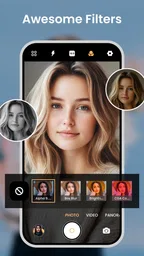
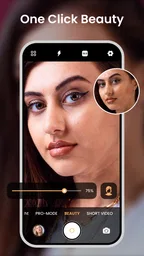
The strongest case for Camera for Android - HD Camera is having a more expressive camera ready for ordinary moments. Imagine taking a quick selfie before meeting friends: you can try a beauty look at capture time instead of taking a plain image, opening another app, and deciding later whether an effect suits you. That shorter path is useful when convenience matters more than polishing every detail.
Beauty filters are most helpful when treated as options, not as a default correction. I would compare a natural-looking result with a stronger effect before keeping the shot, especially for a profile picture or a photo I plan to share widely. A subtle filter can give a selfie a consistent feel; a heavy one can make the image look less like the person in front of the camera. That is a practical reason to test the effect on a low-stakes photo first.
The quick-snap emphasis is another good fit for fleeting scenes: a pet doing something unexpected, a friend laughing, or a small detail noticed while walking. In those cases, the best camera is often the one that gets out of the way. A useful habit is to decide your preferred look before the moment arrives, so you are not comparing effects while the expression or scene disappears.
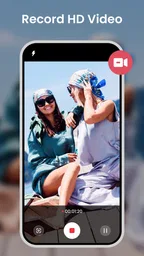
The app also highlights 4K video. That can be appealing when a clip deserves more detail than an ordinary casual recording, but recording in a higher-resolution mode is a trade-off rather than an automatic upgrade. It can demand more storage and may be less convenient to share than a smaller clip. For a short keepsake, higher detail may be worthwhile; for a long recording or a quick message, a simpler setting in your usual camera may be the more sensible choice.
HD selfie capture and effects suggest a focus on people as much as scenery. I would use that combination for informal portraits, video greetings, or documenting a get-together without interrupting it for a separate editing session. The practical gain is not that every result will look professional; it is that a capture-and-style approach can reduce the number of steps between taking a picture and having one you are happy to keep.
Where the usual alternatives may fit better
Your phone’s built-in camera is still the natural comparison. It is already familiar, and it may be the better choice when you want the manufacturer’s usual camera workflow or need to capture something quickly without learning another interface. If the default app already gives you the look and speed you want, adding another camera app may not improve your routine enough to justify switching.
A dedicated photo editor serves a different purpose. If you prefer to take a clean, unfiltered image first and make careful adjustments afterward, an editor gives you a more deliberate second stage. This camera app’s appeal is strongest when you want effects close to capture; it is weaker as a substitute for a considered editing process. Keeping the original approach in mind can prevent a common disappointment: expecting a capture app to provide the depth of a separate retouching tool.
Likewise, someone who regularly shoots controlled scenes may value a camera aimed at manual operation more than one centered on quick snaps and beauty effects. For that person, the priority is repeatable control, not a fast route to a styled selfie. I would not choose this app solely because its summary mentions high-definition video or photography features; the right choice depends on whether its quick, effect-oriented emphasis matches the way you shoot.
There is also a personal-style trade-off. Filters can make a group of casual photos feel more coherent, but they can date an image or flatten the natural look of skin and lighting. I would avoid applying a strong effect automatically to every photo. Use it when it adds something to the scene, and leave it off when accurate color or a natural portrait matters more.
Switching without disrupting your routine
Changing camera apps does not need to mean abandoning the one you already know. I would keep the built-in camera available and try this app on a few ordinary subjects first: a daylight selfie, an indoor portrait, and a short clip. That small comparison reveals more than a single ideal shot because indoor light and moving subjects can expose whether a filter or capture workflow suits your everyday conditions.
For video, make a brief test before recording something important. Check whether the framing, chosen effect, and resulting file fit the way you plan to watch or share it. This is especially useful if you are considering 4K: a short trial helps you judge whether the extra detail is worth the larger storage footprint for your own use, without risking a long recording you later find inconvenient.
It is also sensible to avoid making the new app your only route to a photo before you know its controls. Keep your usual camera as a fallback during the first few sessions. Once you know where the capture options and looks are, you can decide whether this app genuinely saves time or simply adds another step. That is a better test than assuming a separate camera app is automatically more capable.
Because the minimum requirement is Android 11, compatibility should be the first practical check. After that, the real question is preference: do you want quick access to beauty looks and a camera that brings photo and video capture into one place, or are you already satisfied with a default camera plus a separate editor? The former is a clearer reason to try it than the broad promise of “HD” alone.
Who should give it a try
I would recommend it to Android users on a supported system who take plenty of selfies, like trying beauty effects, and want a straightforward way to capture occasional high-resolution video. It is also worth considering for someone who feels the standard camera is too bare for casual social photos but does not want to build every image through a multi-step editing routine.
I would skip it if your device is below Android 11, if your built-in camera already handles your needs comfortably, or if your main interest is detailed manual photography and post-processing. It may also be a poor match if you prefer unfiltered images and rarely take selfies; its most distinctive appeal is less relevant when those are not part of your routine.
Bright Solved’s app is free, so the main cost of trying it is time spent learning whether its capture style works for you. My recommendation is to test it alongside your existing camera rather than switch everything over at once. For quick, effect-friendly portraits and casual video, it has a clear role; for maximum control or a familiar no-frills workflow, another category of camera tool may suit you better.
What we like
- The interface makes common camera controls easy to find.
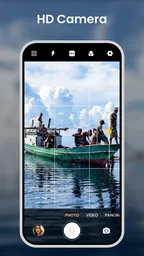
- Grid lines help keep photos level and well framed.
- Timer support is useful for group shots and selfies.
- It offers a straightforward way to switch between photo and video modes.
- Camera settings allow some control over image quality.
What could be better
- Available features may vary across Android devices.
- Image quality depends heavily on the phone's camera hardware.
- Some controls may be unavailable on older Android versions.
- Low-light photos can appear grainy without strong lighting.
- The app may request camera and storage permissions to work.





