

Breastfeeding & Baby Tracker review
 Analysis by Appsdrops
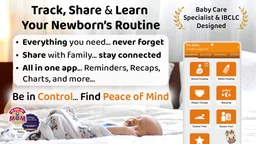
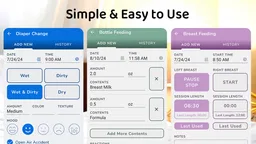
Logging a feed sounds easy until one hand is holding a newborn and the other is trying to remember which side you started on. That is the practical problem Breastfeeding & Baby Tracker is built around: keeping feeding, pumping, diaper and sleep notes together so a parent can check the day without relying on memory. I find that focus more useful than a general-purpose family planner when the details of infant care are changing hour by hour.
This is a parenting app from ParentLove Baby Tracker by Coquisoft, and its 4.9 average from around 12 thousand ratings suggests it has found a committed audience. It is free to install, with in-app purchases ranging from $9.99 to $39.99 per item. The age rating is Everyone. Those details make it easy to try, but the real question is whether a dedicated tracker fits the way your household handles care—and whether it behaves well in the moments when you need it.
When a quick log depends on the connection
For a tracker, connectivity matters less as a headline feature than as a quiet condition behind everyday actions. You may want to record a feed immediately, look back at a sleep period, or show another caregiver what has already happened. Before making it part of a routine, I would test those exact actions on the device and network you expect to use. I would not assume that every screen or saved entry is available without a connection.
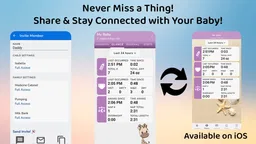
A useful first check is simple: enter a small test record, leave the screen, and return to see whether it remains visible. If you plan to share care with someone else, check how the other person accesses the information and whether updates appear when both devices are connected. This avoids building a handoff routine around an assumption. The app’s core value is a consistent record; the value of that record depends on being able to retrieve it when needed.
That distinction is especially important for feeding notes. If you track which side was used or how long a session lasted, a delayed or missed entry can make the next feed harder to interpret. I would use the tracker as a practical log, not as the sole place to hold information that must be available immediately. A short paper note or a clear verbal handoff can be sensible backup during a network hiccup or a busy transition.
Use it in the rhythm of a real day
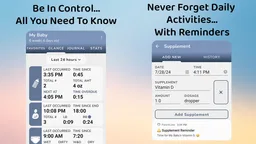
The app is most naturally suited to brief visits between care tasks, not long sessions of data entry. A realistic morning might start with a feed log, then a diaper change, followed by a nap record later on. When another caregiver takes over, the day’s entries can help answer the ordinary but surprisingly difficult question, “What happened since I last checked?” Keeping the records close together is more useful than trying to reconstruct the sequence at bedtime.
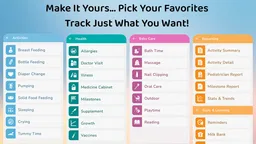
For that workflow, I recommend deciding in advance what you actually want to track. Recording every available detail can turn a helpful tool into another chore, especially during the newborn stage. You might begin with feeds, diapers and sleep, then add pumping notes only if they answer a real question for you. A smaller, consistent log is usually more dependable than a detailed one that gets abandoned after a tiring night.
Mobile use also brings interruptions: a screen may lock, a call may arrive, or a caregiver may need to set the phone down quickly. I would make a habit of checking that an entry has been recorded before moving on, rather than assuming that tapping a control always completed the task. This is not a criticism unique to this app; it is a useful safeguard whenever a phone is being used one-handed in the middle of infant care.
Recovering from missed entries and handoffs
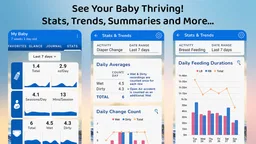
No baby-care log stays perfect for long. A feed gets forgotten, a nap starts while the phone is in another room, or two caregivers each assume the other made the note. I would treat the tracker as a guide to patterns rather than a minute-by-minute legal record. If you notice a gap, add what you remember and keep the uncertainty in mind instead of trying to make the timeline look exact.
A practical handoff is to review the latest entries together before one person leaves. Confirm the most recent feed and diaper, then agree on who will make the next record. That small routine reduces duplicate logging and prevents a missed note from becoming a disagreement about what happened. If the app is not updating as expected, pause and compare what each caregiver can see before relying on it for the next decision.
The same approach helps after a device change or a period without access. Before depending on the app as your only record, make sure the information you care about is present on the device you will actually use. I would keep particularly important notes in a form that both caregivers can access until the app’s behavior in your own setup is clear. That is a cautious workflow, not a claim about a specific backup or synchronization feature.
Keep the log useful without oversharing
Baby trackers can collect intimate details about family routines, so I would be deliberate about who handles the phone and who can see the records. Use the app for information that helps with care, and avoid adding sensitive notes just because a field or free-text option happens to be available. The best personal-data practice is often to keep the record focused: enough to support a handoff or notice a routine, but not a running diary of everything happening at home.
Connectivity adds another reason to be thoughtful. A shared record can make coordination easier, but it also means caregivers should agree on who is included and how the information is used. Check the app’s current privacy and account choices directly before entering details you would not want broadly accessible. I would not infer privacy protections from the presence of a tracker, nor treat a convenient log as a substitute for a conversation between caregivers.
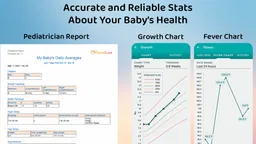
There is also a human side to tracking. A record can reassure you that a task was done, but it can become stressful if every variation looks like a problem to solve. I would use entries to support questions for a pediatric professional, not to diagnose a feeding or sleep concern from a chart alone. If tracking starts to increase anxiety rather than reduce the mental load, scale back to the few notes that genuinely help.
How it compares with simpler options
Compared with a notes app, this is the more focused choice for someone who repeatedly records feeding, pumping, diaper and sleep details. A general note can be flexible, but it tends to require more effort to keep entries organized and easy to scan. A paper notebook, meanwhile, avoids phone interruptions and can sit where caregivers need it, though it is less convenient to carry around and reconcile when more than one person is logging events.
A broad family calendar is better for appointments and shared plans; it is not necessarily the most comfortable place for frequent care entries. This app makes more sense when the day’s small events are the information you want to retrieve. On the other hand, if you only need an occasional reminder, a standard notes or reminder tool may be less work than learning a dedicated tracker. The right choice depends on whether reviewing the record is a regular part of your routine.
The product has been available since October 31, 2015, and its current version is 12.4.0. It has over 100 thousand installs, while the app has 4.3 thousand written reviews. Those figures show that it is an established option, but they do not tell me how well it fits a particular household’s connectivity, device or handoff needs. I would still test the workflow that matters most to you before making it the family’s shared source of truth.
Who should try it—and who may prefer another approach
I would recommend Breastfeeding & Baby Tracker to parents who want a dedicated place for recurring infant-care notes and are willing to keep the habit lightweight. It is particularly appealing when several kinds of daily events need to be remembered together, or when a caregiver wants to review what happened before taking over. The free starting point makes trying that routine straightforward, while the optional purchases are worth considering only after you know which parts you actually use.
I would be less enthusiastic for someone who wants a tracker that requires no phone interaction, who rarely needs to review past entries, or who expects an app to resolve caregiver communication by itself. It is also not the right tool to rely on for urgent medical guidance. If your household’s priority is a shared paper record, a basic reminder, or a broader calendar, one of those may be a better fit than adding another app to a tired parent’s phone.
Overall, I see this as a focused aid for reducing the mental arithmetic of early baby care, not a replacement for judgment or clear communication. Its strongest use is a simple, repeatable log that caregivers can consult and maintain together. My advice is to test a few ordinary entries, check how they behave when you switch screens or devices, and keep only the tracking categories that genuinely make the day easier. If that routine saves you from repeatedly asking what happened at the last feed, it is doing its job; if connectivity or logging becomes another source of stress, choose a simpler system instead.
What we like
- Tracks nursing sessions by side and duration.
- Logs bottle feeds and pumping alongside breastfeeding.
- Records diaper changes and sleep in one place.
- Reminders can help maintain a consistent feeding routine.
- A shared log can help caregivers coordinate baby care.
What could be better
- Manual logging can feel tedious during frequent feeds.
- Entries may be incomplete if caregivers do not update the log.
- Tracking data cannot replace professional medical advice.
- Frequent notifications may become distracting.
- Some features may require an account or paid access.





