


Bose review
 Analysis by Appsdrops
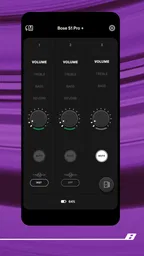
When several people share Bose audio equipment, the awkward part is often not choosing what to listen to; it is getting the right speaker or headphones under control without changing someone else’s setup by accident. I see Bose as a companion for people who already use compatible Bose smart products at home, rather than a general-purpose music player. Its value is in bringing product control into one place, while its usefulness depends on how well the household agrees on who is adjusting what.
One home, several listeners
A familiar situation is a speaker in a shared living room: one person wants music while cooking, another is watching something nearby, and someone else may use Bose headphones later. An app made for controlling Bose products can make those interactions more straightforward than hunting through separate device menus. I would reach for it when I want to manage Bose equipment from my phone, not when I want another place to browse a music library.
The distinction matters. Bose is a Music & Audio app from Bose Corporation, and its role is tied to the company’s smart products. It is free, has an Everyone age rating, and has been available since September 19, 2018. Its scale is substantial—over 10 million installs—though its average rating is 3.4 from around 190,000 ratings. That mixed reception is a useful reminder that an app can be valuable for owners while still frustrating people whose expectations or devices do not line up with it.
In a shared home, I would treat the app as a control point, not as a household agreement. If I change a speaker’s behavior while another person is using it, the app cannot resolve the social part of that problem. A simple habit helps: say which product you are adjusting, and avoid making changes during someone else’s listening session unless you have checked first.
Start with the product, not the household
The first practical question is whether the Bose equipment you own is among the products the app is meant to control. The app’s purpose is specific, so installing it does not turn unrelated speakers or headphones into Bose smart products. I would check the product name and its own setup instructions before asking everyone at home to install anything. That small step prevents a common mismatch: expecting a universal audio remote when this is intended for Bose gear.
For one person, setup may be a quick matter of connecting a phone to the relevant product. A shared household adds a second question: whose phone will be used to make adjustments, and who else needs access? I would begin with the person who already manages the product, then involve other household members only if they have a real reason to control it. This keeps setup simple and avoids confusing “can operate the speaker” with “owns or manages every setting.”
I would also keep expectations modest about account boundaries. The app should be approached as a way to control Bose products, not as a family-management system. If the household needs formal profiles, parental approval workflows, or detailed permissions, those needs should be considered separately rather than assumed to be handled here. For a shared living room, agreeing on a primary device manager can be more dependable than expecting the app to enforce everyone’s preferred boundaries.
Coordinate changes without creating a tug-of-war
One useful workflow is to decide in advance who handles routine adjustments. For example, one person can take responsibility for connecting and setting up the household’s Bose product, while everyone else asks before making changes that could interrupt listening. This is especially helpful in a home where a speaker is used for both casual background music and focused listening. It reduces the chance that a quick phone interaction becomes a debate about who changed the setup.
Another practical habit is to make one change at a time and check the result before moving on. If a product does not behave as expected, changing several things at once makes it harder to tell what helped. I would first confirm that I selected the intended Bose product and then test the adjustment in the room where it is being used. This is not a hidden app feature; it is a straightforward way to troubleshoot shared equipment without blaming another person’s phone or settings.
There is a trade-off between convenience and consistency. Letting several people control the same device can be handy when everyone understands the setup, but it can also create accidental changes or conflicting expectations. Keeping access limited to the people who actually need it may be calmer. On the other hand, if one person is always away from home, a second household member may reasonably need to handle ordinary control tasks. The right arrangement depends on how the Bose product is used, not on a universal rule.
For a realistic evening routine, imagine that I am cooking while someone else is in the next room. I can use the app to manage the Bose product I am responsible for, but I should not assume that a control change will be welcome just because it is easy to make. A quick check-in is still the best coordination tool. That is where the app’s convenience ends and household courtesy begins.
What it does well—and where it asks for patience
The strongest reason to choose this app is focus: it is designed around Bose smart products rather than trying to be a universal controller for every brand. If your home already revolves around Bose equipment, a manufacturer-specific app is often a more natural place to start than a broad smart-home dashboard or a third-party remote. The company behind it, Bose Corporation, is also the maker of the products it is meant to accompany, which gives the app a clear purpose.
The downside of that focus is that it offers little reason to install it if you do not own compatible Bose equipment. It is not a substitute for a music-streaming service, and I would not choose it as my main audio app if I simply wanted to discover or play music across unrelated devices. A general smart-home app may suit someone whose home mixes many brands, while a streaming app is the better choice for searching, playlists, and listening across a broad range of speakers.
The rating suggests that experiences are not uniformly smooth. Around 18,000 written reviews sit alongside the 3.4 average, so I would not assume every setup feels effortless. In practice, the most sensible expectation is that the app’s usefulness will track the Bose products you own and how reliably they are set up. If a control does not work, I would check the product connection and consult that device’s setup guidance before repeatedly tapping or changing unrelated options.
One non-obvious trade-off is that a dedicated control app can simplify product management while adding one more app to a household’s phones. If only one person ever adjusts the equipment, keeping it on that person’s device may be enough. If several people need routine access, the convenience may justify the extra setup and coordination. I would make that decision based on actual use rather than installing it on every phone by default.
Age, trust, and shared-device expectations
The Everyone content rating means the app is categorized for a broad audience, but that should not be confused with a promise that every household member needs an account or should manage the equipment. In a home with children, I would keep the distinction clear: using a device for ordinary listening is different from being responsible for its setup and control. A parent or other trusted adult can decide who handles those tasks without treating the app as a substitute for household rules.
For older relatives or guests, the simplest approach is often to have one person demonstrate the control they actually need, rather than asking them to learn every part of the app. If they only need to use the Bose product occasionally, a short explanation can be easier than changing the whole household setup. If they will be managing it regularly, give them time to try the controls when nobody else is depending on the device.
I also would not infer privacy or account protections from the app’s age label. The label speaks to age suitability, not to who can change a shared product or what boundaries a family can configure. If those are important concerns, read the app’s current settings and the relevant product guidance before deciding how to share control. That is a more reliable approach than assuming the app has dedicated child or household roles.
Who should install it, and who should skip it
I would recommend Bose to someone who owns Bose smart products and wants a direct way to control them from a phone. It makes the most sense when the equipment is used often enough that reaching for a control app is part of the normal routine, or when a household wants one clear place to manage its Bose gear. The free price makes trying it straightforward for an owner, though compatibility with the product remains the deciding factor.
I would skip it if you do not have Bose equipment to control, or if your main goal is to manage a mixed-brand smart home from a single dashboard. I would also choose a music service instead if what I need is music discovery and playback rather than product control. Those are different jobs, and using the right tool for each is less frustrating than expecting this app to cover every part of listening.
My household verdict is that this is a practical, brand-specific companion, not a complete system for coordinating family use. It can make Bose equipment easier to manage, but shared access still works best when people agree on who changes settings and when. If you already rely on Bose smart products, I think it is worth trying and judging with your own setup. If you are only looking for a universal audio app, I would pass and use the tool that matches your devices and listening habits instead.
What we like
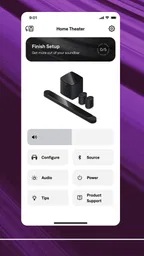
- The app lets you adjust compatible Bose products from one place.
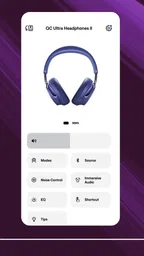
- Customizable EQ helps tailor the sound to your preferences.
- Presets make it quick to switch between listening setups.
- Firmware updates can add fixes and improvements for supported devices.
- Product settings are easier to manage than through device controls alone.
What could be better
- Many features require a compatible Bose product.
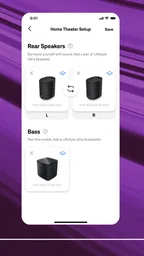
- Some settings vary depending on the connected device.
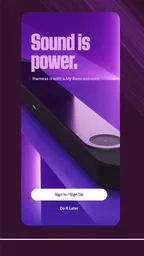
- Setup may require creating or signing in to a Bose account.
- Bluetooth pairing can be unreliable with some phones or products.
- The app offers limited usefulness if you do not own Bose hardware.





