
Boost Cleaner review
 Analysis by Appsdrops
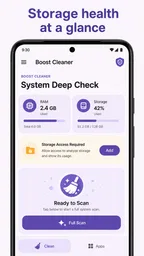
I tend to notice storage trouble at the least convenient moment: when I want to save a photo, install something, or download a file. Boost Cleaner is a free productivity app from Wycked Few that puts storage review and app management in one place. Its appeal is practical rather than flashy: it gives me a way to inspect what is taking up room, consider cleanup suggestions, and decide what to do next. I see it as a small maintenance tool, not a substitute for a broader system for organizing files or managing a device.
Start with a storage problem, not a cleanup button
Before opening a cleaner, I find it useful to know what problem I am trying to solve. Is the phone running short on room, or have I simply stopped keeping track of installed apps? Those are different jobs. Boost Cleaner is aimed at the first kind of check, with app management as a related task; it is not a planner, file archive, or general productivity suite.
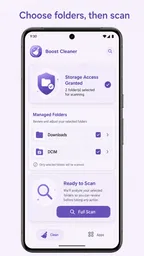
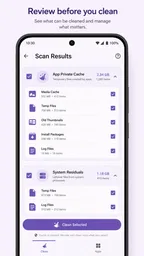
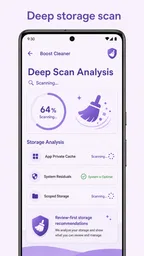
That distinction matters because a scan can point me toward possible actions, but I still need to judge what is safe to remove or uninstall. I would not treat a suggested cleanup as an instruction to delete everything it identifies. The sensible workflow is to scan, inspect the suggestions, and make deliberate choices. The useful part is having a review step between finding clutter and removing it.
This approach suits someone who wants a straightforward place to look when storage feels tight, especially if they would rather not hunt through device settings and installed apps separately. It is less compelling for someone who already has a tidy, familiar routine in the phone’s built-in storage tools and rarely needs a reminder to review apps.
Use the scan as an inventory, not a verdict
When I approach a storage review, I first think about what I might need soon: current projects, travel documents, media I have not backed up, or apps I use only occasionally but still rely on. That context makes cleanup suggestions easier to evaluate. An app can look expendable in a list and still be important for a one-off task, while an app I have not opened in months may be a reasonable candidate to remove.
A useful habit is to check one category of decision at a time. Review cleanup suggestions first, then consider app management separately. This keeps the process from turning into a rushed purge where I remove something simply because it appears alongside other potential clutter. Boost Cleaner’s purpose is to make the review more accessible; the judgment remains mine.
Keep decisions organized around real use
I would use the app most effectively as a prompt to sort choices into three mental groups: keep because I use it, remove because I know I no longer need it, and revisit because I am unsure. That last group is important. If I cannot remember whether an app holds something essential or supports a recurring task, postponing the decision is better than deleting it under pressure.
For a busy person, this can make a quick phone check more purposeful. Rather than opening the cleaner only when a warning appears, I can use it after a period of heavy downloads or when I notice a backlog of apps I no longer recognize. The benefit is not that every scan must lead to removal; a scan that confirms there is nothing I want to change is still a useful check.
Turn occasional cleanup into a repeatable routine
Boost Cleaner makes the most sense to me as one part of a sustainable device routine. I would not run through cleanup in a hurry every time storage gets uncomfortable. Instead, I would review suggestions when I have a few minutes, consider each item in context, and leave uncertain decisions for later. That reduces the risk of treating storage management as an emergency task.
A realistic example: after a weekend away, I have saved files and installed an app for a temporary need. A few days later, I open Boost Cleaner to see whether there is anything worth reviewing. I check the suggested cleanup items, identify the temporary app, and decide whether I still need it. If a suggestion relates to something I recognize as useful, I leave it alone. The point is a calmer review, not a race to make the storage number smaller.
One practical tip is to connect cleanup to a natural trigger rather than an arbitrary schedule: after a trip, a large download, or a stretch when I have installed several apps. That makes the check more relevant and gives me a better chance of remembering why an item is there. Another is to avoid making several unrelated changes at once. If something later behaves differently, it is easier to understand what I changed when I handled one decision at a time.
The app is free, which makes it easy to try as a lightweight part of that routine. Its current version is 3.0.0, and it requires Android 8.0 or later. It is rated for Everyone, so it is presented for a broad audience rather than a narrowly age-restricted one. Those details make it accessible to many Android users, though the Android requirement is worth checking before installing on an older device.
How it fits beside built-in tools
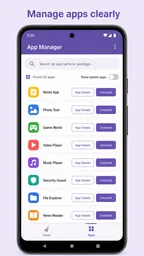
The usual alternative is to use the phone’s own storage settings and manage apps there. Built-in controls may be enough if I want a familiar, direct route and already know where to find the relevant screens. Boost Cleaner’s advantage is its focused role as a place to scan and review cleanup suggestions while also managing apps. That can be more convenient for someone who wants a dedicated prompt to take stock.
It is not automatically better than the system tools. If I need detailed file-by-file organization, a dedicated file manager is the more suitable choice. If I want to preserve personal media, a backup or cloud-storage workflow addresses a different need. A cleaner should not be treated as a backup plan, and an app-management screen cannot replace a considered decision about which documents and photos matter.
This is the main trade-off: convenience versus control. A focused cleaner can lower the effort required to begin a review, but the user still needs to inspect recommendations and understand the consequences of removing items. I would choose Boost Cleaner for a guided storage check, not for advanced file organization or hands-off device maintenance.
Where the routine can go wrong
The biggest friction is the temptation to assume that a suggestion is always safe to accept. Storage decisions depend on how I use a device, and an item that seems unnecessary in isolation may support an occasional but important task. I recommend slowing down around anything unfamiliar, especially when I cannot tell whether it is connected to a file or app I rely on.
Another limitation is that a cleaner cannot solve every reason a phone feels disorganized. If the actual problem is duplicate work across several apps, scattered documents, or not knowing where important files are saved, removing apps may not help. In that situation, I would first establish a simple filing or backup habit. Boost Cleaner can help me review storage-related choices, but it does not replace a system for deciding where information belongs.
I would also avoid making cleanup a reaction to every moment of low storage. In a hurry, I am more likely to remove something without checking its purpose. A better approach is to use the app when I have enough time to review suggestions thoughtfully. If I need immediate space, I would begin with items I can confidently identify as disposable rather than treating every recommendation as equally safe.
Who is likely to get the most from it?
Boost Cleaner is a reasonable fit for Android users who want a simple prompt to inspect storage and manage apps, especially if they have let unused installs accumulate or prefer a focused cleaner over navigating several settings screens. It has reached over 50,000 installs, and its average rating is 3.6 from 84 ratings, which gives prospective users a modest sense of how it has been received without making it a guarantee of personal fit.
I would recommend trying it if you are comfortable reviewing suggestions yourself and want a practical check-in tool rather than an automated decision-maker. It is also a plausible option for someone who periodically downloads apps for short-term needs and then forgets to revisit them. The app’s value in that case comes from making the review easier to start, while the user supplies the context.
I would skip it if your phone’s built-in storage controls already do everything you need, if you want a full-featured file manager, or if you expect a cleaner to organize your digital life without any decisions from you. People who are cautious about removing files should take their time and treat unfamiliar suggestions carefully. That is not a flaw unique to this app; it is an unavoidable part of cleanup tools that ask users to act on what a scan surfaces.
A measured recommendation
After weighing its role, I see Boost Cleaner as a focused maintenance aid rather than a complete productivity solution. Developed by Wycked Few, it offers a free way to scan storage, review possible cleanup actions, and manage apps. Its 3.6 average rating across 84 ratings suggests a mixed but usable reception, so I would approach it with practical expectations rather than assume it will suit every device or workflow.
My recommendation is to try it when you want a clearer starting point for storage maintenance, then keep the decisions selective. Use it to notice what deserves attention, not to remove anything just because it appears in a suggestion. If that distinction matches how you like to manage a phone, the app can support a sensible routine. If you want automatic organization, deep file tools, or no-effort cleanup, the built-in tools or a more specialized alternative may be a better match.
What we like
- Quickly identifies junk files that may be safe to remove.
- Offers a simple interface that is easy for beginners to navigate.
- Can help organize duplicate photos and free up storage.
- Includes tools for monitoring device storage usage.
- A free version lets users try the main features first.
What could be better
- Some cleanup suggestions may require careful review before deletion.
- Certain features may be locked behind a paid subscription.
- Frequent prompts to upgrade can interrupt the experience.
- Cleaning apps cannot reliably boost performance on every device.
- Results may vary depending on the phone model and Android version.





