
Blue Letter Bible review
 Analysis by Appsdrops
I judge a Bible study app not only by how much reference material it offers, but by whether I can find and follow a passage without the interface getting in the way. Blue Letter Bible makes study tools part of the reading experience, which gives it a clear purpose: it is for people who want to look beyond the verse itself and explore its wording and context. My overall impression is that it serves that kind of reader well, though its depth can feel busy if all you want is a calm, simple place to read.
Reading a passage without losing your place
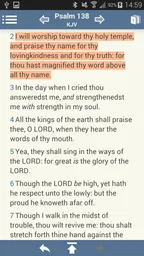
Blue Letter Bible is a free Books & Reference app from Blue Letter Bible, designed around a Bible reader with study resources connected to individual verses. That connection is its most useful idea. Rather than treating reading and research as separate activities, it gives you a way to move from a passage toward related study material while keeping the verse as your point of reference.
In practice, that structure suits focused reading better than browsing without a question in mind. I might begin with a passage I have heard quoted, read a few surrounding verses, then open the tools tied to a particular line to investigate it further. Keeping the study attached to the verse helps me avoid the common detour of searching broadly, opening several unrelated pages, and forgetting what prompted the search in the first place.
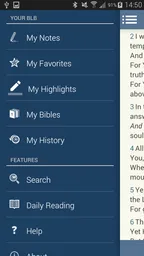
The trade-off is that a reader has to make choices. A straightforward reading app can keep the screen and its purpose very spare; this one is built to offer more than the text. If you are new to Bible study, the number of available directions may take some getting used to. I recommend beginning with one passage and one question—such as what a word means in context—instead of trying to explore every tool at once.
Readable by purpose, not just by appearance
For me, readability includes more than the size or look of the text. It also means being able to understand what the app is asking me to do next. The verse-linked approach has a practical advantage here: it provides a clear anchor for study. You are not simply faced with a separate catalogue of reference material; the passage you are reading gives that material a reason to be there.
A useful workflow is to read a whole thought before opening a verse-level resource. That small pause matters because a single line can be misunderstood when detached from the sentences around it. I would read the surrounding passage, choose the verse I want to examine, and then use the study tools to investigate rather than treating a reference result as a replacement for the passage. This is a better fit for careful reading than for rapid, disconnected lookup.
The app has an average rating of 4.6, with around 19,000 ratings and 6,300 written reviews. Those figures suggest that it has found a substantial audience, but they do not tell me whether its approach will suit a particular reader. Someone who values study depth is more likely to appreciate the design than someone who wants nothing beyond a clean page of text.
Navigation that rewards a deliberate pace
The strongest way to navigate is to keep a simple intention in view: choose a passage, read enough context, then follow one relevant study path. This avoids turning a short reading session into an unstructured tour of reference material. If I am comparing how a verse is understood, I would make a note of the question I am trying to answer before opening tools. That makes it easier to return to the passage and decide whether the material actually clarified anything.
This is also where the app may feel less obvious to a first-time user. A person expecting a single prominent reading screen may need time to learn the relationship between the text and its study options. I would not call that a flaw in the idea; it is the cost of offering a more research-oriented experience. Still, the app is better approached as a study companion than as a minimal reader that happens to include a few extras.
Motor and sensory considerations
People use Bible apps in different ways: some read for long stretches, some check a verse briefly, and some rely on a device while dealing with limited dexterity, visual strain, or a noisy environment. I would avoid assuming that a feature-rich layout automatically works equally well for everyone. More choices can be helpful when they are relevant, but they can also mean more navigation and more opportunities to lose one’s place.
For someone with limited hand mobility, a sensible approach is to keep interactions purposeful: open a passage, settle on the question, and avoid repeated back-and-forth exploration unless it is needed. The verse-linked design can reduce the conceptual effort of finding a relevant study path, but it does not remove the physical effort involved in navigating a mobile interface. If repeated tapping or precise selection is difficult, it is worth trying the app on the device and settings that person normally uses before making it their main reading tool.
For readers who experience visual fatigue, short sessions may be more comfortable than trying to inspect a large amount of material at once. I find it useful to treat study as several small steps: read the passage, pause, check one reference, and return to the text. That approach is not a special feature; it is a practical way to keep a dense research session manageable. Readers who need a highly customized display or a particular assistive setup should check how the app behaves on their own device rather than assume every need is covered.
Audio and other sensory preferences also affect the choice of Bible app. Blue Letter Bible’s central strength is its connection between reading and study resources, so I would choose it for that purpose rather than presume it will be the best option for every listening-first routine. Someone whose main need is hands-free access may prefer a reader built around spoken content, especially if operating study menus while listening would be inconvenient.
Useful in ordinary settings, with a little planning
A realistic use case is a short morning reading before work. I could read a passage, notice a phrase I do not understand, and use the verse as the starting point for a closer look. The important practical choice is to limit the session to that question. Without a stopping point, a quick reading can grow into a long search, which is valuable when I have time but frustrating when I am about to leave.
It can also suit a small-group discussion. If a question comes up about a particular verse, the linked study approach gives the group a place to begin exploring the text rather than relying only on a remembered quotation. I would still keep the surrounding passage in view and distinguish a study aid from a final answer. That habit is especially useful when different readers are bringing different assumptions to the same line.
For travel or other moments when attention is divided, the deciding factor is not just what the app can do but how much focus the situation allows. On a quiet commute as a passenger, a verse and a single related resource may be manageable. While walking, driving, or doing anything that requires attention elsewhere, it is not a sensible time to interact with a detailed study interface. In that case, I would save the question for a safer, more settled moment.
Blue Letter Bible is free and has been available since January 31, 2015. It is rated for Everyone, has over 1 million installs, and its current version is 1.87.22 build 2122, with Android 8.0 or later required. That makes the platform requirement worth checking before installing, particularly on an older Android device; the age rating describes the app’s content classification, not whether its study approach suits every reader.
Where it stands beside simpler alternatives
Compared with a basic Bible reader, this app is more useful when I want to investigate a passage rather than simply read it. The verse-level connection gives study a direct route from the text. By contrast, someone who mostly wants to open a passage, read quietly, and close the app may find a less research-heavy reader easier to settle into. The best choice depends on whether study tools are part of the routine or an occasional distraction.
It also differs from a general search engine or a broad reference app. Those can be useful for exploring a topic, but they may require me to move between sources and keep track of which passage started the search. Here, the Bible verse remains the organizing point. That is a meaningful advantage for focused study, though it does not mean every result will answer every interpretive question or that the app replaces careful reading.
Remaining barriers and who may want another option
The main limitation I see is the tension between depth and ease. A person who is still learning how to study scripture may not know which tool to open or when to stop exploring. A person who already has a well-established method may prefer a different app if it better matches that routine. Either way, I would not judge the experience by the number of resources alone; the useful question is whether those resources help you return to the passage with a clearer understanding.
It is also not my first recommendation for someone seeking only the simplest possible reading screen, or for a reader whose primary requirement is a specific accessibility accommodation that they have not tested in this app. A visually or motor-sensitive user should try a short passage and a few navigation steps before relying on it for extended sessions. That is a more reliable test than assuming that a popular app will fit an individual setup.
New users can make the learning curve gentler by choosing a familiar passage, reading several verses around the one that caught their attention, and opening only one study resource at a time. If a result sends them into a longer chain of questions, they can note the next question and return later. This keeps the app’s depth available without letting it take over every reading session.
An inclusive choice when study is the goal
I recommend Blue Letter Bible to readers who want their Bible reading and verse-focused research to live in the same place. Its lasting strength is the way it makes a particular passage the starting point for study, and its free access makes it straightforward to try. Its scale—more than 1 million installs—shows that many people use it, but popularity is less important than whether its approach fits your attention, reading habits, and device.
My verdict is positive, with a clear qualification: this is a better choice for curious, deliberate study than for effortless, distraction-free reading. Its depth can support readers who like to follow a question back to the text, while its extra navigation may create friction for people who need a very simple interface or a highly specific mode of access. If you want to explore why a verse says what it says, I think it is worth trying; if you only want a quiet reader, a simpler alternative may feel more comfortable.
What we like
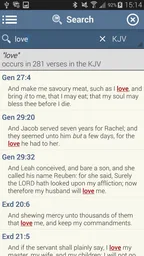
- Strong search tools make it easy to find passages and topics.
- Multiple translations support side-by-side Bible study.
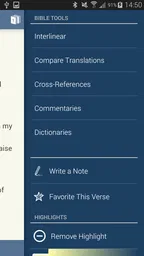
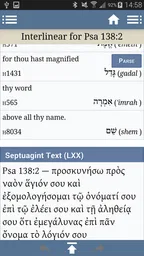
- Commentaries and lexicons add useful context to scripture.
- Audio Bible options support listening on the go.
- Reading plans help users build a regular study habit.
What could be better
- The large number of tools can feel overwhelming to newcomers.
- Some study resources require an internet connection.
- The interface can feel dated compared with newer Bible apps.
- Audio availability varies by translation and book.
- Frequent ads may interrupt use for some users.





