



Bible Study: KJV, Audio & AI review
 Analysis by Appsdrops
My first impression of Bible Study: KJV, Audio & AI is that it tries to make Bible reading fit the small gaps in an ordinary day: a few verses between errands, a longer listening session at home, or a devotional pause when I need to step back and reflect. It is a free Books & Reference app from RichMobile Life, and its focus is the King James Version alongside audio, devotional material, prayer, and an AI chat feature. That mix is appealing, but it also means the experience is not just about opening a text. Some parts may depend on a working connection, so I would treat connectivity as part of choosing how and when to use it.
Reading and listening when a connection is available
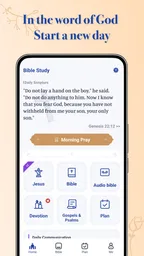
The app’s strongest appeal is the choice between reading and listening. Text suits close study, while audio can make a passage easier to fit into a walk, a quiet chore, or a commute where looking at a screen is inconvenient. In my view, that flexibility is more useful than simply having a Bible text on a phone: it gives the same reading habit more than one practical shape.
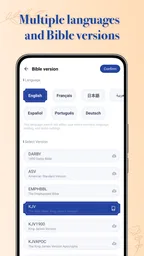
The King James Version has a distinctive cadence and vocabulary. Readers who already know it may appreciate having that familiar translation at hand; newcomers should expect older phrasing and may find some passages slower to interpret. I would use the app for devotional reading or following a familiar passage, but anyone comparing subtle meanings across translations may prefer a resource built around several versions and stronger study tools.
Audio can be especially helpful when attention is divided, but it changes the way I absorb the text. I can listen while moving around, yet it is harder to pause over a phrase or compare nearby verses than when reading on screen. For a passage I want to understand carefully, I would listen first and then return to the text. That two-step routine makes better use of both formats than treating audio as a full replacement for reading.
Network access matters most when moving beyond material that is already available on the device. The app’s summary presents KJV reading and listening as usable offline, which is valuable for travel and weak-signal areas; still, I would check that the passage or audio I need is ready before leaving a reliable connection. It is a sensible precaution rather than a reason to assume every screen, conversation, or supporting feature will behave the same way without internet.
When AI and devotional tools add something
Daily devotionals, prayer, and AI chat give the app a more guided feel than a plain digital Bible. A devotional can offer a starting point when I do not have a reading plan in mind, while prayer tools may help create a small, repeatable pause in the day. These features are most useful when they support a personal routine rather than replace it.
I would approach AI chat as a conversational aid, not as an authority on scripture. It may help me frame a question or find a way into a topic, but I would check any important interpretation against the biblical text and, where appropriate, a trusted human source. That is particularly important with the KJV’s older language, where a confident-sounding explanation can still miss context. For sensitive pastoral guidance or detailed theological research, a knowledgeable person or a dedicated study reference is the better choice.
Connectivity can shape these tools differently from reading. A devotional or prayer prompt may be available as part of the app’s regular content, while an AI conversation naturally raises the question of whether a connection is needed at that moment. I would plan to use chat when I have access to the internet and not rely on it as the feature that must work during a disconnected journey. That distinction keeps the app useful even when one part of the experience is unavailable.
Making it work in everyday mobile moments
A realistic routine might be to read a short passage over breakfast, save the longer listening session for a walk, and return to a devotional in the evening. On a busy day, I would avoid opening the app for the first time in a place with poor reception if I already knew I wanted audio. Preparing while connected reduces the chance of wasting a quiet moment waiting for something to load.
On public transport, audio is convenient if the surroundings allow it, but a noisy carriage can make listening frustrating. Reading is more discreet, though it requires attention and a safe moment to look at the screen. I would choose based on the setting rather than assume one format is always better. If I am driving, I would not handle the phone; any listening should be set up safely before setting off.
The app is also a reasonable companion for short breaks, because a single passage or devotional does not require a long study session. The trade-off is that quick access can encourage skimming. When a verse raises a question, I find it more useful to slow down, read the surrounding passage, and make a note to revisit it than to treat a fragment as a complete answer. That habit matters especially when using any AI response alongside scripture.
What to do when the signal drops
If the connection becomes unreliable, the first thing I would try is returning to the Bible text or audio already made available on the device rather than repeatedly refreshing an online feature. For a trip, I would open the passages I expect to use beforehand and confirm they are accessible. This simple check is more dependable than assuming every component has the same offline behavior.
When a feature does not respond, it helps to separate the task: continue reading if that remains available, and leave chat or other connection-sensitive activity until service returns. This avoids turning a brief signal problem into a complete interruption. If a screen appears stuck, closing and reopening the app after connectivity improves is a straightforward recovery step; I would not assume that a conversation or unfinished action will necessarily be preserved.
That is a practical limitation of combining a reference library with connected tools. A traditional printed Bible never waits for a network, and a basic offline reader can be more predictable in a remote area. This app’s broader mix is more convenient when the connection is steady, but the added features do not remove the value of preparing ahead for travel or keeping a familiar fallback available.
Keeping data use deliberate
Audio is the part I would be most mindful of when using mobile data. Listening for a long stretch can be less economical than reading, so I would use a trusted Wi-Fi connection when possible or choose text when conserving a limited data allowance matters. I would also check the app’s own settings and the phone’s data controls before making audio part of a daily routine, rather than guessing how much any session will use.
AI chat is another feature I would use intentionally. Apart from its connection requirement, a chat prompt can invite longer back-and-forth use than a quick reference lookup. I would keep questions focused and avoid entering personal information that is not needed to ask about a passage. This is good practice for any conversational tool, and it keeps the feature centered on Bible study rather than turning it into a general diary.
For device space, the practical question is whether I want audio and reading available when I am away from service. I would review what the app has made accessible and remove material I no longer need if storage becomes tight. I would not download everything automatically without considering how often I actually listen; a small set of passages for an upcoming trip may be more useful than preparing a large library I will not use.
Who will appreciate it, and who may prefer another tool
The app will suit readers who want a KJV-focused companion with more than text, especially people who alternate between reading and listening and like having devotional or prayer material close by. Its audience is broad: it is rated for Everyone, and the app has passed one million installs. Its average rating is 4.7 from around 6,300 ratings, with 198 written reviews, so there is a substantial user base, though those figures alone cannot tell me whether its particular workflow will suit you.
It is less compelling for someone who wants extensive translation comparison, scholarly annotations, or a fully predictable reference experience in places without service. In those cases, a multi-translation study Bible, a dedicated commentary resource, or a print edition may be a better fit. I would also skip the AI feature if I prefer scripture study without generated conversational guidance; the core appeal of the app’s other reading and listening options can still be considered separately.
The app is free to install, with in-app purchases ranging from $1.99 to $74.99 per item. I would look carefully at what an optional purchase actually unlocks before paying, especially if I only need the basic reading habit. The current version is 2.4.6 and it requires Android 8.0 or later, details worth checking against an older phone before relying on it for a trip or daily routine.
My connectivity verdict
My overall view is that this is a flexible KJV companion whose usefulness depends partly on matching the feature to the situation. Reading and prepared listening are the natural choices for moments away from a stable network; AI chat is better saved for when a connection is available. Devotionals and prayer give the app a daily rhythm, while the audio option helps when the screen is inconvenient. The main trade-off is that a combined reading-and-connected-tools experience can be less predictable than a simple offline text reader.
I would recommend it to someone who wants the King James Bible in both written and spoken form, with devotional and conversational tools nearby, and who is willing to prepare before going offline. Before a commute or trip, open the material you expect to use, confirm it is accessible, and reserve data-heavy listening for Wi-Fi when that suits your plan. If your priority is deep comparative study or dependable access to every feature in remote conditions, choose a more specialized resource instead. For a reader who values convenience and variety, Bible Study: KJV, Audio & AI offers a practical blend, as long as its connected features are treated as helpful extras rather than something to depend on everywhere.
What we like
- Offers the King James Version for readers who prefer traditional wording.
- Audio playback supports listening instead of reading.
- AI tools can help users explore Bible passages.
- Study features bring scripture access into one app.
- Useful for personal devotional time on the go.
What could be better
- AI interpretations may not reflect every theological tradition.
- Audio listening requires sound or headphones.
- The King James wording can feel difficult for modern readers.
- Some features may require an internet connection.
- Users should verify AI-generated explanations against trusted sources.





