


Bible Homescreen - Read Now review
 Analysis by Appsdrops
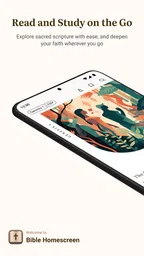
Bible Homescreen - Read Now has a focused idea: bring Bible reading closer to the place you already begin many phone sessions. Rather than presenting itself as a broad study suite, it offers a Bible-themed homescreen experience built around reading and inspiration. I find that approach appealing for anyone who wants a gentle reminder to make room for scripture during an ordinary day. The app’s own summary puts it simply: read the Bible and get inspired by God’s Word with a Bible Launcher.
A Bible launcher with a clear purpose
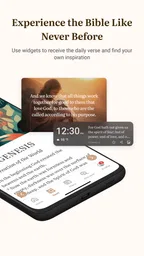
The central capability is right there in the name: Bible Homescreen makes the phone’s home screen part of a Bible-reading routine. That shift matters because it connects a familiar, frequently visited part of the device with a specific intention. Instead of requiring a separate plan to remember to open a reading app, the homescreen becomes the starting point for engaging with the Bible.
That concept gives Bible Homescreen a distinctive place among books and reference apps. Its appeal is less about offering every possible religious resource and more about making scripture feel close at hand. I see it as a small change in how someone approaches their phone: the device can be a practical tool for turning a spare moment into an opportunity to read or reflect.
In day-to-day use, the idea is straightforward. You use the app as a Bible-focused launcher, then let that homescreen-centered setup support the habit of returning to God’s Word. The store description emphasizes reading and inspiration, so the strongest way to think about the app is as a devotional prompt and a more intentional doorway into Bible reading, rather than as a complete study platform.
Why the homescreen matters
Most people reach for their phone throughout the day, often without a specific task in mind. A homescreen designed around a meaningful subject can influence what catches the eye in those moments. Here, the subject is scripture. That makes the app’s value less dependent on a complicated feature list and more dependent on whether the idea fits naturally into the way you already use your device.
I like this kind of focused design when the goal is consistency. A reading routine can be difficult to maintain when it depends entirely on remembering to seek out a resource. By putting a Bible-oriented experience at the center of the phone, the app aims to make that next step feel more immediate. It does not guarantee a daily habit, of course, but it gives the habit a visible place in everyday phone use.
The approach also suits people who prefer a simple nudge over a detailed schedule. Some readers want structured plans and extensive study tools; others mainly want to keep scripture within reach. Bible Homescreen is most compelling for the second group. Its identity is easy to understand, and that clarity helps set expectations before you install it.
What the experience is best suited to
The best scenario is a reader who already wants to spend more time with the Bible but finds that ordinary phone routines pull attention elsewhere. A Bible-centered homescreen can serve as a reminder to pause and read when the phone is already in hand. It may also appeal to someone who likes keeping personal interests and daily practices visible, rather than tucked away in a folder or forgotten among other apps.
It can be a useful fit for a quiet moment at home, a short break during the day, or the beginning of a personal devotional routine. The key benefit is convenience: the app’s central idea connects Bible reading with the screen people naturally return to. That does not make every session deep or uninterrupted, but it can lower the mental barrier to beginning.
For a family or individual considering a faith-oriented app, the age classification is Everyone 10+. That rating can help set expectations when choosing apps for younger users, while the app’s subject matter remains clearly centered on Bible reading and inspiration. As with any app, families can decide how it fits their own routines and preferences.
Where the focused approach has limits
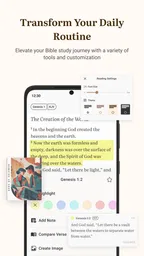
A homescreen-centered Bible app is not automatically the right choice for every reader. If you are looking for a wide-ranging reference library, elaborate study aids, or a highly customized reading program, the app’s core promise may feel narrower than you want. Its clearest strength is making scripture more present in the phone experience, not positioning itself as an all-in-one theological research tool.
There is also a personal tradeoff in giving a launcher-style app a prominent role on your device. Some people enjoy shaping their homescreen around a daily priority; others prefer to keep the default layout unchanged and open apps only when needed. The value of Bible Homescreen depends in part on which style feels comfortable. If a visible Bible-focused setup sounds motivating, the concept makes sense. If you dislike changing how your phone’s home screen works, the central idea may be less persuasive.
Cost is another consideration to keep in mind. The app is free to download, while optional in-app purchases range from $1.99 to $12.99 per item. That means you can approach it without an upfront purchase, while still checking the app store for the details of any optional items before buying. I would treat those purchases as a separate decision from the basic appeal of the homescreen concept.
The app has an average rating of 4.5 from around 4.4 thousand ratings, alongside more than 600 written reviews. It has also reached over 100 thousand installs. Those figures suggest that the idea has found an audience, though whether it suits you will still come down to your preferred reading habits and how you like to organize your phone.
A practical fit for everyday reading
For someone who wants to make Bible reading more present without turning the experience into a complicated project, the launcher approach is easy to grasp. The app’s short description, “Bible Homescreen,” captures its purpose without asking users to interpret a long list of functions. That simplicity is helpful: you can quickly decide whether a scripture-centered homescreen matches what you are looking for.
The developer is Homescreen Apps, and the app was released on October 4, 2023. Its current version is 1.6.5, and it requires Android 9 or later. These details are useful when checking compatibility, especially if you use an older device. The basic download is free, so interested readers can explore the experience before deciding whether optional purchases have a place in their use of the app.
For searchers comparing Bible apps, the important distinction is the emphasis on the homescreen. Someone seeking a Bible reading app that also aims to keep scripture visible may find this concept more motivating than a conventional app icon. Someone primarily searching for a comprehensive study reference may want a different kind of product. Being clear about that distinction can save time and lead to a better match.
Who is likely to benefit most
I think the strongest audience is made up of readers who already value scripture and want a practical prompt to return to it more often. The app is also a reasonable option for people who appreciate faith-centered phone customization and are comfortable letting a particular subject shape their homescreen experience. In those cases, its focused design can support a simple routine without demanding a major change in how someone studies.
It may be less suitable for readers who want advanced research tools or a broad collection of reference materials in one place. It is also a more natural fit for Android users whose devices meet the minimum operating system requirement. Those distinctions are not flaws so much as reminders that the app has a specific job: connect a Bible-focused experience with the screen people see and use regularly.
Overall, Bible Homescreen - Read Now makes a clear case for using the phone’s most familiar screen as a prompt for Bible reading. I appreciate the practicality of that central idea: it takes a habit someone may already want and gives it a visible place in everyday device use. The app is free to start, has earned a 4.5 average from around 4.4 thousand ratings, and is aimed at readers who want inspiration close at hand. If a Bible-centered homescreen sounds like a helpful nudge rather than an unwanted change, it is a focused app worth considering.
What we like
- A home screen shortcut can make daily Bible reading easier to remember.
- The app offers a focused way to open scripture without searching through menus.
- It may suit users who prefer quick access to Bible content.
- A scripture-centered home screen can encourage a regular reading habit.
- The concept keeps Bible reading close at hand throughout the day.
What could be better
- Frequent home screen content may feel distracting to some users.
- The experience depends on the Bible text and translations available in the app.
- Home screen widgets may use space needed for other shortcuts.
- Some features may require an internet connection.
- Compatibility can vary across Android devices and home screen launchers.





