


Beatron - AI Music Maker review
 Analysis by Appsdrops
I see Beatron as a quick creative sketchpad rather than a replacement for a full music studio. It is an AI music app from Ocean Float Mobile, built for turning ideas into songs, beats, lyrics, and cover-style reinterpretations. That mix is appealing when I have a mood or a rough concept but no instrument in reach. The useful question is not whether it can finish a professional track on its own; it is whether it can help me move from a blank page to something I can listen to, refine, or use as a starting point.
From a rough idea to a first draft
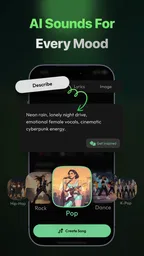
My most sensible way to approach Beatron is to begin with one clear intention. Rather than asking for “a great song,” I would describe the feeling, energy, and setting I want: for example, a mellow instrumental for a late drive, or a bright beat for a short video. A focused prompt gives the generator a more useful target and makes it easier to judge the result. If I change several ideas at once, I may not know which change helped.
The app’s text-to-music approach suits people who can describe a sound more easily than they can produce one. I can think in everyday terms—warm, tense, playful, spacious—and use those as creative direction. That makes it approachable for a beginner, but it also gives experienced musicians a fast way to test a musical premise before opening a digital audio workstation. The generated result is best treated as a draft: listen for what works, notice what feels off, then adjust the brief rather than expecting the first attempt to match a precise arrangement.
For a practical everyday example, imagine I need a short background idea for a personal video. I would first decide whether the scene needs a calm bed or a more energetic pulse, generate a starting point, and listen with the video’s pacing in mind. If the music competes with speech or changes mood too abruptly, I would revise the description toward a simpler, less dominant sound. This is a more reliable workflow than chasing a vague notion of “better” through repeated generations.
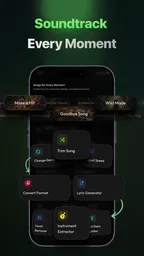
Beat-making and lyric generation broaden that workflow. I can use the beat side when I have a rhythm in mind but no arrangement, or ask for lyrical material when a theme is clear but the wording is not. These tools are useful at different stages: a beat can establish momentum before I write, while lyrics can give a musical idea a subject. They do not remove the need to edit. I would still check whether a lyric sounds natural when spoken or sung, and whether a beat leaves enough room for the voice or other instruments I plan to add.
Give each generation a job
A habit that saves time is to separate exploration from polishing. In an exploration pass, I would try distinct directions—perhaps a restrained version and a more rhythmic one—without expecting either to be final. Once one direction feels promising, I would keep the next prompt close to it and change only one aspect at a time. That makes the process easier to evaluate and reduces the temptation to keep generating without learning from the results.
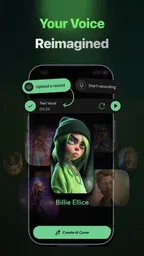
This also helps when using AI covers. I would approach a cover as a way to experiment with interpretation, not as a guarantee of a faithful or release-ready performance. The interesting question is how a different treatment changes the feel of an idea. If I need exact control over melody, phrasing, or vocal character, a conventional recording and editing setup is a better fit. Beatron is more valuable when surprise and quick experimentation matter more than precise production control.
Check the practical details before settling in
The app is free to install, but it includes optional in-app purchases, with individual items ranging from $0.99 to $99.99. I would check the purchase screen carefully before building a routine around frequent generations, especially if I expect to use it heavily. The free entry point makes it easy to try, while the wide purchase range is a reason to understand what an optional item offers and whether it matches my actual use before spending.
It is rated for Everyone, and its current version is 34.0, with Android 7.0 as the minimum operating-system requirement. Those details matter if I am installing it on an older device or helping a younger family member explore music tools. The age rating is not a substitute for adult judgement about how a child uses generated content or purchases, so I would still supervise spending and review the app together where appropriate.
Its standing suggests that many people have found a reason to try it: Beatron has a 4.6 average from around 99,000 ratings, and it has passed five million installs. I take that as a useful sign of broad interest, not proof that every generated track will satisfy me. Music is personal, and an AI result can be technically interesting while still missing the mood I had in mind. I would judge the app by whether it helps me reach a workable idea, rather than by popularity alone.
Build a repeatable creative routine
Experienced users can get more out of a generator by keeping a small prompt notebook outside the app. I would save the wording that produced a useful mood, then note what I changed for the next attempt. This is not a special Beatron feature; it is a simple habit that makes experimentation more repeatable. It also helps me avoid starting from scratch when I return to a project after a few days.
Another useful pattern is to decide in advance what “good enough” means for a session. If I need a rough instrumental cue, I might only need a coherent mood and a workable pulse. If I am writing a song, I may care more about whether the generated lyric gives me a fresh angle than whether every line is ready to keep. Having a concrete goal prevents endless rerolls and makes the app feel like part of a creative process rather than a slot machine for possibilities.
I would also listen in the context where the music will be used. A beat that feels full on headphones may crowd a voice-over on a phone speaker. A lyric that reads well on screen may be awkward to sing aloud. This simple check catches problems that are easy to miss when judging an output in isolation. For short-form personal projects, it can be enough to identify a usable direction; for public or commercial work, I would make a more careful review of the result and its suitability before relying on it.
Where the shortcuts stop helping
The main trade-off is control. Text prompts are fast, but describing a sound is not the same as arranging it note by note. If I want to specify exact chords, instrument articulation, timing, mix balance, or detailed edits, a conventional music-production app gives me more direct tools. Beatron is better suited to broad creative direction and early drafts than to meticulous finishing.
There is also a difference between generating material and making a complete song. A strong musical seed still needs decisions about structure, transitions, performance, and how parts fit together. Lyrics may need rewriting for meaning or singability, and a beat may need adjustment to suit a particular vocalist. I would not treat an AI output as automatically polished simply because it sounds complete at first listen.
For similar reasons, I would not choose this as my main option if I already know exactly what I want and need dependable, repeatable control over every musical detail. A traditional DAW or a hands-on instrument is a better choice for that. On the other hand, someone who is curious, short on time, or stuck at the blank-page stage may find the app more inviting than opening a complex studio interface. The best alternative depends on whether the priority is speed and exploration or precision and editing depth.
Who will enjoy it, and who may not
I would recommend Beatron to curious beginners, songwriters looking for prompts, and creators who want to experiment with musical moods without first learning a full production tool. It can also be useful for an experienced musician who treats AI output as raw material: a way to test a direction, spark a lyric idea, or compare contrasting approaches. The app’s Music & Audio focus is clear, and its combination of song, beat, cover, and lyric creation gives users several different entry points into the same creative session.
I would suggest skipping it if the goal is a precise, finished recording with tight control over every part, or if the user expects each prompt to produce a ready-to-publish result. It is also not a substitute for learning an instrument or developing arrangement skills. Those are not flaws so much as boundaries: the app is designed around generation and experimentation, and its value is highest when I bring my own taste and editing judgement to what it makes.
A useful sketchpad when you bring your own judgement
My overall view is that Beatron is most rewarding when I treat it as a collaborator for the first stage of an idea, not as the final decision-maker. I would start with a focused prompt, keep track of what works, change one direction at a time, and listen in the setting where the result will be used. That routine makes the app more practical than repeatedly asking for a completely different song and hoping one lands perfectly.
Ocean Float Mobile’s app is free to try, while optional purchases mean I would pay attention to costs if it becomes part of a regular workflow. With a 4.6 average and a large audience, it has clearly drawn interest, but my recommendation comes down to fit: if you want a quick way to turn a musical thought into something audible, Beatron is worth exploring. If you need detailed production control, I would choose a traditional studio tool instead. Used with realistic expectations, it can help you get past the blank page and into the more important work of deciding what your music should become.
What we like
- Creates music from text prompts with little effort
- Offers an accessible way to explore AI music creation
- Can help spark ideas for new compositions
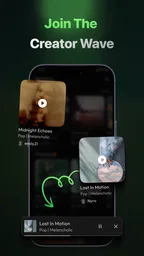
- Generated tracks are easy to share
- Useful for experimenting without music production skills
What could be better
- Results may not match the prompt precisely
- Generated songs can sound repetitive
- Creative control may be limited compared with music software
- Some features may require a paid plan
- Output quality can vary between generations





