
Beat Maker Pro - DJ Drum Pad review
 Analysis by Appsdrops
I like music apps that let me get from “I have a rhythm in my head” to actually trying it without first learning a complicated production setup. Beat Maker Pro - DJ Drum Pad takes that approachable route: its central appeal is tapping drum pads along with a song and shaping the moment through rhythm. It is a music-making app rather than a full studio, and that distinction is important. I found it most rewarding as a quick, hands-on way to explore timing and beat ideas, not as a substitute for detailed recording and arranging tools.
Making a beat by playing along
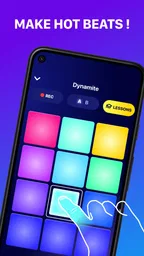
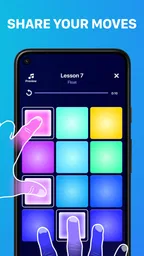
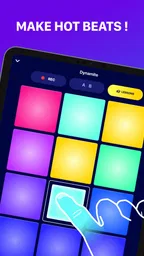
The defining idea is simple but useful: you play a track and groove on drum pads. That changes the experience from programming a beat step by step to responding to music as it moves. Instead of needing to know a drum machine’s sequencing workflow, I can focus on when a hit feels right and how a pattern sits against the song.
That immediate feedback is the app’s strongest creative advantage. A rhythm that seems promising in isolation may feel crowded once a song is playing; another, simpler pattern can suddenly make sense. Playing along helps expose that difference in real time. For a beginner, it makes experimentation feel less abstract, while a more experienced musician can use the same interaction to test a rhythmic idea without opening a larger production project.
There is a practical trade-off in that focus. Tapping pads is not the same as building a polished track with precise editing, layered arrangements, or a full recording workflow. I would treat this as a compact beat-making playground: useful for trying ideas and enjoying the physical act of playing, but not the tool I would choose when a finished, carefully structured production is the goal.
What playing along changes
Many music-making apps begin with a grid, a sequencer, or a collection of instruments. Those approaches can be powerful, but they ask you to make decisions before you hear how an idea feels against a song. Here, the song provides a reference point. You can concentrate on pulse, accents, and the relationship between your taps and the music rather than starting from an empty timeline.
That makes the experience especially approachable if you are curious about beat-making but do not yet know the vocabulary. You do not need to think in terms of complex production techniques to notice that a pattern feels too busy or that a hit lands well. The app turns those judgments into something immediate: tap, listen, adjust, and try again.
There is also a useful distinction between playing a rhythm and merely selecting one. The pad-based interaction encourages you to participate, which can make a short session feel more like an instrument practice break than browsing presets. It is a small difference, but it is the reason I would reach for this over a passive music app when I want to do something with a song rather than just listen.
How I would use it in a real session
For a low-pressure first session, I would choose a song I already know, start with a sparse pattern, and listen for the points where a hit naturally fits. Then I would add activity only when the rhythm still feels clear. This is more useful than tapping as quickly as possible: the song gives you a reference, and restraint helps you hear whether each extra hit contributes anything.
A realistic everyday use is a short break between tasks. If a groove comes to mind while you are waiting for a meeting or winding down at home, opening a pad-based app can be quicker than setting up a desktop music project. You can test the idea against a song and discover whether it works before you forget it. I would not treat that quick exploration as a guaranteed way to save a finished composition, but it is a convenient way to turn a passing musical thought into an active experiment.
One practical tip is to focus on one question at a time. Try a steady pulse first; then see whether a few accents improve it. If you change several things in rapid succession, it becomes harder to tell what made the rhythm feel better. The app’s play-along premise is most useful when you listen as closely as you tap, rather than treating the pads as a speed challenge.
Another helpful approach is to use familiar songs as different kinds of practice material. A track with a clear, steady beat can help you concentrate on consistent timing, while a more varied song can test whether you can keep your own pattern from competing with the music. This is not a formal lesson plan, but it gives each session a purpose and makes experimentation more revealing than random tapping.
Where it fits among music apps
Compared with a conventional digital audio workstation, this app puts less emphasis on detailed construction and more on immediate performance. A workstation is the better choice if you want to arrange a complete song, edit every element, or work through a deliberate recording process. Beat Maker Pro is better suited to the moment before that: testing a pulse, exploring a groove, or simply enjoying the responsive feel of playing pads along with music.
It also differs from a basic metronome or a passive music player. A metronome offers a steady timing reference but does not invite the same kind of musical response; a player lets you hear a song but leaves you as a listener. The pad-playing concept sits between those uses. You remain anchored to the music while making rhythmic choices of your own, which is a more engaging option for someone who wants casual practice without committing to a full production setup.
That middle ground will not suit everyone. If your main goal is learning an instrument through structured lessons, composing with notation, or editing a finished recording, another category of app will serve you better. I would also look elsewhere if you need a precise, comprehensive production environment. The value here is not depth in every direction; it is how quickly the interaction gets you making rhythmic decisions.
Trade-offs to keep in mind
The same immediacy that makes the app easy to approach can feel limiting once you want more control. Tapping along is satisfying, but it does not by itself answer questions about how to organize a whole track or refine a beat in fine detail. If you start with a casual idea and later want to develop it into a more involved production, you may find yourself moving to a different kind of tool.
There is also a learning curve in listening while playing. A familiar song can make the first attempt comfortable, but it can also tempt you to tap over every beat. I found that leaving space is often the better test: if a simple pattern already works, extra hits may add energy, or they may just muddy the groove. The app makes that choice audible, but it cannot make the musical judgment for you.
For that reason, I would approach it as a hands-on creative diversion with a real practice benefit, not as a promise of instant production skills. Beginners can gain a feel for pulse and accents, but tapping along is only one part of understanding rhythm. More experienced players may enjoy the quick response, yet they should expect to use a more specialized tool when they need careful editing or a larger arrangement.
The app is free to install, with optional in-app purchases ranging from about a dollar to around ninety dollars per item. I would start by exploring the free experience before spending anything, then consider a purchase only if the app has become part of a routine you genuinely enjoy. That is sensible for a casual creative tool: first see whether tapping along holds your attention, rather than assuming every paid option is necessary.
Who gets the most from it
Beat Maker Pro is a good fit for curious beginners who want to experiment with rhythm without being confronted by a complicated studio interface. It also suits music fans who enjoy interacting with songs and want a more active alternative to listening alone. If you already make music, it can work as a quick place to test a groove before deciding whether the idea deserves a more detailed session elsewhere.
I would skip it if you need a complete composition and editing environment, or if you prefer learning through a structured course rather than experimenting by ear. It is also less compelling for someone who only wants to play music in the background. The central activity asks you to pay attention and participate; if that is not what you want from a music app, its main strength will not matter much.
Published by MWM - AI Music and Creative Apps, this Music & Audio app has a 4.6 average from around 548,000 ratings and more than 50 million installs. It is free, rated for Everyone, and was released on August 20, 2018; version 4.22.00 supports Android 7.1 and later. Those figures suggest broad reach, but my recommendation rests on the experience itself: the focused play-along idea is easy to understand and gives you a reason to engage with rhythm rather than just browse sounds.
My overall take is that Beat Maker Pro - DJ Drum Pad works best when you want a quick, tactile way to try beats against a song. Keep your first attempts simple, listen for whether each tap actually improves the groove, and think of it as an idea-testing and practice tool rather than a full studio. If that balance sounds appealing, it is an approachable way to make a spare few minutes musical; if you need detailed production control, you will be happier with a more complete music-making app.
What we like
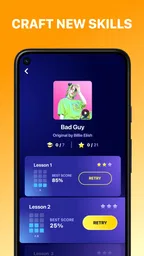
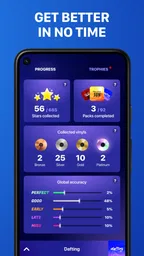
- Guided lessons help beginners learn common beat-making techniques.
- The pad-based interface makes rhythm creation easy to explore.
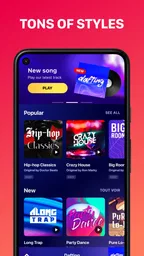
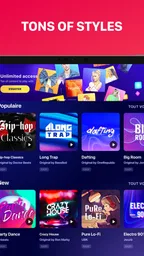
- Built-in sound packs offer a quick way to try different styles.
- Loop playback helps you hear how patterns work together.
- Short practice sessions fit easily into a busy day.
What could be better
- The free version may restrict access to lessons or sound packs.
- Some content may require in-app purchases to unlock.
- Touch controls can feel cramped on smaller phone screens.
- Export options may not meet advanced production needs.
- Ads may interrupt the experience for free users.





