
BandLab – Music Making Studio review
 Analysis by Appsdrops
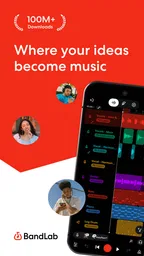
Making music on a phone is easy to try and harder to stick with. The first beat can be exciting, but a useful studio needs to keep helping once the novelty wears off. BandLab aims to cover that longer journey: it brings vocal recording, beat making, demo mixing, audio editing, and AI music tools into one free app. I see its appeal in the way it lets a casual idea grow into something more deliberate without requiring a desktop studio from the outset.
From a quick idea to a first demo
The first-week attraction is straightforward: open the app, start experimenting, and see how far a musical idea can go. BandLab is built for the moments when a melody arrives during a commute, a lyric needs a rough vocal take, or a beat sounds worth developing. Rather than treating a phone as only a place to listen, it turns it into a space for making and shaping music.
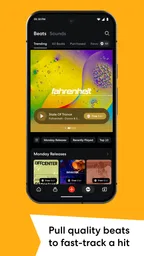
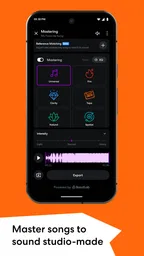
That combination makes BandLab approachable even if you have never used a traditional recording setup. You can record vocals, build beats, and mix demos, with audio-editing and AI music tools included in the same broad creative package. The emphasis is not just on capturing a sound; it is on giving you ways to work with it afterward.
For a beginner, that breadth can make the first session feel rewarding. You do not have to begin with a polished composition or a clear production plan. A rough chorus, a rhythm idea, or a voice memo with potential is enough to get started. I like that the app’s central promise is practical: make a musical sketch, then keep refining it as your confidence grows.
It also suits people who already make music but want a convenient companion for drafts. A phone-based studio will not replace every reason to use a larger production environment, but it can help bridge the gap between inspiration and a shareable demo. That is a meaningful role, especially when the alternative is losing an idea because the right equipment is not nearby.
A creative entry point, not a magic shortcut
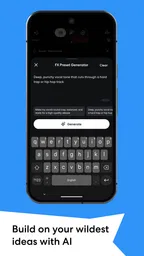
The presence of AI tools may catch the eye, but the lasting value depends on how you use the whole toolkit. No feature can automatically supply taste, direction, or the satisfaction of making a track feel like your own. I would treat the AI side as part of an exploratory music-making process, not as a promise that every idea will become a finished song with no effort.
That distinction matters when expectations are high. The app can make it easier to experiment, record, and assemble a demo, but creative decisions still belong to you. Choosing what to keep, what to redo, and when a draft is good enough is part of the work. For me, that balance is healthier than expecting a mobile studio to do all the composing and production thinking on your behalf.
BandLab has been around since June 2015, which gives it a more established feel than a short-lived novelty app. Its current version is 11.36.1, and it supports devices running Android 9 or later. The app is rated Teen, a relevant point for households deciding whether it is suitable for younger musicians.
What keeps it useful month after month
First-week excitement is only the start. An app earns a permanent place when it fits into repeated habits: recording a new idea, returning to a draft, practicing a part, or making a demo to share. BandLab’s value is its range across those stages. You can approach it as a simple place to capture a seed of a song, then revisit that seed with beat-making, mixing, and editing in mind.
That flexible use makes the app easier to return to than a tool designed for just one narrow task. If you are a singer, vocal recording may be the reason you open it. If you are more interested in rhythm, building beats may become the routine. If your focus changes from one project to another, the same app can still serve as a general-purpose music-making studio for demos and experiments.
It is also free to download, which lowers the barrier to forming a habit. You can explore the basic experience before deciding whether it belongs in your creative routine. In-app purchases range from $2 to $350 per item, so I would keep the distinction clear: free access makes trying the app easy, while optional spending can become a separate consideration for people who want more from the broader offering.
That pricing range is wide enough to make a little restraint sensible. I recommend beginning with the music-making tasks you actually care about rather than browsing upgrades out of curiosity. If the free experience already supports your routine, there is no reason to spend just because the option exists. If you later consider a purchase, judge it against a specific need instead of treating spending as a shortcut to better songs.
The app’s scale suggests that it has reached a broad audience: it has more than 100 million installs, an average rating of 4.4, and around 842,000 ratings. Those figures do not decide whether it will suit your style, but they do indicate that BandLab is not an obscure experiment. The more useful personal test is whether you find yourself returning to your own drafts after the first burst of curiosity.
Making a repeatable creative habit
I would not try to use every tool in the first session. A small routine is more likely to last: capture one idea, make one beat, or record one vocal draft, then come back later and improve it. That approach keeps the app from becoming a collection of features you tried once and forgot. It also makes progress easier to notice, because each visit has a clear purpose.
For a new musician, this can turn experimentation into practice. A rough recording gives you something concrete to listen back to; a beat idea gives you a starting point for another session. For someone with more experience, short mobile sessions can help keep projects moving between longer stretches of focused work. Either way, the app is most valuable when it supports a habit you already want to build.
There is a useful psychological benefit in being able to start small. A polished track can feel intimidating, while a quick demo is manageable. I find that a low-pressure first draft often makes it easier to continue, and a tool that welcomes drafts can encourage more frequent creative attempts. The key is to treat those attempts as raw material rather than expecting each one to become a finished release.
How much upkeep does it ask of you?
BandLab is a creative app, so its main maintenance burden is not the effort of keeping a complex setup in order; it is the attention required to keep projects moving. Recording a vocal or sketching a beat is only one part of a music habit. Listening back, making choices, and returning to incomplete ideas take time. If you want the app to remain useful, it helps to give those projects a little structure in your own routine.
I would also be realistic about mobile production. A phone is convenient, but it can invite interruptions and make a focused session harder to protect. That does not make the app a poor fit; it simply means that a quick creative tool works best when you know whether you are capturing an idea on the go or settling in for careful editing. Matching the task to your available attention makes the experience less frustrating.
Updates are another ordinary part of keeping any app in use. BandLab’s current release is 11.36.1, and its long history gives it the feel of an ongoing product rather than a one-off novelty. Still, I would not assume that a particular feature or workflow will remain unchanged forever. The practical approach is to keep your important musical work organized in a way that makes sense to you and avoid relying on a single app as the only place your creative process exists.
There is also a personal maintenance question: do you enjoy returning to drafts? Some people thrive on collecting fragments and gradually connecting them; others find unfinished projects discouraging. BandLab can support the first approach, but it cannot make the second person love the process. If you know you tend to abandon ideas, setting a modest goal—such as completing a short demo rather than chasing a perfect song—can make the tool feel more rewarding.
Where the novelty can wear thin
A broad creative toolkit can be energizing at first and a little distracting later. When an app offers several ways to make and shape music, it is tempting to jump between possibilities instead of finishing a single draft. I would guard against treating exploration as progress every time. Experimenting is valuable, but the app becomes more satisfying when some sessions are devoted to completing or improving something specific.
Another possible source of fatigue is the gap between a quick idea and the sound you imagined. Recording a vocal or making a beat gives you a starting point, not an automatic match for what you hear in your head. That difference is normal in music production, but it can be discouraging if you expect instant polish. I suggest treating early results as sketches and judging them by whether they help you develop the idea.
AI music tools can add another layer of expectation. They may encourage curiosity, yet the presence of AI does not remove the need to make choices and shape a result. If you prefer complete control over every step, you may want to approach those tools selectively. If you enjoy trying different ways to spark a project, they may add variety. Either way, the strongest reason to keep using the app should be the music you want to make, not the novelty of a feature label.
Optional purchases can also become a distraction if you start thinking that spending is necessary before you have established a routine. The free starting point makes it easier to test whether the app fits your needs, while the in-app purchase range means it is worth paying attention before committing. I would first learn what you can accomplish with the tools you already use. A clear, repeated need is a better reason to consider an upgrade than a passing impulse.
Finally, no music app can make creativity feel effortless all the time. Some days, a session produces a promising hook; other days, you may not like what you record. That fluctuation is part of making music, not necessarily a sign that the app has failed. BandLab is most likely to stay useful when you view it as a place to practice and experiment, rather than a guarantee of constant inspiration.
Does BandLab earn a lasting place?
For me, BandLab’s strongest long-term case is its ability to support several parts of a mobile music routine in one place. Vocal recording, beat making, demo mixing, audio editing, and AI music tools give it more staying power than a simple novelty recorder. The app can meet you at the rough-idea stage and remain relevant as you become more interested in shaping that idea into a demo.
That does not mean it will suit every musician equally. Someone seeking a highly focused single-purpose tool may find the breadth less important, while someone who wants an all-around starting point may appreciate it. Your willingness to work through drafts also matters. The app is not the habit; it is a practical environment for one. You still need to return, listen, revise, and decide what you want to make.
BandLab is free to download and has reached more than 100 million installs, with a Teen content rating. Those details make it easy to consider as an accessible option, but the real long-term verdict comes from your own use. Try it with a specific musical goal, keep the first sessions simple, and see whether you naturally come back to continue the work.
Overall, I think BandLab can earn a lasting spot on a phone for people who want an approachable way to record vocals, make beats, and develop demos. It has enough creative range to remain useful after the first-week excitement, provided you build a routine around the music rather than endlessly exploring tools. If you are happy to treat each session as a small step toward a better draft, it is a compelling free music-making app to keep within reach.
What we like
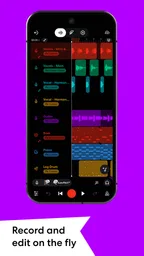
- Multitrack editing makes it easy to build layered songs.
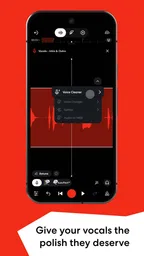
- Built-in effects help shape vocals and instruments.
- Cloud projects can be opened across supported devices.
- Collaboration tools let musicians work on shared tracks.
- A large sound library offers useful starting points.
What could be better
- Some features require a stable internet connection.
- The interface may feel crowded to first-time producers.
- Export options may not suit every professional workflow.
- Large projects can be demanding on older devices.
- Shared projects require care with access and privacy settings.





