



Baby Tracker: Pregnancy App review
 Analysis by Appsdrops
Pregnancy tracking is most useful when it turns a quick question into an easy next step: what changed, what should I keep an eye on, and what do I want to remember for later? Baby Tracker: Pregnancy App brings pregnancy guidance, growth tracking, and a daily diary together, which makes it a practical option for someone who wants those routines in one place. I’d approach it as a personal organizer and reading companion, not as a substitute for a clinician or a source of urgent medical advice.
What the app is built to help you do
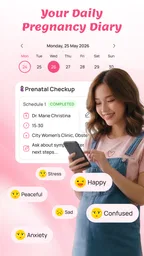
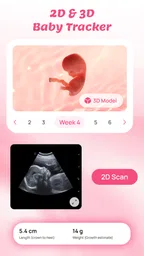
This is a parenting app from Imgori LLC, designed around pregnancy rather than the broader demands of caring for a newborn. Its central appeal is the combination of following baby’s growth, reading pregnancy tips, and keeping a diary. Those jobs naturally complement one another: a tip can prompt a question, while a diary entry can preserve the context that makes the question useful at an appointment.
The app is free to install and has over 500,000 installs. It is rated for Everyone, though that age label should not be mistaken for a claim that every pregnancy topic will feel comfortable or relevant to every reader. Optional in-app purchases range from $2.99 to $14.99 per item, so I would check what is included in the free experience before deciding whether a paid item suits your needs.
The current version is 11.0.0, and the app was released on July 16, 2026. It supports devices running Android 8.0 or later. Those details are useful when deciding whether to try it, but they do not tell you exactly how it will behave on your particular phone; performance can depend on the device and what else is running.
A calmer way to follow pregnancy
Pregnancy can make small changes feel significant, especially when information is scattered across conversations, browser tabs, and notes. A dedicated tracker can give those details a home. I find the most useful approach is to treat growth information as a broad progress guide, then use the diary to record what is personal: symptoms, questions, mood, or a moment you want to remember.
That distinction matters. A general description of development cannot explain what a particular symptom means for an individual pregnancy. If a tip raises a concern, it is better to take the specific question to a qualified health professional than to rely on an app entry as a diagnosis. Used thoughtfully, the app can help you prepare for that conversation instead of trying to replace it.
Speed expectations and everyday use
I would expect this kind of app to be most valuable in short visits rather than long sessions: open it to check a growth update, read a tip, or add a diary note, then get on with the day. That use pattern suits pregnancy tracking, where a quick reference is often more helpful than a complicated dashboard. The app’s purpose suggests a straightforward routine, but the available details do not establish a measured launch time or guarantee that every screen responds instantly.
For a smoother experience, I’d keep entries concise when I’m on the move and save longer reflections for a quieter moment. A short note such as “ask about recurring headaches” is easier to capture between errands than a full account, and it preserves the question for later. This is a useful workflow whether the app feels fast or a little sluggish on an older device, because it avoids turning tracking into a chore.
It is also worth separating app responsiveness from the time it takes to decide what to record. Pregnancy can bring a lot of information, and no tracker can make every entry obvious. Rather than trying to document everything, I’d use the diary for details I am likely to forget or want to discuss. That keeps the routine manageable and makes past notes easier to scan.
When several needs come together
The app’s combined focus becomes more useful on a busy day. Imagine coming home from an appointment, remembering a question you forgot to ask, and wanting to note how you felt that morning. You can use a diary entry to capture the question and context, then return to the pregnancy guidance when you have time to read. The practical benefit is less about collecting more information and more about keeping related thoughts together.
A second useful habit is to write observations in neutral language. Instead of deciding that a change is definitely caused by one thing, record what happened and when. That creates a clearer personal record to discuss with a care provider and reduces the risk of treating an app’s general guidance as a conclusion about your own health.
Another trade-off is that tracking only helps if you can maintain it. If daily writing feels burdensome, a brief note when something notable happens may be more sustainable than trying to fill the diary every day. The app is a better fit for people who like having a record to revisit; someone who dislikes logging may get more value from occasional reading and skip the diary habit altogether.
Reliability is more than opening quickly
For a tracker, reliability means being able to return to useful information and keep personal notes in a way that feels dependable. I would test the diary with a small, non-sensitive entry first, then check that it appears as expected when I return. That simple first-use check is sensible for any app where someone plans to record details they may later want to remember.
I would also avoid making the app the only home for information that has real medical importance. Keep appointment details and urgent instructions in whatever channel your care team uses, and use the tracker as a convenient personal aid. This is not a criticism of this particular app; it is a sensible boundary for any consumer pregnancy tool. A diary can support memory, but it should not become the sole record of care.
When an app seems slow or temporarily unavailable, a low-friction recovery plan helps: wait and try again, and keep time-sensitive questions somewhere you can access independently. I would not assume that any particular backup or syncing behavior is available without checking the app itself. For entries that matter to you, it is prudent to retain essential details in a separate personal note until you know how the app behaves on your device.
Heavy-use moments and practical limits
The most demanding moments may be informational rather than technical. A reader might move between growth updates, tips, and diary writing in one sitting, especially after a new appointment or when trying to make sense of several changes. In that situation, the app’s all-in-one approach may reduce the need to jump between tools. It can also make the session feel like too much if you are already overwhelmed by pregnancy content.
My advice is to use the app with a purpose: check one topic, write down one question, or record one memorable detail. If a tip leads you into a long search for certainty, pause and contact a health professional instead of treating more reading as a substitute for advice. This boundary is particularly important when an issue is urgent, worsening, or worrying.
There is also a genuine preference question around information density. Some people want frequent prompts and a detailed record; others prefer a calendar and a few notes. Baby Tracker’s mix of tracking, tips, and diary is suited to the first group, but a simple notes app or a clinician-provided tool may be better for someone who wants minimal content or a specific medical workflow.
Device constraints and choosing the right alternative
Android 8.0 is the minimum operating system, so a device running an earlier version will not meet the stated requirement. Even on a supported phone, available storage, background activity, and the age of the hardware can affect the general feel of an app. I would begin with a short trial rather than assuming that a current version will feel equally responsive on every supported device.
For iPhone users, the practical next step is to check the relevant app store for availability and compatibility before planning a routine around it. The confirmed system requirement here is for Android, so I would not infer an iOS version or matching device support from that alone. This is a small but important check for anyone choosing a tracker across different phones in a household.
Compared with a paper journal, the app’s advantage is having pregnancy guidance and growth tracking alongside personal notes. Paper may still be preferable if you want complete control over your writing or do not want another digital routine. Compared with a general notes app, Baby Tracker is more pregnancy-focused, while a notes app may be simpler and more flexible. If your priority is clinical monitoring, follow the tools and advice recommended by your care team rather than treating a consumer tracker as an equivalent.
Who I’d recommend it to
I’d recommend giving it a try if you want a pregnancy-centered place to read tips, follow growth, and keep a lightweight diary, especially if you already like recording questions before appointments. The free entry point makes it possible to see whether that combination fits your habits before considering optional purchases. Since paid items vary in price, I would make that decision only after identifying a specific feature or content that you actually want.
I would skip it if you want a strictly medical tool, dislike pregnancy-related reading, or know you will not maintain a diary. I would also choose another option if your main need is a highly personalized plan from a clinician, shared care records, or a very minimal tracker. A useful app is not necessarily the one with the most content; it is the one that supports the routine you can realistically keep.
My performance verdict
Baby Tracker: Pregnancy App has a sensible role as a pregnancy companion: it brings growth information, tips, and personal reflection into one parenting app, without needing to be treated as a medical authority. Its best performance is the practical kind—helping you capture a question before it slips away and return to a useful note when you need it. I would keep entries focused, check the experience on my own device, and use professional care for anything that requires medical judgment.
Overall, I see it as a worthwhile option for an organized, low-pressure pregnancy routine, with the usual caveats around personal preference, device behavior, and paid extras. It is most convincing when used in brief, purposeful visits rather than as a source of constant reassurance. If that sounds like the kind of support you want, try the free version and judge whether its combination of tracking and diary suits your day-to-day life.
What we like
- Pregnancy milestones make it easy to follow development week by week.
- Appointment reminders help keep prenatal visits on schedule.
- A kick counter lets you record fetal movement patterns.
- A contraction timer can help track labor signs.
- The pregnancy calendar gives a quick view of upcoming milestones.
What could be better
- Some features may require a paid upgrade.
- Health estimates are informational and not medical advice.
- Frequent notifications may feel distracting.
- Pregnancy details require sharing sensitive personal information.
- Some content may not match every pregnancy or care plan.





