

Baby Tracker - Newborn Log review
 Analysis by Appsdrops
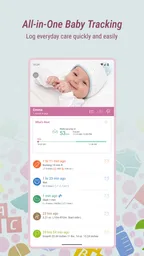
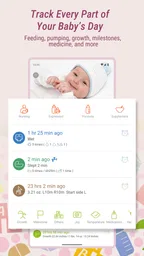
When a baby’s routine is changing by the day, it can be hard to remember whether the last feed was just an hour ago or much longer. Baby Tracker - Newborn Log is a parenting app built around recording those small, recurring events: feeding, sleep, diapers and pumping. I see its main value as a shared memory aid, not a substitute for a parent’s judgment or medical advice. If you want a clear record without relying on tired recollection, it is worth considering; if you dislike logging everyday details, it may feel like one more task.
Keeping a record when days blur together
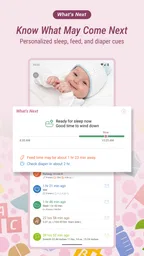
The appeal is straightforward. Instead of holding routine details in your head, you can enter them as they happen and look back when you need to. That can be useful during a demanding stretch when naps, feeds and diaper changes interrupt one another and the day has no obvious shape. The app also offers personalized timing cues, which can help make the recorded routine easier to use in the moment.
I would treat those cues as prompts to check in, not instructions to follow blindly. Babies do not always behave on a neat schedule, and a reminder cannot account for every change in appetite, comfort or sleep. The record is most useful when it supports what you already observe rather than making the day feel governed by a timer.
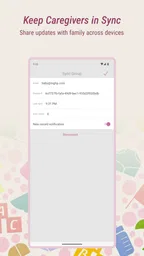
One practical benefit of a log is the handoff between caregivers. If one parent has been awake overnight and another takes over in the morning, a recent record can reduce the familiar round of “When did the baby last eat?” and “Was there a diaper change?” That is a simple use case, but it is exactly where a consistent log can save effort. The app’s usefulness depends on entries being made reliably enough that the next person can trust the timeline.
Baby Tracker is a free parenting app from NIGHP SOFTWARE. It has a 4.9 average from around 72,000 ratings, and over one million installs. Those figures suggest many families have found a reason to keep it in their routine, but they do not tell me whether its workflow will suit yours. I would judge it by how quickly you can record the events that matter to your household and whether you actually consult the history later.
What the routine log is good at
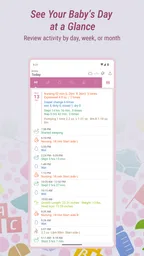
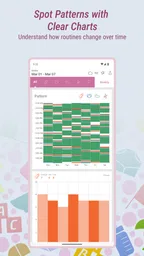
Because feeding, sleep, diaper changes and pumping are all part of its focus, the app can bring several routine threads into one place rather than scattering them across notes, a paper chart and a shared message thread. That matters most when you are trying to spot a pattern over time. A quick glance at a log can be more dependable than trying to reconstruct several days from memory, especially when nights have been broken.
A useful habit is to agree on a simple logging convention with anyone else who cares for the baby. For example, decide together what counts as a complete entry and whether you will record an event immediately or at the next quiet moment. This is not a special app feature; it is a way to prevent gaps and mismatched assumptions. A log with consistent entries is more helpful than a detailed one that only one caregiver understands.
The personalized timing cues may be especially handy when you are juggling other responsibilities. I would use them as a nudge to review the last entry and see whether the baby’s needs match the usual rhythm, rather than as a prediction that something must happen at a particular time. That distinction keeps the tool practical and avoids turning ordinary variation into a source of worry.
There is a trade-off: logging creates its own workload. If entering every event becomes stressful, the record may stop reflecting real life. I would start with the categories that answer an immediate question for your family, then expand only if the extra detail is genuinely useful. A small, steady log beats an ambitious system that becomes a chore after a few days.
Trust begins with choices you can inspect
For a parenting app, trust is not an abstract extra. The information being recorded concerns a baby’s daily care, and the phone may be shared or handled by more than one caregiver. Before making this the household record, I would look directly at the app’s current permission requests, privacy information and any account or sharing controls it presents. I would not assume that a particular safeguard exists simply because the app is popular or focused on families.
That is also why I would keep the log focused. Enter what helps with everyday care, and avoid adding sensitive personal details that do not improve the record. If you are unsure what a setting means, pause before enabling it and check the explanation shown in the app. This is a sensible approach for any app that holds family information, and it helps you make a decision based on visible choices rather than guesses.
When using the phone around visitors or other family members, consider whether the screen is visible and whether you are comfortable with the device’s normal lock and notification setup. That is a device-level consideration, not a claim about a specific Baby Tracker privacy feature. In practice, small habits—locking the phone and avoiding unnecessary detail—can matter as much as choosing which app to use.
I would also decide who is responsible for keeping entries current. If several people use a shared device or take turns caring for the baby, an agreed routine helps prevent duplicated or missing records. If the app offers an account or sharing option, read the terms and controls before relying on it; if it does not fit your family’s expectations, a private, locally managed method may be preferable. The key is not to confuse convenience with a guarantee about how information is handled.
Where it sits beside paper and general note apps
The usual alternatives are a notebook, a notes app, a calendar or a more specialized baby log. Paper is dependable when you want something visible beside the changing area and do not want to reach for a phone. A general notes app can be flexible, but you may have to invent your own structure and search through entries. Baby Tracker’s advantage is its specific focus on recurring baby-care events and timing cues, so the record is organized around those needs rather than repurposed from a blank page.
That focus is not automatically better for everyone. If you only need to remember one detail now and then, a note or shared household calendar may be faster. If you need a clinical record with requirements set by a health professional, follow that professional’s instructions rather than assuming a consumer log is an adequate replacement. I would use this app to support conversations and personal memory, not to make health decisions from a pattern alone.
A realistic example: after a night with several wake-ups, one caregiver may remember the last feed but not the sequence of sleep and diaper changes. A quick review of the entries can help the next caregiver understand what has already happened and what still needs attention. The benefit is less about producing a perfect chart and more about avoiding repeated questions at a tiring moment. If logging itself wakes or distracts you, though, a simple paper note near the usual care spot could be the kinder option.
Making it fit your household
I would begin by choosing a narrow purpose: perhaps keeping track of feeds and sleep for a short period, or making handoffs easier between caregivers. After that, notice whether the record answers real questions. Are you checking it before a handoff? Does it help you remember what happened overnight? If not, you may not need to record every category. The right level of detail is the one that helps without adding pressure.
For pumping, the app’s inclusion of that routine can be useful if pumping is part of your day and you want it alongside other care events. But a general log may not match every person’s preferred level of detail or workflow. If you need specialized tracking, compare the app’s visible options with the specific information you need to retain before committing to it as your only record.
It is free to download, with in-app purchases listed from $4.99 to $49.99 per item. I would check the purchase screen carefully before buying anything and decide whether the free experience already covers your routine. The existence of optional purchases is not a reason by itself to upgrade; the decision should depend on whether a clearly described paid option solves a problem you actually have.
The app is rated for Everyone, and its current version is 6.06, with Android support beginning at version 7.0. Those details can help you check basic compatibility, but they do not determine whether the app’s organization or data choices feel right for your family. I would install it only after checking the device’s available space and reviewing the choices presented during setup, then test the workflow with a few ordinary entries before making it the household’s main log.
A cautious recommendation for tired caregivers
My view is that Baby Tracker is most appealing when several recurring care details need to be remembered and more than one caregiver benefits from a common record. Its focused approach can be more convenient than building a tracking system from scratch, while personalized timing cues add a gentle prompt to revisit the routine. The strongest reason to use it is practical: fewer details have to live in an exhausted parent’s memory.
I would skip it if you find logging intrusive, if a simple paper method already works, or if your priority is a specific privacy or data-control arrangement that you cannot verify in the app’s own settings and policy. I would also avoid treating its timing cues as a strict schedule or its history as medical guidance. A good log should make care easier, not create anxiety or a new standard you feel obliged to meet.
My recommendation is to try it as a lightweight household record, while keeping your expectations modest and checking its visible controls before entering sensitive details. If it makes handoffs clearer and helps you remember routine events, keep using the parts that earn their place. If it becomes another demand during an already full day, switch to a simpler method without guilt. The best tracker is the one your family can use comfortably and consistently.
Baby Tracker has been available since July 9, 2015, and its established audience makes it an easy option to investigate, but the decision still comes down to fit: a focused log for families who value a shared timeline, rather than a must-have for every new parent. I would give it a try when remembering the sequence of care is the problem, and choose another approach when privacy preferences, specialized needs or the burden of recording outweigh that convenience.
What we like
- Logs feeding sessions with useful timestamps.
- Tracks diaper changes and sleep in one place.
- Simple layout makes daily entries quick to add.
- Charts help reveal routines and changing patterns.
- Useful for sharing baby-care updates with caregivers.
What could be better
- Manual logging can become repetitive during busy days.
- Tracking depends on caregivers entering accurate details.
- Some features may require a paid upgrade.
- Charts offer limited value before enough data is logged.
- Shared access may require setup across caregivers.





