

AuraCleaner review
 Analysis by Appsdrops
When my phone starts warning me that storage is tight, I want a cleaner that helps me make a safe, informed choice—not one that turns every file into a target. AuraCleaner is a free Android tools app from ULA LIMITED, built around clearing unwanted files and reclaiming capacity. My view is that it makes most sense as a practical starting point for people who want a simpler cleanup routine, rather than as a replacement for careful, manual file management.
A cleaner with a focused job
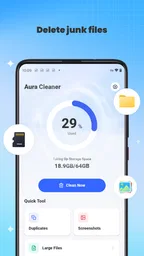
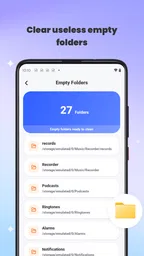
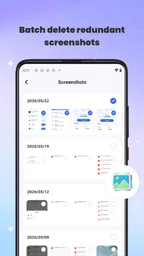
The appeal is easy to understand: storage pressure is annoying, especially when it interrupts a download, a photo, or an app update. AuraCleaner’s central purpose is to help remove junk files. That focus gives the app a clear role, but it also means I would judge it by how confidently it helps me decide what can go—not by how many unrelated tools a cleaner might advertise.
It sits in the familiar Android-cleanup category, where the usual alternatives include built-in storage controls and file managers. Those built-in options can be the better choice if I want to inspect folders and decide item by item. A dedicated cleaner is more appealing when I want a guided way to look for reclaimable space without beginning with a manual tour of the filesystem. The trade-off is important: convenience should not replace checking what a suggested cleanup would remove.
The app’s current version is 1.1.7, and it runs on Android 8.0 or later. That gives owners of older supported devices a possible route to a dedicated cleanup tool, while people using newer Android phones can also consider it. The version number tells me which release is current; by itself, it does not reveal a feature history or prove how the app has changed over time.
What I would use it for
I would reach for AuraCleaner when storage is low and I need to make room before a specific task, such as saving a batch of pictures or installing an update. In that situation, a cleanup app can be useful as a first pass: identify space that may be recoverable, then review the proposed action before committing to it. The practical value is not simply deleting more; it is making the storage problem easier to understand and act on.
A realistic routine would be to check available capacity before a trip, clear only items I recognize as disposable, and then revisit storage settings to see whether the space problem has actually eased. I would avoid treating a cleaner as a reason to delete unfamiliar files just because they look temporary. If I am unsure about an item, leaving it alone is usually the safer decision.
That caution matters particularly for people who keep important documents, offline media, or app data on a phone with little spare room. Before cleanup, I would make sure anything personally valuable is backed up or stored somewhere I can access again. A cleanup tool can help with clutter, but it cannot decide how much a file matters to me.
How the release facts shape expectations
AuraCleaner was released on June 23, 2026, and its current release is 1.1.7. Those facts establish a fairly specific snapshot of the product, not a promise about future development. I would not infer from a version number alone that the app has added particular scanning methods, safeguards, or customization options. For a storage tool, those details matter, so I would assess what the installed version actually presents on my own device.
For someone who already uses a phone’s built-in storage screen, the practical question is whether AuraCleaner makes the cleanup decision clearer or faster. If its suggestions are easy to understand, it may be a more approachable first stop. If I need precise control over folders or want to preserve every item that is not clearly disposable, the native settings or a file manager may still be the better fit.
This is also why I would not measure improvement only by the amount of space freed. A tool that removes a large amount without making the consequences clear would not earn my trust. I would value understandable categories, a clear review step, and an easy way to back out more than an impressive-looking total. Those are criteria I would check during use, rather than capabilities I assume from the app’s purpose.
Who is likely to appreciate it
AuraCleaner is aimed at people who want a straightforward helper for storage maintenance and do not enjoy sorting through files manually. It may suit a casual Android user who wants to check for removable clutter before deciding what to keep. It is also a reasonable option to try for someone who regularly runs short on capacity and wants a dedicated tool alongside the phone’s own storage controls.
The audience figures suggest that it has reached a broad group of users: it has more than one million installs, an average rating of 4.4, and around nineteen thousand ratings. That reception is useful context, but it is not a guarantee that its suggestions will match my habits or that every cleanup will be appropriate for my device. Ratings can tell me that many people have tried it; they cannot make the deletion decision for me.
The app is rated for Everyone, and it is free. That makes trying it accessible, but I would still pay attention to each screen and confirm what an action means before approving it. “Free” describes the price, not the level of care a user should take when removing files. ULA LIMITED is the developer behind the app, and that is the name I would look for when checking its identity in the app store.
Where I would be careful
A cleaner is not automatically the right answer to every storage problem. If my phone is full because I deliberately keep large videos, downloaded maps, or music for offline use, deleting temporary clutter may make little difference. In that case, reviewing those larger personal files or moving items I want to keep is more direct than expecting a cleanup app to solve the underlying issue.
I would also skip a dedicated cleaner if I already understand my phone’s storage tools and prefer to inspect files myself. Manual review takes more effort, but it gives me a clearer sense of what is being removed. The same applies when the phone contains work documents or irreplaceable media: a deliberate backup and file-by-file decision can be more appropriate than a quick cleanup pass.
One useful habit is to treat the first scan as a diagnostic, not a command. I would look at the proposed categories, pause over anything unfamiliar, and remove only what I can identify as unwanted. Afterward, I would check whether the specific problem—such as making room for a download—has been solved. This avoids turning a vague “clean everything” impulse into an unnecessary deletion.
Another trade-off is that a cleaner may simplify the first step while adding an extra app to the routine. If I only run into storage pressure occasionally, the built-in settings may be enough and require less maintenance. If I regularly want a guided check, a dedicated tool can be more convenient. The best choice depends on how often the problem occurs and how much control I want over each file.
What to watch as you try it
When opening AuraCleaner for the first time, I would focus on clarity: can I tell what the app considers removable, and can I review the items before deletion? I would also check whether the suggested cleanup addresses the actual source of low storage. These are simple tests, but they reveal whether a cleaner is useful for my own situation rather than merely offering a broad promise of more space.
For existing users, the move to version 1.1.7 is a reason to check the app-store release notes and the installed interface for concrete changes, rather than assuming the release number means a particular improvement. If a new version changes how cleanup suggestions are presented, I would take a moment to review those choices again. The safest routine is to keep personal files backed up and to reconsider any category whose contents are not obvious.
AuraCleaner has a focused purpose, a free entry point, and a current release that supports Android 8.0 and newer. I see it as a useful candidate for people who want help making a storage cleanup less of a chore, provided they remain attentive to what they approve. I would recommend giving it a cautious try when the phone is cramped and a guided first pass sounds helpful; I would choose built-in controls or manual file management when precision and direct oversight matter more.
What we like
- Quick scans make it easy to check storage at a glance.
- The interface is straightforward for first-time users.
- Junk-file cleanup can help free up device space.
- Large-file detection helps identify items worth reviewing.
- Scheduled reminders can encourage regular storage maintenance.
What could be better
- Some cleanup suggestions may need manual review before removal.
- Results depend on the files and apps on your device.
- Aggressive cleanup can remove data you meant to keep.
- Background features may use battery or system resources.
- Some features may require a subscription or show ads.





