
AT&T review
 Analysis by Appsdrops
When several people in a household rely on the same AT&T account, the account holder can end up fielding a steady stream of small questions: Has the bill been paid? How much data is left? Where should I go for help? I see AT&T as a practical place to handle those errands, rather than as a general-purpose phone-management app. Its value is greatest when you already use AT&T services and want account tasks close at hand.
One account, several everyday routines
AT&T is a free productivity app from AT&T Services, Inc. Its central appeal is straightforward: it brings billing, data-use checks, deals, and support into one mobile destination. Instead of switching between a browser, a bill reminder, and a support search, I can start with the provider’s app and see whether the task is something I can resolve there.
That can be useful in a shared-device household, but “shared use” needs a little care. The app is most naturally useful to the person responsible for the AT&T account. Other people in the home may need information, yet that does not mean they should automatically use the account holder’s login or make changes. I would treat the app as the account holder’s control point and share relevant details with others as needed.
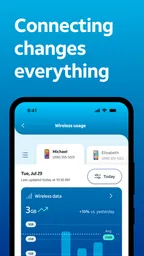
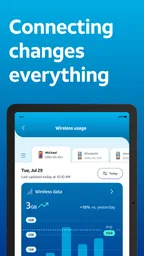
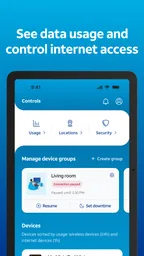
A realistic example is a parent checking the household’s data use before a long drive. They can look at the account rather than rely on each person’s estimate, then decide whether to change streaming habits or simply wait for the next billing cycle. The useful part is not a dramatic feature; it is having a current account task in the same place as the bill and support options.
Keep the account boundary clear
Before installing it on a shared phone or handing a device to someone else, I would decide whose account is being used and who is allowed to see its information. Billing and usage details are personal account matters. A family member who only needs to know whether service is available or where to seek help may not need access to the account itself.
This is also why I would avoid treating the app as a household dashboard for every person. Its purpose is tied to AT&T account management, not to coordinating everyone’s schedules, devices, or spending. If several adults each manage separate AT&T accounts, they should keep their own sign-in boundaries rather than assume one app installation combines them into a shared family view.
For an account holder, the first practical step is to sign in and confirm that the account information shown is the one they mean to manage. I would then use the app for a specific task—checking a bill, looking at usage, or finding support—before making it part of a regular routine. That simple check matters in a household where more than one person handles phones or payments.
Useful for coordination, not a substitute for conversation
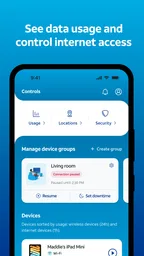
The app can make coordination easier when a household has one person who handles the provider relationship. That person can check data use before deciding whether a family member should switch to Wi-Fi, and can look into a billing question without asking everyone to search their own messages. It can also give the account holder a single starting point when a service issue comes up.
But the app does not replace the conversation about who is using what. A usage screen can help explain why the account needs attention, yet it cannot tell the account holder which household member caused a particular change or what everyone agreed to do. I would use it as a source of account information, then communicate the decision directly rather than assuming everybody can see or interpret the same details.
One useful habit is to check usage when there is a concrete reason, such as a trip, a busy month, or a question about an unexpected bill. That is more actionable than repeatedly opening the app without a decision in mind. If the numbers prompt a change, the account holder can explain what needs to change and why, instead of turning routine checks into surveillance of other people’s phone habits.
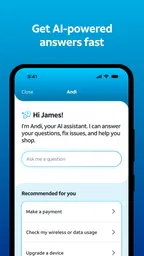
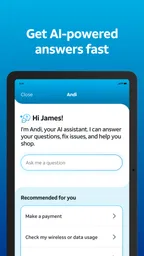
For support, I like having a provider-specific route available when a problem is clearly tied to AT&T service. It is a more sensible first stop than a generic troubleshooting app for questions about the account itself. On the other hand, if the issue is with a handset setting, a third-party app, or a home Wi-Fi device unrelated to the account, the AT&T app may not be the right tool; the device maker or the relevant service’s support channel may be more useful.
Age context and trust in a household
The app has an Everyone content rating, which describes its general store age classification. That should not be confused with permission to manage an adult’s account or with a dedicated family-control system. I would still keep account access with a responsible account holder and make sure younger household members understand that billing and service details are not theirs to change casually.
For a teenager who wants to know whether they have used a lot of data, the account holder can choose to check and share the relevant information. That is a more careful arrangement than giving out account credentials simply for convenience. The app’s purpose is account access, so the trust decision belongs to the household; the age rating alone does not settle it.
There is a trade-off here. Putting provider tasks in one app can reduce friction for the person who pays the bill, but it can also concentrate sensitive information on one device. I would use the phone’s ordinary security protections and avoid leaving an account signed in on a device that is routinely passed around. That is sensible account hygiene, not a special family feature.
How it compares with the usual alternatives
Compared with checking account information in a mobile browser, a provider app is appealing when I expect to return for common tasks. The app is designed around AT&T services, so billing, usage, deals, and support sit within the same provider-focused experience. A browser may still be preferable for someone who rarely checks the account, wants to avoid another app, or is already comfortable managing everything from a computer.
Compared with general budgeting or data-monitoring apps, AT&T is narrower. A budgeting tool can help organize spending across many companies, while a phone’s own settings may help explain local data use on that device. Neither is a direct replacement for checking the provider account. I would use AT&T for account-level questions and a separate tool only when I need broader household budgeting or device-specific detail.
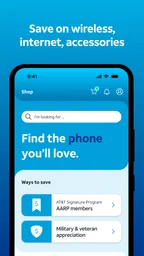
The deals area may be handy for someone already looking at AT&T account tasks, but I would not install the app solely for offers. Deals are an added reason to browse, not a guarantee that every offer suits a household’s needs. I would compare any offer with the actual service or purchase I want rather than letting an in-app promotion decide for me.
What to expect from the experience
AT&T has been available since April 28, 2010, and the current version is 2026.10.2. It has a 4.5 average from around 454,000 ratings, with roughly 160,000 written reviews and over 100 million installs. Those figures suggest that it is a widely used provider app, but they do not tell me whether it will fit a particular household’s account setup or solve a specific service issue.
The app is free and requires Android 9 or later. For a current Android phone that meets that requirement, the main decision is less about the download and more about whether you want a dedicated AT&T account tool. If you use another provider, this app has little reason to stay on your device. If you use AT&T but almost never need to check billing or usage, the account website or occasional support contact may be enough for you.
As with any provider app, the experience is most useful when the task is within the provider’s reach. I would not expect it to manage unrelated household subscriptions, explain every phone setting, or coordinate family responsibilities automatically. Keeping that scope in mind makes it easier to judge the app fairly: it is a convenient account companion, not a complete household-management system.
My household verdict
I recommend AT&T to the person in a household who actually handles the AT&T account and wants a mobile way to check bills, review usage, look for deals, and start support requests. Its strongest practical benefit is reducing the little bits of account administration that otherwise get spread across reminders, browser tabs, and conversations.
I would skip it if you do not use AT&T, prefer to manage service from a computer, or need a shared family organizer rather than a provider account app. For households, the best approach is to keep sign-in access with the account holder, use information from the app to make clear decisions, and share only what other people need to know. That boundary keeps the convenience without confusing account access with family coordination.
Overall, I find it worthwhile for an AT&T customer who regularly handles service tasks on a phone. It is focused, practical, and more useful as part of a clear account routine than as an app everyone in the home is expected to use.
What we like
- Manage account details and review usage from your phone.
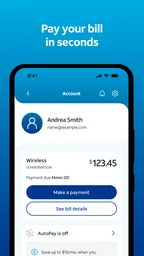
- Pay bills and check payment history in one place.
- Get support without calling customer service.
- Find nearby AT&T stores and service locations.
- Eligible customers can manage wireless and home services together.
What could be better
- Some features require an AT&T account and active service.
- App performance and reliability can vary by device.
- Certain account changes may require contacting support.
- Promotional offers and features can differ by region.
- The app may request permissions that some users prefer to limit.





