




Artvilize: AI Video Generator review
 Analysis by Appsdrops
The most interesting thing about Artvilize: AI Video Generator is its focus on starting with a single photo. Instead of asking me to build a video from a timeline of clips, it turns one still image into a more animated piece, a dance-style result, or a collage. That makes it an appealing option when I have a picture worth sharing but don’t want to learn a full editing app just to give it a little more life.
Artvilize is a free photography app from Astronex, with optional in-app purchases priced from $6.99 to $38.99 per item. It is rated for Everyone, and its current version is 1.7.5. The app has a 4.9 average from around 12,000 ratings and more than 1 million installs. Those figures suggest broad interest, but they don’t tell me whether its particular style suits every photo; the result depends heavily on choosing an image that works with the transformation I want.
Why starting with one photo changes the process
Many mobile video editors assume I already have several clips, a soundtrack, and a rough idea of how the finished piece should be arranged. Artvilize takes a different route: the photo is the starting point, and the creative decision is what kind of treatment to give it. That narrower approach is useful when my goal is a quick social post rather than a carefully edited short film.
The practical benefit is less preparation. I don’t have to sort a camera roll into a sequence or decide where to cut between shots before I can try something. A single portrait or other suitable image can be enough to begin. In my view, that is the app’s clearest strength: it lowers the effort required to experiment, particularly for someone who doesn’t normally make videos.
The trade-off is that the source photo carries more responsibility. With a conventional montage, several images can create variety and help tell a story. With a one-photo workflow, the chosen image needs to hold attention on its own. If it is blurry, badly cropped, or visually cluttered, an animated treatment is unlikely to turn it into a compelling post. Choosing a clean, expressive source image matters more than adding complexity afterward.
Three possible directions from the same starting point
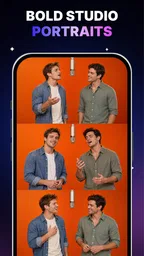
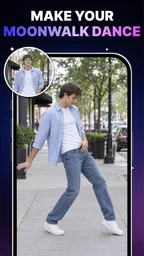
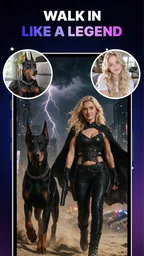
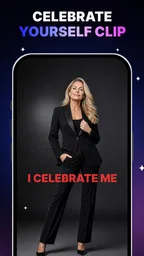
The app’s creative premise covers three different outcomes: a video treatment, an AI dance, or a photo collage. I would think of those as distinct ways to reuse an image, not as interchangeable buttons. A dance treatment is a playful choice for a portrait intended to make friends smile; a video-style result can give a still more movement and presence; a collage is better when I want the image to sit alongside other visual elements rather than carry the whole post alone.
That distinction is useful before opening the editor. Ask what the image is meant to do: entertain, add motion, or become part of a broader visual arrangement. Starting with that decision makes experimentation more purposeful and reduces the chance of spending time on an effect that does not fit the mood of the photo.
I would also keep the audience in mind. A playful transformation can work well in a casual message or social post, while a polished business announcement may need restrained typography and predictable layout that a dedicated design tool handles more directly. The app’s appeal is creative speed, not a guarantee that every treatment will suit every context.
A practical workflow for getting a better result
For a realistic everyday example, imagine I want to share a birthday photo in a family chat. Rather than assembling several clips, I can start with one clear portrait and decide whether a dance treatment feels funny or whether a simpler video effect better preserves the moment. I would preview the available direction before committing to the image, because the same photo can feel warm in one treatment and awkward in another.
A useful, easily overlooked habit is to make a copy of the original photo before experimenting. That gives me a clean fallback and makes it easier to compare the source with the finished creation. It also matters because a transformation is a reinterpretation, not a replacement for the original memory. I would keep the untouched image for personal use and share the generated version only where its playful tone fits.
Another practical tip is to crop with the intended output in mind. A face close to the edge or an important detail at the bottom may be harder to preserve in a treatment than a centered subject with some breathing room. I would choose an image where the main subject is easy to recognize and avoid using a photo whose meaning depends on small background details. This is a general preparation step, but it is especially important when one image has to do all the visual work.
For a collage, I would think less about animation and more about whether the source image has enough contrast and a clear focal point to remain legible among other elements. For a dance-style result, I would choose a portrait whose expression suits a lighthearted interpretation. These are small decisions, but they help avoid the common disappointment of expecting the app to rescue a source image that was never a good fit.
Where it fits beside other photography and video apps
Compared with a standard photo editor, Artvilize is aimed at changing the presentation of a picture rather than carefully correcting it. If my priority is adjusting color, removing distractions, or making precise edits, a conventional photo-editing app is the more sensible first stop. Artvilize makes more sense when I already like the photo and want to turn it into something more playful or shareable.
Compared with a timeline-based video editor, it asks for less planning but also gives me a different kind of control. A timeline is better when I need to choose exact cuts, arrange multiple clips, set a deliberate pace, or coordinate a project around narration. Artvilize’s one-photo premise suits a quick transformation, not a complicated piece with a carefully structured beginning, middle, and end.
It also sits apart from template-focused design tools. Those can be a better choice for a flyer, a branded announcement, or content where precise text placement matters. I would reach for Artvilize when the image itself is the main event and I want to explore a more animated or collage-like presentation. Knowing that boundary keeps expectations realistic: a simple creative shortcut is valuable, but it is not a substitute for every tool in a creator’s kit.
The tradeoffs I would consider before spending
Although the app is free to install, optional purchases are listed at $6.99 to $38.99 per item. I would try the free experience first and decide whether its results match my taste before paying for anything. In-app purchase ranges can cover different items, so I would check the specific offer shown in the app rather than assume that every effect or use is included at no cost.
The main creative limitation is inherent in the concept: one source image offers less variety than a sequence of original footage. A result may be fun once but less distinctive if I use the same kind of photo and treatment repeatedly. Rotating between a portrait, a product image, and a collage-oriented idea can make the app more useful, but it still won’t provide the narrative range of filming several moments myself.
I would also be selective about realism. A playful AI transformation can be entertaining without being a faithful record of what happened. For a family joke or casual post, that may be exactly the point. For documentation, professional use, or anything where viewers need to understand that an image has been transformed, a straightforward photo or a clearly edited video is the safer choice.
Artvilize is designed for Android devices with a minimum OS version of 7.0. That makes it relevant to many Android users, while anyone on another platform should check the appropriate app store for availability and compatibility before planning a workflow around it. The age rating is Everyone, but that does not mean every generated style will fit every person or occasion; I would still choose images and effects with the eventual audience in mind.
Who will get the most from this app
I’d recommend Artvilize to someone who often shares photos and wants a quick way to make a familiar image feel more lively without learning a conventional video editor. It is particularly well suited to casual creators, people making lighthearted posts for friends, and anyone who has a strong portrait but no time or desire to shoot and assemble footage.
It is less suitable for someone who needs precise editing controls, consistent brand layouts, or a video built from multiple moments. If I were preparing a product demonstration, a carefully paced travel recap, or a professional presentation, I would use a tool built around clips and detailed adjustment. If I only wanted to improve a picture’s exposure or remove an unwanted object, I would choose a photo editor instead.
My overall view is that Artvilize has a clear, useful niche: it makes a single picture a starting point for a more expressive share. Its best results are likely to come from thoughtful image selection and a treatment that matches the moment, not from expecting one tap to fix every weakness in a photo. If that quick, playful workflow is what you want, Artvilize is worth trying before you commit to a purchase. If you need exact control or a complete video-editing workspace, you will be happier with a more specialized alternative.
What we like
- Turns text prompts into short videos with little editing effort.
- Offers an approachable option for experimenting with AI video creation.
- Can help visualize ideas for social posts and creative projects.
- Automates parts of the video-making process for faster drafts.
- Makes AI-generated video accessible without advanced editing skills.
What could be better
- Generated scenes may not match the prompt precisely.
- Video quality and consistency can vary between generations.
- Creating polished results may require several prompt revisions.
- Some features or generation limits may depend on a paid plan.
- AI-generated visuals may need review before sharing publicly.





