
Apple Music review
 Analysis by Appsdrops
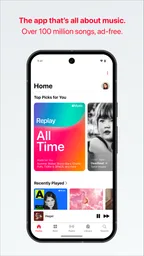
I find Apple Music easiest to judge not by its enormous catalogue, but by what happens when I want a particular song, want to keep listening without interruption, or need to work out why a track is not playing as expected. It is a music and audio app from Apple, and its scale is a real draw: the service offers more than 100 million songs. But a large catalogue does not remove the small setup snags that can make a music app feel confusing. My experience is that a little care with account, playback, and library settings can make the difference between a smooth daily companion and a frustrating one.
Where listening can get stuck
The first point to understand is that finding music and being able to play it are not always the same thing. A search can surface an album or song, while the listening experience still depends on the account and access arrangement you use. Apple Music is free to install, but in-app purchases range from $5.99 to $199.99 per item. I would check the current options in the app store before assuming that installing it alone gives ongoing access to every listening feature.
When something does not play, I avoid repeatedly tapping the same track. Instead, I check whether other songs play, whether the issue affects one album or the whole app, and whether I am looking at a result that is available to play under my current account. Those simple comparisons help separate a track-specific hiccup from a broader sign-in or connection problem.
Search can also feel less direct than expected if I use a vague phrase. I get better results by trying the artist name, a distinctive part of the title, or both together. If I am looking for a particular recording rather than merely a song with that name, I check the artist and album details before starting playback. That small habit avoids saving the wrong version and wondering later why it does not match what I meant to hear.
Another common source of confusion is expecting the library to behave like a simple folder of files. A library is useful for returning to music, but I still need to pay attention to what I have actually added and what I have only found through search. When a track seems to have disappeared, I first revisit the search result and confirm its identity, then check the library view I normally use. I find that more useful than assuming the app has lost the music.
Make the first session deliberate
Apple Music is rated Teen, and its large audience is reflected in an average rating of 4.5 from around 765,000 ratings. Those figures make it a well-established option, but they cannot tell me whether its everyday flow suits an individual listener. The better test is to use the app with a real task: find a song I already know, save something I want to revisit, and see how easily I can get back to it later.
On first use, I would take a moment to confirm that I am signed in to the Apple account I intend to use. If music seems to be missing from a device, checking the account is a sensible early step before changing other settings. It is easy to spend time searching for an obscure playback fix when the basic issue is that the app is not using the account associated with the library or access I expected.
I also recommend testing playback on a familiar track before building a long queue or relying on the app for a commute. This gives me a clear reference point: if the familiar track works but a new discovery does not, the issue is probably specific to that selection or its availability rather than the whole listening setup. If nothing plays, I can focus on the broader connection or account checks instead.
For a cleaner library, I make a habit of adding music deliberately rather than treating every interesting search result as something I have saved. When I am exploring, I can keep listening and decide later whether a track belongs in my regular rotation. That separation is especially helpful if I use the app for both familiar favorites and casual discovery; it keeps a passing curiosity from making my main library harder to browse.
A practical routine for recovering playback
If playback stops unexpectedly, I work from the simplest checks toward the more disruptive ones. First, I try a different track. Then I check whether the connection is working by using another online service or loading a fresh search result. If the problem is limited to one selection, I search for it again and inspect the artist and album details. If several unrelated tracks fail, I close and reopen the app and make sure I am signed in as expected.
I would not erase or rebuild a library as an early troubleshooting step. That is a heavy response to a problem that may be temporary or limited to a single track. I also avoid changing several settings at once: if the issue clears, I want to know which change helped, and if it does not, I do not want to create a second problem while trying to fix the first.
For a practical everyday example, imagine getting ready in the morning and discovering that a familiar album will not start. I would try one track from a different album, then search for the original song again. If the alternative plays, I can keep moving and investigate the album afterward. If neither plays, I check the connection and account before spending time comparing versions. That sequence is quick, keeps the problem in proportion, and avoids turning a minor interruption into a full app reset.
Queue management is another place where a little attention helps. Before starting a long listening session, I check what is already lined up rather than assuming the next song will be the one I expect. If I have been sampling music, I clear up my intention by choosing the album or playlist I actually want. This is a useful distinction: a playback problem and an unexpected next track can feel similar in the moment, but the second is often just a queue that needs a quick review.
When the app is not the cause
Not every missing song or failed start points to a fault in Apple Music. A weak or unavailable connection can interrupt streaming, while a device’s audio output may be directed somewhere other than the speaker I am listening to. Before reinstalling anything, I check the connection and the selected output, then test another track. These are ordinary checks, but they often explain why music seems silent even though the app itself is open and responsive.
It also helps to distinguish between an app problem and a catalogue expectation. With a library this broad, I might reasonably expect a particular version to appear, but a search result is not always the exact recording I had in mind. I compare the artist, album, and track details rather than judging only by title. If the specific version is not the one I want, trying a more precise search is more productive than repeatedly restarting playback.
When the app behaves differently across devices, I check the same account and the same track before concluding that one installation is broken. A familiar song is a useful test because I can tell quickly whether the issue is the selection, the connection, or the device. Keeping the test simple makes troubleshooting clearer and helps me avoid changing preferences that were not involved in the problem.
There are times when another music service is the better fit. If I already organize my listening around a different service’s library and recommendations, switching brings a learning curve and may not improve my daily routine. If I mainly want a basic local player for music already stored on a device, a simpler player may be more convenient. Apple Music makes the most sense to me when I want a broad streaming catalogue and am willing to use its account-based library and playback flow.
How it fits into everyday listening
For a commute, I would prepare the music I want before leaving rather than wait until I am already dealing with a weak connection or a tight schedule. The same approach works for a workout or household chores: choose a familiar album or set of tracks, check the queue, and start playback while the connection is reliable. This is less about an elaborate setup than about avoiding the predictable annoyance of troubleshooting when I would rather be listening.
For discovery, I use search as a starting point rather than assuming the first result is automatically the right one. I compare recordings, listen, and then decide whether I want the track in my regular library. That workflow makes the size of the catalogue useful without turning the library into a pile of items I added impulsively. It also gives me a reliable way back to music I genuinely liked.
Apple Music is a free app to install, but its in-app purchases mean I would check the available arrangements and cost before committing to a routine. I would also consider how much value I personally get from streaming rather than only counting how many songs are available. Someone who listens throughout the day may find a broad catalogue more compelling than someone who rarely moves beyond a small collection of owned tracks.
Apple, the developer, has made an app with substantial reach: it has over 100 million installs and around 54,000 written reviews. Those figures suggest many people have tried it, but my recommendation still depends on fit. The app is worth considering if I want a large music catalogue in one place and am comfortable checking account and playback details when something behaves unexpectedly.
My practical verdict
I recommend Apple Music to listeners who want a broad selection, enjoy moving between familiar albums and new finds, and are willing to keep their library and queue tidy. Its strongest practical quality is that it can support different moods without requiring me to rely on a narrow personal collection. Its most noticeable friction is that access, search results, and playback can be easy to misread when I have not checked the account, connection, or exact recording.
I would skip it if I want a no-setup player for files already on my device, strongly prefer another service’s existing organization, or do not want to pay for ongoing music access after installing a free app. For everyone else, I would begin with a familiar track, check the account, and build a small, intentional library before making it part of a daily routine. That gives a fair picture of how the app fits my listening habits without letting a first-session snag decide the whole experience.
Overall, Apple Music feels most useful when I treat it as both a catalogue and a listening workspace, not simply a search box. A quick account check, a precise search, and a glance at the queue solve many of the small problems that can interrupt a session. If that level of attention sounds reasonable and a wide range of music matters to you, I think it is a strong option to try.
What we like
- Lossless audio is available at no extra subscription cost.
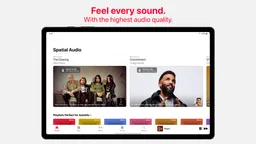
- Dolby Atmos tracks create an immersive listening experience.
- Lyrics appear in sync with many songs.
- Downloads let subscribers listen offline.
- Apple Music works with Siri voice commands.
What could be better
- A paid subscription is required for on-demand listening.
- Some features work best within the Apple ecosystem.
- Music availability varies by country and licensing rights.
- The interface can feel crowded with its many sections.
- Downloaded tracks stop working if the subscription ends.





