






AppClose: Co-Parent Essentials review
 Analysis by Appsdrops
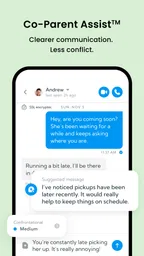
When co-parenting gets busy, the hard part is often not making a plan but keeping both households aligned as the plan changes. AppClose: Co-Parent Essentials is a parenting app built around that shared coordination problem. I see its main appeal in bringing family communication and planning into a space intended for co-parents, rather than scattering decisions across texts, calendars, and email. That focus can make everyday logistics easier to follow, but it works best when both adults are willing to use the same system consistently.
Where AppClose fits into a co-parenting routine
AppClose is made by AppClose, Inc and sits in the parenting app category. It is free to download, with in-app purchases listed between $8.99 and $98.99 per item. The app is rated for Everyone, and its broad purpose is clear: give separated or coordinating parents one place to manage the practical side of raising a child together. Its average rating is 4.3 from around 30,000 ratings, and it has passed one million installs, so it has reached a sizable audience without being a universal fit for every family.
The most useful way to approach it is as shared infrastructure, not as a magic fix for difficult communication. An app can help keep information in a more orderly place, but it cannot make a reluctant co-parent respond promptly or resolve a disagreement about what is best for a child. If both adults already communicate respectfully and mainly need a dependable routine, a dedicated tool may reduce needless back-and-forth. If one person refuses to participate, the value is naturally limited.
Expectations for speed: fewer searches, not instant agreement
For a co-parenting app, speed is less about flashy animation and more about how quickly I can find the relevant detail while juggling the rest of the day. AppClose’s value is the promise of a shared destination for co-parenting essentials. Instead of trying to remember whether a school update arrived by text or was buried in an email thread, the goal is to make coordination feel less scattered. That is a practical benefit when the same questions recur: who is handling a pickup, what changed, and what has already been discussed?
I would not judge its usefulness by expecting every task to become effortless. A shared plan still depends on both people entering information carefully and checking it at the right time. A one-sided calendar or a message left unread can create the same uncertainty as any other communication method. My practical advice is to agree on a simple rule before relying on it: decide which kinds of updates belong in the app, and which situations still deserve a direct call or text. That prevents an important change from being lost because each person assumed the other would notice it.
A sensible first week is a small one. Start with the recurring logistics that cause the most confusion, then see whether both parents actually keep the information current. Trying to move every conversation and every historical detail at once can make the app feel like another chore. A narrow starting routine gives you a fair test of whether a shared tool is helping, without forcing the child’s entire schedule into a new process overnight.
Busy days and heavy use: make the routine do the work
The app is most relevant during the messy parts of family life: a school day runs late, a child needs an item between homes, or a pickup arrangement changes after the day has already started. In that kind of moment, having one agreed place for co-parenting coordination can be more helpful than searching several channels. The real benefit is not simply storing information; it is reducing the chance that a detail is remembered differently by each adult.
One useful workflow is to treat updates as handoffs. When a plan changes, write the practical point plainly, include what action is needed, and make clear whether the change is temporary or ongoing. That habit is useful in any communication tool, but it matters especially in co-parenting because a vague message can lead to two different interpretations. I would avoid mixing a time-sensitive pickup update with a long emotional discussion. Handle the immediate logistics clearly, then address the broader disagreement separately when there is room to do so.
Another non-obvious advantage of a dedicated co-parenting space is that it can encourage more deliberate communication. When a conversation is likely to be revisited, concise and factual wording is easier for both adults to act on than a stream of reactive messages. That does not mean every exchange has to sound formal. It means keeping the child’s immediate needs distinct from old disputes, so a practical decision does not get buried under frustration.
There is a trade-off during heavy use: more information only helps if it stays organized and both people know where to look. A shared app can become one more inbox if every minor thought is sent as a separate update. I would reserve it for decisions, changes, and details the other parent needs, rather than using it as a running diary. That keeps the signal clearer when a genuinely important message arrives.
Reliability is also a question of habits
For a tool that supports parenting logistics, reliability has two parts: the app needs to be usable when needed, and the adults need a dependable routine around it. AppClose is on version 3.4.7.8, but a version number alone cannot tell me how it will behave on every device or network. I would test the tasks that matter to my family before making it the only place where urgent information is shared. If a schedule change affects a child’s immediate safety or a same-day handoff, I would use a direct backup channel until both parents are confident they will see and act on app updates.
That backup approach is not a criticism unique to this app. Phones can be offline, notifications can be overlooked, and people can forget to check any shared system. The better question is whether the family has agreed what to do when a message needs an immediate response. A short rule such as “call for same-day emergencies; use the app for routine coordination” can prevent the app from being blamed for a communication gap it cannot solve.
It is also worth being thoughtful about recovery from confusion. If a parent misses an update, avoid sending a series of increasingly heated messages. Restate the key fact, identify the next action, and confirm the arrangement through a channel both people are checking. Keeping the message focused makes it easier to recover the plan without turning a missed notification into a larger argument. AppClose can support a clearer process, but the calm, explicit follow-through still comes from the users.
Device limits, cost, and who should think twice
The app’s minimum operating-system requirement is Android 6.0, which means compatibility depends on the device and its software. Before asking another parent to join, I would check that both phones can run it and that each person is comfortable using an app for regular family coordination. A shared tool only works when it is accessible to both sides. If one parent has an older or unreliable phone, or rarely checks apps, a simpler method may be more dependable for essential arrangements.
AppClose is listed as free, while in-app purchases range from $8.99 to $98.99 per item. The store summary describes a 60-day free period and says the core plan includes everything without upsells, so I would read the current in-app terms carefully before making a purchase or assuming every paid item applies to my situation. The practical question is not just whether the download costs nothing; it is whether the features your family expects to use are included in the plan you choose. If you only need occasional coordination, compare the ongoing value with a shared calendar and ordinary messaging before committing to a paid option.
I would skip AppClose if both co-parents already have a low-friction system that neither finds confusing. Replacing a working shared calendar with a new app can add steps rather than remove them. It may also be a poor fit when the central issue is not disorganization but persistent conflict, refusal to communicate, or a need for professional or legal support. A parenting app can help record and structure routine coordination; it should not be treated as mediation or a substitute for advice from a qualified professional.
How it compares with familiar alternatives
The usual alternatives are a shared calendar, text messages, email, or some combination of all three. A calendar is excellent for fixed dates and repeat events, but it can be awkward for discussion and changes that need context. Texting is fast, though important details can disappear in a long thread or remain mixed with unrelated conversation. Email is easier to search in some situations but can feel cumbersome for a quick handoff. AppClose’s case is strongest when a family wants a purpose-built place for co-parenting coordination rather than another general-purpose tool.
That does not automatically make it better. If both adults are comfortable with a shared calendar and have a clear texting rule for changes, the simplest option may be the one they already maintain. If the family regularly loses track of which conversation contains a decision, a dedicated app is more compelling. I would compare options by asking one concrete question: where will both parents reliably look when the school schedule changes? The answer should guide the choice more than a long feature checklist.
My performance verdict: useful when both parents commit
AppClose: Co-Parent Essentials is a focused option for parents who want everyday coordination to feel less fragmented. I would recommend trying it when both adults are prepared to check the same place, keep information current, and agree on what belongs there. Its strongest practical value is not a promise of perfect cooperation; it is the possibility of making routine details easier to locate and discuss. With more than one million installs and a 4.3 average, it is clearly used by many families, though those figures cannot tell any particular pair whether the workflow will suit them.
My honest reservation is that a dedicated tool can add friction if the other parent will not use it or if the family already has a system that works. Treat the first few days as a trial of the shared habit, not just the software. Choose one recurring handoff, agree how urgent updates should be handled, and see whether both people follow through. If that small test reduces confusion, AppClose may earn a regular place in the routine. If it creates another inbox to monitor, a simpler alternative is likely the better choice.
What we like
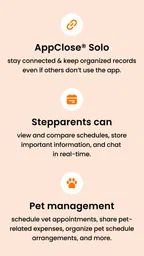
- Shared calendars help both parents keep track of custody dates and appointments.
- Parents can exchange messages in one place for clearer communication.
- Expense tracking helps organize child-related costs and reimbursements.
- Document storage keeps important parenting records accessible to both parents.
- The app offers tools for coordinating parenting plans and schedules.
What could be better
- Both parents need to use the app to get the most from its shared tools.
- Message and activity records may feel overly formal for some families.
- Entering expenses and receipts can take time.
- Notifications may become distracting during frequent coordination.
- The app is not a substitute for legal advice or professional mediation.





