
Anima: Binaural Beats review
 Analysis by Appsdrops
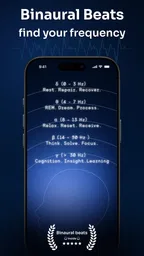
When my attention is scattered or bedtime arrives with a busy mind, I usually reach first for a familiar playlist or a fan-like background sound. Anima: Binaural Beats offers a more focused alternative: it is a music and audio app built around listening to binaural beats for relaxation, concentration, sleep, and tinnitus relief. I like the idea of having a sound-based routine rather than another stream of songs to browse, but it works best when treated as a listening aid—not as a guaranteed fix for sleep problems, stress, or ringing in the ears.
Starting with a specific listening goal
The app is made by ZEUS AI Limited and is free to install, with in-app purchases available. Its Everyone age rating makes it broadly accessible, though the fact that the app is suitable for all ages should not be confused with medical guidance. If tinnitus is affecting your daily life, or sleep difficulties are persistent, audio can be one small part of a routine, not a substitute for professional advice.
On the store, Anima has a 4.7 average from around 23,000 ratings, and it has passed 100,000 installs. Those figures suggest a sizeable audience for a specialized listening tool, but they do not tell me whether a particular sound will suit your ears or your routine. With binaural audio, personal comfort matters more than popularity: a sound that feels calming to one listener may be distracting to another.
The useful first step is to decide what you want from a session. “I need to settle down before bed” calls for a different listening mindset than “I want a steady sound while reading.” Picking a goal before pressing play helps keep the app from becoming background noise you leave running without noticing. It also gives you a fair way to judge whether a session is helping: are you less distracted, more relaxed, or simply listening to something new?
Build a routine around the moment
For a realistic evening workflow, I would start by making the room and the phone less distracting, then choose a sleep-oriented listening session and keep the volume comfortable. The point is not to chase the strongest or most noticeable sound. A gentle level is easier to live with over time, particularly when you are trying to wind down rather than actively analyze the audio.
For focus, I would use a session as a cue to begin one bounded task—reading a chapter, reviewing notes, or writing a first draft—rather than expecting the sound to create concentration by itself. This is a practical distinction: the app can help establish a consistent atmosphere, while the task, notifications, and your own energy still shape the result. If the beats draw your attention away from the work, a plain ambient track or silence may be the better choice.
A small but useful habit is to compare sessions under similar conditions. Try the same kind of task or bedtime routine on different occasions, and notice whether the audio fades into the background or keeps pulling your focus. Changing several things at once—volume, environment, and the kind of session—makes it harder to tell what you actually prefer. This is a simple listening experiment, not a claim that the app measures your sleep or concentration.
What the sound can and cannot do
Binaural beats are commonly approached through headphones, because the listening effect depends on distinct audio reaching each ear. That makes headphones an important practical consideration for anyone trying this style of audio. If you do not like wearing them, especially in bed, the format may be inconvenient; I would not assume that playing the same sound through a room speaker will provide the same experience.
There is also a comfort trade-off. Headphones can make a session feel more private and immersive, but they can become uncomfortable when lying on your side or wearing them for a long time. I would test a short session while awake before making this part of a nightly routine. If the equipment itself keeps you alert, the supposed relaxation benefit is lost.
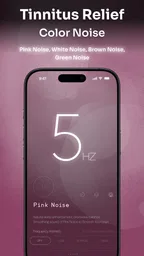
For tinnitus, I would be particularly careful about expectations. A sound may give some listeners something else to focus on, but that is not the same as treating the underlying cause or promising relief. If a session makes the ringing feel more prominent or uncomfortable, stop and choose a different approach. The app’s focus on tinnitus relief is a reason to explore it cautiously, not a reason to ignore symptoms that deserve clinical attention.
Handing off from listening to daily life
Audio tools are most useful when they fit around the rest of a routine. At bedtime, that can mean using a session as a transition from reading or preparing for sleep, then putting the phone aside instead of continuing to browse. During work, it can mean starting a focused block with the sound and stopping playback when the task ends. These handoffs matter because an app cannot make a noisy room quiet, remove a stressful deadline, or decide when you should take a break.
I would also avoid treating continuous playback as automatically better. A short, deliberate session is easier to evaluate and less likely to become an unnoticed habit. For sleep, some people prefer silence once they are ready to drift off; others find steady audio helpful. The right outcome is the one that leaves you comfortable, not the one that keeps the app running longest.
Compared with a general music service, Anima is more narrowly aimed at purposeful sound sessions rather than songs, artists, or playlists. Compared with a basic white-noise option, its binaural-beat approach is more specialized and may appeal if you specifically want that listening style. The trade-off is that a simple rain recording or fan sound can be easier to understand and use, especially for someone who does not want headphones or a technique to think about.
Where the workflow can break
The main friction is that a specialized audio format is not automatically relaxing. Some listeners may find the beats unusual, repetitive, or too noticeable to ignore. If that happens, there is no virtue in forcing yourself through a session. A familiar ambient recording, ordinary music without lyrics, or quiet may suit you better. I would give the format a fair trial, but let comfort decide whether it earns a place in your routine.
Another limit is the gap between intention and outcome. Starting a focus session does not guarantee productive work, and playing sleep-oriented audio does not ensure a good night. Stress, surroundings, habits, and health all matter. The most reasonable test is modest: does the sound make it easier to begin or maintain a routine, without creating a new annoyance? If not, the app may simply not match your needs.
The app is free to download, but purchases inside it range from $7.99 to $129.99 per item. That is a substantial spread, so I would explore the free experience and decide whether the listening approach suits you before spending. Think about what you actually need from an upgrade, and check the purchase details in the app store before confirming anything. A higher-priced option is not automatically a better fit for your ears or your schedule.
The current version is 1.2.0(1), and it requires Android 8.0 or later. Those details are worth checking before installing, particularly if you are using an older device. The app’s value also depends on a few practical basics: a comfortable listening setup, an environment where you can hear the audio, and enough patience to try it without expecting an instant change.
Who I would recommend it to
I would suggest Anima to someone curious about binaural audio who wants a dedicated way to try it for winding down or creating a focused work atmosphere. It is also worth considering if ordinary playlists tempt you to skip tracks or keep searching, because a purpose-led session can make it easier to settle into one activity. Start gently, keep expectations grounded, and pay attention to whether the sound feels supportive rather than demanding.
I would steer away from it if you dislike headphones, strongly prefer natural ambient sounds, or want a tool that diagnoses or treats a health condition. People with persistent sleep trouble or distressing tinnitus should seek appropriate professional help rather than relying on an audio app alone. And if you need silence to concentrate, adding another sound layer may make your attention worse, not better.
A measured recommendation
My view is that Anima is most convincing as a structured listening option, not a promise of transformation. Its specialized focus gives it a clearer purpose than a general music app, while the need to find a comfortable sound and listening setup makes it less effortless than pressing play on familiar background noise. Start with one specific moment in your day, use a comfortable volume, and judge the experience by how it fits into the routine afterward.
If the audio helps you begin reading, settle into a quiet evening, or shift attention away from distractions, it may be a useful addition. If it feels intrusive, uncomfortable, or ineffective, moving on is sensible. That practical test is more valuable than chasing a dramatic result: the best reason to keep Anima is that its sound genuinely makes your own routine easier to follow.
What we like
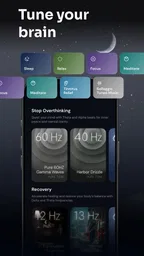
- Offers a range of sound programs for different listening goals.
- Binaural audio can be played with headphones for an immersive effect.
- Sessions may fit easily into a daily relaxation routine.
- The app provides an alternative to music or spoken meditation.
- Sound-based sessions may appeal to users who prefer minimal guidance.
What could be better
- Binaural beats may not produce the same effects for every listener.
- Headphones are needed to experience the intended binaural effect.
- Some users may find repetitive tones tiring during longer sessions.
- Sound programs may not offer enough variety for every preference.
- It may not suit people who are sensitive to pulsing audio.





