

AngelSense Guardian review
 Analysis by Appsdrops
I see AngelSense Guardian as a specialist safety tool, not a general-purpose family tracker. Its value is in helping a caregiver stay informed about a child or adult with special needs through location, alerts, and voice contact. That focus makes it potentially reassuring in a difficult everyday situation, but it also means the app is best judged by how well it fits a person’s support routine—not by how many features it might have compared with a standard phone map.
Designed around reassurance and response
AngelSense is a free parenting app from AngelSense, aimed at caregivers supporting children and adults with special needs. It is for Everyone in the app store, though its practical audience is much narrower: families and care teams who need a dedicated way to check where someone is and respond when a situation changes. The app has a 4.6 average from around 960 ratings, and more than 100,000 installs suggest it has reached a substantial group of families looking for this kind of support.
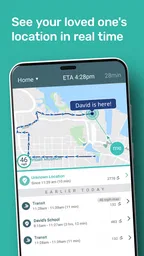
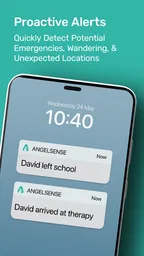
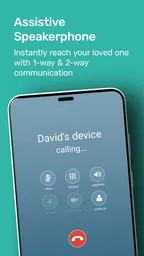
The central idea is simple, but the context matters. A location marker can be useful when someone is travelling independently, moving between familiar places, or temporarily out of sight in a busy setting. Alerts can help turn that location information into something actionable, while two-way voice offers a way to make contact without relying on a conventional phone conversation. I appreciate that this is framed around caregiving rather than being presented as a generic map with a family label attached.
That distinction is also the app’s main strength and its main constraint. A conventional phone-location service may be enough for a family whose child carries and uses a phone comfortably. AngelSense is more relevant when a caregiver needs a dedicated safety arrangement and values alerts and voice contact as part of the same routine. It should complement responsible supervision and agreed care plans, not replace them.
Where the focused approach helps
The most useful way to think about the app is as a shared decision aid. A caregiver can check location rather than repeatedly calling or messaging, then decide whether the situation needs a quick check-in or a direct response. In a household where transitions are stressful, that can make the difference between reacting to uncertainty and having a clearer starting point.
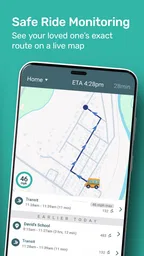
For example, imagine a caregiver waiting for someone to return from a familiar outing. Rather than immediately treating a delay as an emergency, they can use the location view to understand whether the person appears to be on the expected route or somewhere that calls for a check-in. If the situation warrants it, voice contact provides another step. This is a realistic benefit of combining location, alerts, and communication: the caregiver has more than one way to assess what is happening.
A practical tip is to agree in advance on what different alerts should prompt. If every notification triggers the same level of alarm, the app can add stress instead of reducing it. A family or care team can make the tool more useful by deciding who checks first, when to make voice contact, and when to involve another caregiver. That planning is not a feature of the app, but it is an important part of using a safety tool well.
It is also worth thinking about the person being supported, not only the person viewing the app. Voice contact may be reassuring for one user and unwelcome or confusing for another. Caregivers should consider how the individual responds to unexpected communication and how the arrangement fits their preferences and support needs. The app’s purpose is to make care more informed; it should not become a reason to ignore the person’s comfort or dignity.
What to weigh before relying on it
AngelSense is not a friction-free answer to every caregiving concern. Location information and alerts can support decisions, but they do not remove the need for human judgement. A caregiver still has to interpret what they see in context and decide what to do. For someone who expects an app to guarantee safety or eliminate uncertainty, this is the wrong expectation to bring to it.
There is also a real trade-off in choosing a dedicated service over the location tools already built into a phone. A phone-based option may be simpler for a person who carries a smartphone, is comfortable using it, and only needs occasional location sharing. AngelSense makes more sense when the specific combination of location, alerts, and two-way voice fits a support need that a basic map-sharing setup does not address as well. Families should compare the routines they actually need rather than assuming that a specialist app is automatically better.
Another point to consider is coordination. If several people share caregiving, they need a clear understanding of who is monitoring and how they will communicate with one another. Without that agreement, multiple people may assume someone else has seen an alert, or several may respond at once. I would treat setup as a small care-team process: decide who is responsible at different times, keep the routine understandable, and review whether the app is helping rather than adding another source of distraction.
Because this is a safety-oriented tool, a caregiver should also think through ordinary practicalities before making it part of a plan: whether the person can use the associated communication comfortably, whether the responsible adults can check the app when needed, and what the backup plan is if the technology is unavailable. These are not reasons to dismiss the app; they are basic safeguards against expecting any single tool to carry the entire responsibility.
Who is likely to benefit most
I would consider AngelSense for a caregiver who needs more than occasional location sharing and wants location checks, alerts, and voice contact together in a dedicated parenting app. It may be a particularly useful fit when a person’s support needs make ordinary phone-based tracking or direct messaging less suitable. The best result is likely when the caregiver has a clear purpose for each part of the app and the person being supported is comfortable with the arrangement.
It is less compelling for a family whose only need is to see where a teenager’s phone is, or for someone who wants a broad parental-control suite. The app’s identity is care and safety support, not a general toolkit for screen limits, device use, or everyday family scheduling. If your situation is straightforward phone sharing, the simpler option may be easier to maintain. If your concern is broader than location and contact, you may need other support tools alongside it.
The release history gives some context for the product’s maturity: AngelSense first appeared on June 22, 2015, and the current version is 4.4.5. It requires at least iOS 12. Those details matter most when checking whether a device can run it and whether the app remains part of the caregiver’s regular routine. I would verify compatibility on the device you plan to use before building a care process around it.
With 473 written reviews among its 961 ratings, there is a sizeable body of user feedback to read before deciding. I would focus on comments from people whose caregiving situation resembles yours rather than treating an overall average as a promise. A family’s experience can depend heavily on the person being supported, the caregiver’s routine, and how consistently everyone involved uses the same plan.
A thoughtful tool, not a substitute for care
My overall view is that AngelSense Guardian has a clear reason to exist: it brings location awareness, alerts, and two-way voice into a focused tool for people who need additional support. That combination is more relevant than a general tracker for some families, especially when the concern is not simply finding a phone but maintaining a practical way to check in and respond.
The app is not the right choice for every household, and I would not recommend choosing it solely because the idea of tracking feels reassuring. Consider whether the person’s needs match its focus, whether voice contact is appropriate, and whether the adults involved can agree on a sensible response routine. If those pieces fit, AngelSense may offer meaningful peace of mind without pretending that technology can replace attentive caregiving.
For families seeking a specialist option in the parenting and care space, I think AngelSense Guardian is worth considering. Its strongest case is a specific one: caregivers who want a dedicated way to stay aware of location and make contact when needed. If you only need basic phone sharing, choose the simpler route; if that focused support matches your situation, this app is a more purposeful place to start. AngelSense Guardian earns its recommendation through that clear fit, not through a claim that one app can solve every safety concern.
What we like
- GPS tracking provides frequent location updates.
- Geofences can alert caregivers when a child arrives or leaves.
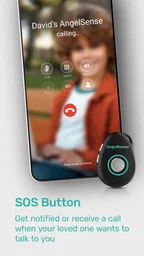
- SOS alerts offer a quick way to request help.
- Caregivers can review location history.
- Two-way voice features support direct communication.
What could be better
- A subscription is needed for ongoing service.
- The wearable must be charged regularly.
- Location accuracy can vary indoors.
- The device requires reliable cellular coverage.
- Some children may find the wearable uncomfortable.





