






Amex review
 Analysis by Appsdrops
I see Amex as a practical companion for people who already manage an American Express account and want everyday account tasks close at hand. Its central appeal is not that it replaces every financial tool, but that it brings card information, payments, and rewards into one place. If you use an Amex card regularly, that can make routine checks feel quicker; if you do not have an account with American Express, there is little reason to install it.
Useful when your card is part of daily life
This is a finance app from American Express, built around access to an Amex account. I would reach for it to check a balance, review account activity, make a payment, or see what reward options are available. Those are simple jobs, but they are the ones that matter when I want to answer a quick question without opening a laptop or searching through paper statements.
A realistic example is checking the account after a busy weekend of errands. I can look over the balance, confirm that recent spending is reflected, and decide whether to make a payment while the activity is fresh in my mind. That small routine can be more useful than trying to remember several purchases at the end of the month. The app works best as a convenient account window, not as a substitute for paying attention to statements and due dates.
Its scope is a strength and a boundary. Rather than presenting itself as a general-purpose budgeting platform, it focuses on the relationship between a cardholder and American Express. That makes the experience more relevant for existing customers, but it also means people who want one dashboard for accounts from several banks may prefer a separate financial organizer.
Payments and account checks in one place
The most helpful workflow is pairing a quick account check with a deliberate payment decision. I would not treat a displayed balance as a reason to pay blindly: first consider which transactions have posted, what amount you intend to pay, and whether the payment fits your own cash-flow plan. Keeping those steps together in the same app can make the task less of a chore, while still leaving the decision in your hands.
For a useful habit, choose a regular moment—after a weekly grocery run, for example—to review activity and make a payment if appropriate. This is more reliable than opening the app only when a balance feels surprising. It also gives you a chance to notice a transaction you do not recognize and follow up through the account’s available support options. I find that kind of routine more valuable than checking a number repeatedly without a clear reason.
There is an important practical distinction between viewing a balance and understanding what it means. Recent spending, payment timing, and the figures shown in an account can serve different purposes. Before making a payment, I would read the labels on the screen carefully and confirm that I am acting on the amount I intend to pay. That is ordinary financial care, but it matters especially when a mobile interface makes a payment feel like a one-tap task.
Rewards are more useful when checked with a purpose
Having rewards access beside account information makes it easier to review redemption choices when I am already thinking about the card. My advice is to check the available options before redeeming, rather than treating a reward balance as cash with a fixed value. Redemption choices can differ in usefulness, so I would compare what the app presents and decide whether an option actually suits a planned purchase or goal.
A practical use case is checking rewards before making a larger household purchase. If an available redemption fits what I already planned to buy, it may be worth considering; if it would push me into spending just to use rewards, I would leave it alone. The app can make the options easier to reach, but the value judgment still belongs to the user. That is a small but important distinction: convenient access is not the same thing as a recommendation to redeem.
This is also where the app may feel less complete to someone who wants detailed financial planning. Reward access is useful for managing an Amex relationship, but it is not the same as a broad view of savings, debt, and spending across an entire household. I would keep a separate budgeting method if I needed category-by-category planning or a unified view of accounts beyond American Express.
What the track record tells me—and what it cannot promise
The app has a 4.8 average rating from 109K ratings, with 15K written reviews, and has passed 10M installs. Those figures suggest that many users find it useful, though they cannot tell me whether it will suit a particular account, device, or personal workflow. I treat the rating as a reassuring signal of broad adoption, not a guarantee that every screen or task will feel effortless for everyone.
It is free to download and is rated for Everyone. Its release date was Dec 2, 2010, and the current version is 7.36.0. Those details help place it as an established account-management app rather than a new financial experiment. I would still keep it updated through the app store and use the security options available on my device and account, especially because a finance app may provide access to sensitive account information.
The app’s long presence does not remove the need for sensible account habits. I would use a device lock, avoid signing in on a device I do not control, and make sure I understand the account recovery steps before relying on mobile access while traveling. These are not special tricks; they are practical safeguards for any app that puts financial information within easy reach.
Where the convenience can fall short
The clearest limitation is that this app is built around American Express, not around all of a person’s finances. Someone with cards and bank accounts from several providers may still have to switch between apps to understand their full picture. A third-party money manager may be a better fit for that person, provided they are comfortable with the way that service handles account connections and privacy.
There is also a trade-off between quick access and careful review. Mobile screens are handy for a glance, but they can encourage rushed decisions if I am checking an unfamiliar transaction or choosing a payment amount while distracted. For a complicated account question, I would slow down, read the details, and use the appropriate American Express support route rather than assume that a quick overview answers everything.
Another limitation is relevance: the app’s best features depend on having an American Express account and using its account services. It is not a general finance app that becomes valuable simply because it is installed. If you are comparing cards before choosing one, this app is not a substitute for evaluating fees, terms, rewards, and your own spending habits. It becomes useful after the card relationship exists.
Who will get the most from it
I would recommend it to an Amex cardholder who wants a straightforward way to keep an eye on account activity, make payments, and check rewards without turning account management into a desktop task. It is especially convenient for someone who already handles most routine financial tasks on a phone and wants a direct view of their American Express account.
It is less compelling for someone who rarely uses an Amex card, wants a combined budget across multiple providers, or prefers to handle payments and statements through a browser. Those users may gain little from adding another app. Likewise, anyone who expects a dedicated budgeting coach should look elsewhere and keep this app, if needed, for the narrower purpose of managing the Amex relationship.
For a household, I would also be clear about who is responsible for checking the account and making payments. The convenience of having account access on a phone does not automatically create a shared system or settle who should monitor spending. A simple agreement about review and payment routines can prevent the app from becoming just another place where everyone assumes someone else is keeping track.
My verdict
Amex is at its best as a focused account companion, not an all-in-one money manager. In my view, its strongest case is the combination of everyday account access, payments, and rewards for people who already use American Express. That focus keeps its purpose clear, and the established user base gives me confidence that it is a familiar tool for many cardholders.
I would install it if I wanted to check my Amex account during the week and keep routine tasks within easy reach. I would not rely on it alone for a complete household budget, nor would I expect a mobile overview to replace careful statement review. If that distinction matches what you need, the app is a sensible, free addition to your financial routine; if you need a broader view, pair it with a budgeting tool or choose a different option for that job.
What we like
- Manage eligible Amex cards and review recent transactions.
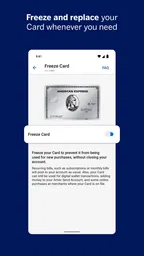
- Freeze a lost card through the app.
- Get purchase alerts to track card activity.
- Use Amex Offers to find eligible card-linked deals.
- Contact customer support from the app.
What could be better
- Features vary by card type and country.
- Some account actions may require identity verification.
- Amex Offers often require manual enrollment.
- The app is less useful without an Amex account.
- Not all merchants accept American Express.





