



Amazon Music: Songs & Podcasts review
 Analysis by Appsdrops
When I open a music app, it is usually because I need the right sound for a particular moment: something familiar for the commute, a playlist that suits a workout, or a podcast I can pick up while doing chores. Amazon Music is built to cover those switches in one place. In my experience, its biggest advantage is convenience: music and spoken audio sit together, so I can move from listening to a playlist to choosing a podcast without changing apps.
From a listening mood to something worth playing
Amazon Music: Songs & Podcasts is a free music and audio app from Amazon Mobile LLC, with optional in-app purchases. It has an average rating of 4.5 from around 3.6 million ratings, and more than 100 million installs. Those figures suggest broad appeal, but they do not tell you whether its listening style suits you. The useful question is whether you want a single place to browse familiar songs, playlists and podcasts, or whether you need a particular library or listening tool above all else.
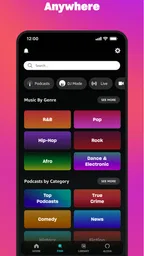
I find the app most appealing when I arrive with a general mood rather than a precise plan. If I want energetic music while getting ready, a trending playlist is an easier starting point than building a queue song by song. If I already know what I want, searching for a favorite track or artist makes more sense. That distinction matters: browsing is convenient when I want discovery, while deliberate searching gives me more control over what comes next.
The first practical decision is whether to use the free experience or consider an in-app purchase. The app itself is free to install, while purchases are offered at prices ranging from $12.99 to $129.00 per item. I would not treat those prices as a reason to buy before trying the basic listening workflow. Start with the kind of music or podcast you actually use, then judge whether the available experience meets your needs before spending anything.
The app carries a Teen content rating. That is useful context for households deciding whether it is appropriate on a shared device, but I would still choose listening material with a younger listener rather than assume every song or show will suit every family. The rating describes the app’s audience guidance, not a personal recommendation for every item of audio inside it.
Build a session without overthinking it
My preferred workflow is to begin with the task, not the catalog. For a short trip, I look for music that will hold together as a continuous listening session. For housework, I might choose a podcast because spoken content gives me something to follow while my hands are occupied. Keeping the intended use in mind prevents aimless browsing, which is one of the easiest ways to spend more time choosing audio than listening to it.
There is a useful trade-off between playlists and individual favorites. A playlist can reduce the effort of deciding what to play next, especially when I want music in the background. A familiar song is better when I need a specific mood or do not want the uncertainty of a broader selection. I recommend saving a few reliable starting points in whatever way the app makes available to you, rather than expecting one playlist to suit every situation.
One less obvious tip is to treat music and podcasts as different kinds of sessions. A playlist can be left running while attention moves elsewhere; a podcast often asks me to remember where I was and what was being discussed. If I am about to switch tasks, I choose a show with a topic I can re-enter easily or finish a segment before moving on. That small choice makes listening feel smoother than jumping between formats without considering the interruption.
Another practical approach is to make the first few minutes a test. I start a playlist or episode, check whether the tone and pacing fit the moment, and change course early if they do not. This is especially useful when I am leaving home or starting a workout: discovering that a selection is wrong after I have settled in is more annoying than spending a moment checking it beforehand.
Moving between the phone, the room and the day
Music rarely stays confined to one app screen. I might begin listening on my phone, then want the sound in a room while I cook, or pause when a call or conversation takes over. Amazon Music works best for me when I decide in advance how much attention I can give the handoff. If I need to keep a podcast’s place, I pause deliberately before switching tasks instead of assuming I will remember the point later.
A realistic weekday example is a morning that starts with music while I get dressed, continues with a podcast during breakfast, then returns to a playlist on the way out. Having both kinds of audio in one app makes that sequence feel more direct than keeping separate music and podcast apps open. The benefit is not that every transition is effortless; it is that I do not have to restart my search in a different service just because my listening goal changed.
For shared listening, I would also make the handoff explicit. Before putting a phone near a speaker or passing it to someone else, I check what is queued and whether the next item is appropriate for the room. That is a simple habit, but it avoids the awkward moment when personal listening turns into accidental group listening. I also prefer to choose the next session before setting the phone aside, rather than relying on a long queue to match everyone’s taste.
Compared with a dedicated podcast app, Amazon Music’s appeal is having spoken audio alongside songs. A podcast-focused alternative may be a better fit if you organize your listening around episode tracking, show management or a large backlog. Compared with a music service centered on a particular library or discovery approach, this app is most persuasive when you value the combination of music and podcasts more than one specialist feature. I would compare the actual catalogs and listening controls that matter to me before making it my only audio app.
What the session delivers
When the workflow clicks, the result is simple: I choose a mood or a show, get audio playing, and let it accompany the task. That is where Amazon Music is strongest. Its range of listening contexts makes it handy for people who alternate between hit songs, playlists and podcasts throughout the day, and who do not want every change of format to become a separate app decision.
I would recommend it to someone who already uses Amazon services, enjoys a mix of music and spoken audio, or wants a low-commitment way to try an all-in-one listening app. It is also worth considering if you are less interested in carefully curating a collection and more interested in finding something suitable for the next part of your day. The free starting point makes it reasonable to explore before deciding whether any purchase is worthwhile.
There is a different answer for listeners with narrow requirements. If you rely on a particular podcast workflow, have a carefully managed music library, or want the strongest possible tools for one format, a specialist app may serve you better. The convenience of having both in one place is real, but convenience is not a substitute for controls or organization you depend on every day.
Where the flow can snag
The first friction point is choice. An app that brings together songs, playlists and podcasts gives me several possible directions, but that can also make browsing feel unfocused. When I know the artist, show or mood I want, I can get moving; when I have no preference, I may spend too long exploring. I try to solve that by deciding on a listening purpose before opening the app.
The second is that a good handoff depends on context. Music is easy to leave playing in the background, while a podcast can be frustrating if an interruption makes me lose the thread. I would not choose a discussion-heavy episode for a task that regularly pulls my attention away. For those moments, familiar music or a lighter show is the more sensible choice, regardless of which app I use.
Cost is another point to consider. The app is free, but in-app purchases range from $12.99 to $129.00 per item, so I would inspect the purchase option carefully and decide whether it addresses a need I actually have. A large price range can make it tempting to assume that paying automatically improves the experience; I would instead make the decision based on the features and listening access shown at the time of purchase.
Finally, a high average rating and wide adoption can be reassuring, but neither guarantees that the app’s catalog, recommendations or organization will match my preferences. I would test it with the artists and podcast subjects I return to most, not just with whatever appears first. That gives a more useful answer than a quick browse and helps reveal whether the app can support a real routine rather than a one-off listening session.
My overall view is that Amazon Music is a practical choice when I want music and podcasts close at hand, and its free entry point makes it easy to see whether that arrangement fits. I would choose it for flexible everyday listening, especially when my plans change from songs to spoken audio. I would skip it as my main app if a specialist music or podcast workflow matters more than having both formats together. The best reason to try it is the convenience of changing what you listen to without changing your listening routine.
What we like
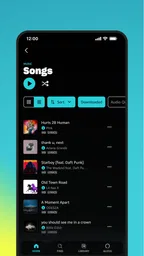
- Offline downloads let subscribers listen without a connection.
- Alexa voice controls make playback convenient on supported devices.
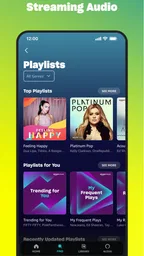
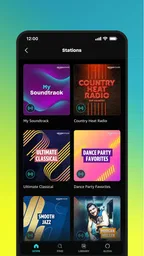
- Playlists and stations help users discover music by mood or genre.
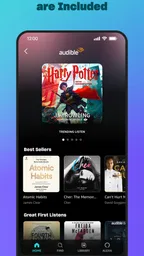
- Podcast listening is included alongside music streaming.
- Crossfade can create smoother transitions between tracks.
What could be better
- Offline downloads require a paid subscription.
- The free tier has limited on-demand playback.
- Some podcasts may include advertising.
- High-quality streaming can use substantial mobile data.
- Music availability varies by country and licensing rights.





