


Amazon Fire TV review
 Analysis by Appsdrops
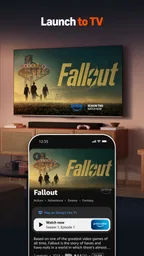
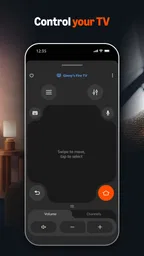
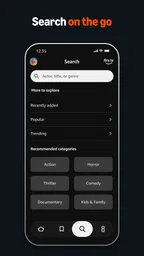
I find the Amazon Fire TV app most useful for a simple reason: it makes controlling a Fire TV less dependent on finding the physical remote. Its phone-based controls combine navigation, text entry, and voice search, which is especially handy when the thing you want to do is easier to type or say than to hunt for with a remote. It is a focused companion app, not a general-purpose streaming hub, and that distinction matters when deciding whether it belongs on your phone.
Why phone control changes the Fire TV routine
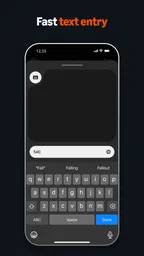
On a television, small actions can become unexpectedly fiddly. A remote is easy to misplace, and entering a film title letter by letter with directional buttons can feel slow. The app shifts those tasks to a device most people already have nearby. I can use its navigation controls to move through the Fire TV interface, then switch to the phone keyboard when a search field calls for a title, actor, or other text.
That keyboard is the capability I value most. It is not merely a spare way to move around menus; it changes the annoying part of searching. Typing a specific name on a phone is usually more direct than selecting each letter on a television screen. If I am trying to find something with an unusual spelling, or entering a longer title, the difference is practical rather than flashy.
Voice search offers another route when typing is inconvenient. I can speak a search instead of navigating to a keyboard, which suits quick, broad requests while I am settling in. I would still treat voice as an alternative, not a guarantee that every title or phrasing will be interpreted exactly as intended. For a precise search, the keyboard gives me more control; for a quick query, speaking can be the smoother choice.
Amazon Mobile LLC makes this free Tools app for Fire TV use. Its role is narrow by design: it helps operate the television experience rather than replacing a streaming service or turning the phone into a separate media library. I see that focus as a strength for people who want a practical remote companion, but it also sets a clear boundary. If you do not use Fire TV, the main reason to install it disappears.
Using it without turning a search into a chore
The useful workflow is to choose the control method that fits the moment. I would use the on-screen navigation for ordinary movement through the interface, bring up the phone keyboard when a search involves several characters, and try voice when I want to make a quick request without typing. Switching between these approaches is more sensible than insisting that one input method should handle everything.
A small but helpful habit is to keep the phone close before starting a search, rather than waiting until the remote becomes frustrating. That way, the keyboard is ready when a text field appears. It also avoids the awkward pattern of reaching for the phone, unlocking it, and then trying to remember where the search was on the TV. The app earns its place most when it is part of the viewing routine, not an emergency download after the remote vanishes.
For example, imagine I sit down to watch something and remember only part of its title. With a conventional remote, I might spend more time moving across the letter grid than deciding what to watch. With the phone app, I can enter the words directly, then return to the television for the results. If I only have a rough idea, voice search may be quicker to try first. This is a modest convenience, but it removes a specific point of friction that comes up often enough to matter.
The app also makes sense in a shared living room. Someone else may be using the remote, or it may be on the other side of the room, while I want to search for a title without interrupting the person holding it. A phone can offer an additional way to interact with the Fire TV interface. I would not assume that this makes every shared-control situation effortless, but having another input option is useful when the physical remote is inconvenient rather than broken.
One practical trade-off is that using a phone as a controller means keeping the phone available and the app ready. If I am trying to reduce screen time or keep my phone put away during a film, a physical remote remains the more natural tool. The app is most valuable for setup-like moments—searching, entering text, and navigating—not necessarily for every small adjustment throughout a show.
Where it fits beside a regular remote
Compared with the usual alternative, a physical Fire TV remote, the app is strongest at text entry and offers a different way to search by voice. The remote, in turn, is simpler for routine control when it is already in hand. It does not need me to pick up my phone and change attention between devices. I would keep both options in mind: the app complements the remote rather than making it pointless.
That distinction helps set expectations. This is not a substitute for the broader range of controls people may expect from a dedicated remote, nor is it a universal phone remote for every television. Its value is tied to Fire TV and to the particular jobs it handles well. If you mainly want to press familiar buttons from the sofa, the physical remote may be enough. If searching and typing are the chores you notice, the phone becomes much more compelling.
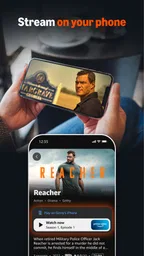
It is also different from opening a streaming service on a phone and watching there. The point is to control the Fire TV experience on the television, not to shift the viewing session onto the handset. That makes it a better fit for people who want to browse and choose on the big screen while using the phone as an input device. If your priority is watching away from the television, a streaming app would serve a different purpose.
Voice search is particularly situational. It can reduce the effort of entering a query, but speaking is not always comfortable: other people may be in the room, the television may be noisy, or I may know exactly how a title is spelled and prefer to type it. A good companion app should offer useful alternatives, and this one’s mix of navigation, keyboard, and voice gives me options without making voice the only way to search.
The limitations worth knowing before installing
The main limitation is its dependence on having a Fire TV to control. It is not a standalone entertainment destination, so downloading it without that device is unlikely to solve a problem. It is also not automatically better than a remote simply because it is on a phone. For quick, repeated button presses, reaching for a dedicated controller can be less distracting than unlocking a handset and opening an app.
There is a small attention cost, too. A phone can bring notifications and other distractions into a viewing session. If I pick it up to type a title, I may be tempted to check something unrelated. Someone who values a phone-free evening may prefer the remote even when its text entry is slower. That is not a defect in the app so much as a real trade-off of making a multipurpose device part of the TV setup.
I would also choose the input method with the room in mind. Voice is convenient when speaking aloud feels natural, but typing is the more discreet option when others are present. Navigation controls are useful for moving around, while the keyboard is the better tool for precise text. Treating them as complementary choices avoids expecting voice search to handle every query or expecting a phone keyboard to improve every moment of remote control.
For readers checking compatibility, the app’s minimum operating system is version 9, and its content rating is Everyone. Those details make it easier to judge whether an older phone is likely to meet the stated requirement and whether the app’s audience rating suits the household. I would still make sure the device I intend to control is a Fire TV, since that is the specific job this app is built around.
Who gets the most out of it
I would recommend it first to people who regularly search for specific titles on Fire TV, especially anyone who finds on-screen typing tedious. It is also a sensible backup for households where the remote is often misplaced or shared. The phone keyboard can make a noticeable difference for longer searches, while voice gives a quick option when hands are occupied or a broad query is enough.
It is less compelling for someone who already finds the physical remote comfortable and rarely enters text. It is not the right choice for people without Fire TV, or for anyone seeking a phone app to stream content independently. And if you prefer to keep your phone out of reach while watching, the convenience of typing may not outweigh the distraction of bringing it into the room.
The app is free, and its scale suggests it has become a familiar companion for many Fire TV households: it has over 50 million installs, a 4.6 average rating, and more than 600,000 ratings. It was released on November 18, 2014, and has accumulated a substantial audience over time. I would regard those figures as useful context, not a promise that the experience will suit every home; the deciding question is whether phone-based control solves a real annoyance for you.
A practical companion, not a remote replacement
My view is that Amazon Fire TV succeeds by improving a few specific moments rather than trying to do everything. When I need to enter a title, the phone keyboard is the clearest benefit. When I want to make a quick search, voice can save effort; when I am simply moving through the interface, the navigation controls provide another route. Those options are most valuable when used selectively.
If Fire TV is part of your routine and searching with the remote slows you down, I think this free app is worth trying. Keep the physical remote for ordinary viewing and use the phone when typing or speaking is easier. That balanced approach is where the app makes the most sense: not as a replacement for a familiar controller, but as a useful shortcut for the parts of television browsing that remotes handle poorly.
What we like
- The home screen brings streaming services and installed apps together.
- Voice search can help find titles without typing.
- The mobile app can serve as a remote when the physical remote is missing.
- Profiles help keep recommendations separate for different household members.
- Many Fire TV devices support popular streaming formats and services.
What could be better
- The interface may promote Amazon content prominently.
- Some apps and features vary by country or device model.
- Streaming quality depends on your internet connection.
- Voice features may require a compatible remote or Alexa device.
- Older Fire TV devices may feel slow with newer apps.





