



Allstate Mobile review
 Analysis by Appsdrops
I think Allstate Mobile makes the most sense when insurance is something you need to check or handle in the middle of an ordinary day, rather than a topic you want to save for a call or a pile of paperwork. In a household, that can mean looking up a policy while someone else is preparing for a trip, or checking an insurance detail when the person who usually keeps the documents is not nearby. The app’s value is practical access; it is not a substitute for deciding who should see or manage a household’s insurance information.
Published by The Allstate Corporation, this free finance app is rated for Everyone and has a 4.1 average from around 127,000 ratings. It has passed 10 million installs, which suggests it is a familiar option for people already connected with Allstate. I would consider it first as a companion to an Allstate relationship, not as a general-purpose place to compare every insurer or manage unrelated household finances.
Useful when the usual policyholder is busy
Picture a familiar situation: a household member is away from home, and another person needs to check an insurance detail before dealing with a practical task. Having an insurer’s app on hand can save the search through email or a drawer of documents. That convenience is especially appealing when the person who knows where everything is cannot answer right away.
The important distinction is between convenience and shared access. Installing the same app on a shared tablet may make it easier to reach, but it does not automatically make an account suitable for everyone in the home. I would treat the account as belonging to the person whose insurance it represents and keep login access within that boundary. For a household that wants several people to handle insurance independently, the right arrangement depends on the account and the insurer’s available processes, not simply on putting the app on another device.
That is a useful way to judge this app against more general alternatives. A browser, saved paperwork, or a call to an insurer can all help with insurance tasks, but they involve different trade-offs: a browser may be better when you are already at a computer, while paper can be useful when a phone is unavailable. A dedicated insurer app is most convenient when you already know which company you need and want a direct route to your own insurance information.
Keep setup tied to the right person
My first setup step would be to use the account holder’s own details and a device they are comfortable using. On a personal phone, the app can stay within the usual pattern of private apps. On a shared device, I would pause before signing in and ask who can unlock the device, whether other household members use the same profile, and whether the account holder is comfortable leaving an insurance session available there.
This is not a special feature claim; it is sensible account hygiene for any insurance app. A shared household device can blur the line between “available to the family” and “open to anyone who picks it up.” If the device is used by children or visitors, I would favor access through the account holder’s own phone rather than relying on the shared screen. That small choice reduces the chance of someone seeing private account information by accident.
It is also worth thinking ahead to changes in the household. If a phone is replaced, passed to someone else, or taken off a shared charging station, the account holder should make sure the app is no longer accessible to the next user. I find this more important with insurance than with a casual utility app because the account may contain details people do not want casually exposed.
Coordinate without assuming everyone has equal access
Insurance decisions often involve more than one person, but that does not mean every person needs the same account access. One practical routine is for the policyholder to check the app when a question comes up, then share the relevant information through the household’s normal communication channel. That keeps the account itself with its owner while still helping a partner or another adult coordinate plans.
For example, before a household trip, one person can verify the insurance information they need and tell the other travelers where to find it if a question arises. The useful habit is to agree on the process before leaving, rather than trying to sort out access while everyone is packing or already on the road. I would avoid passing around a password as a shortcut; it can create confusion later about who is responsible for the account and which device is still signed in.
There is a real trade-off here. Keeping access narrow is better for privacy and accountability, but it can be inconvenient if the account holder is unreachable. If your household regularly needs different adults to manage insurance separately, check what access or account arrangements Allstate supports for your situation before making this app the center of your coordination plan. I would not assume a mobile app alone solves shared responsibility.
Age rating is not the same as an account decision
The app is rated Everyone, and its current version is 21.6.1. That age label is useful context for deciding whether the app is appropriate to have on a device, but it does not mean a child should use an adult’s insurance account. An age rating and permission to access personal financial or insurance information are two different questions.
For a family phone or tablet, I would make the account holder the person who signs in and handles the app. Younger household members can be shown how to locate a paper document or whom to contact without being given access to an adult’s credentials. For teenagers who help with family logistics, the better arrangement is one the policyholder has deliberately approved, not a shared login created for convenience.
Trust also matters between adults. A partner may reasonably need to know where insurance details are kept, while the account holder may still prefer to keep their personal sign-in private. Agreeing on what information should be shared and how to reach it is more useful than treating a phone with the app installed as a complete household record system.
What I would choose it for—and when I would look elsewhere
I would recommend Allstate Mobile to an Allstate customer who wants insurance access on a phone and is comfortable keeping account responsibility with the policyholder. Its finance focus is clear, and the company behind it is The Allstate Corporation. Its strongest household role is as a convenient personal tool that can support coordination, not as a shared family dashboard that every person should expect to use equally.
I would look elsewhere if the main goal is comparing insurance across providers, organizing policies from several companies in one place, or giving multiple household members independent access. A direct insurer app is naturally tied to that insurer, whereas a broader comparison service or a household document system may better fit those needs. The choice depends on whether you want a direct connection to an existing Allstate account or a wider view across providers.
One practical tip is to decide what the app is for before installing it on a shared device: quick access for the policyholder, or a supposed common hub for the household. Those are not the same use case. If it is only for the policyholder, use their personal device and keep the sign-in private. If the household needs dependable shared access, establish an approved way to share the necessary information rather than relying on an assumption that one login covers everyone.
A grounded household verdict
Allstate Mobile is a sensible choice when you already use Allstate and want a phone-based route to your insurance. I like the convenience of having the insurer’s app close at hand, but I would not confuse that convenience with a complete plan for family access. The best results come from pairing the app with clear expectations about who owns the account, who can use the device, and how other household members get the information they need.
The app was released on January 12, 2013, and the current version is 21.6.1. It requires Android 11 or later, so an older Android phone may not be able to run it. Those details matter if you are choosing a device for the account holder or hoping to install it on a household tablet. For iPhone users, I would check the app store’s compatibility information for the particular device before relying on it.
My overall take is positive, with a clear boundary: use it as a convenient Allstate account companion, not as a shared-access promise. If you are the policyholder and want insurance close by, it is worth considering. If your household needs several people to manage separate responsibilities, first confirm the appropriate account arrangement and keep access intentional. That approach makes the app useful without turning a shared phone into an open door to private information.
What we like
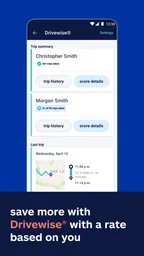
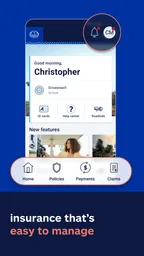
- View insurance policy details and coverage in one place
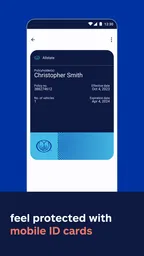
- Access digital insurance cards from your phone
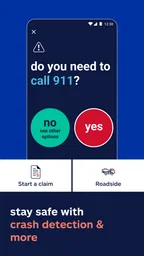
- Submit and track claims through the app
- Find nearby repair shops and service providers
- Roadside assistance is available for eligible policies
What could be better
- Some features require an active Allstate policy
- Available tools can vary by policy and state
- Account setup may require personal policy information
- Claim decisions and payouts still depend on review
- App usefulness is limited for customers with other insurers





