




AllEvents - Discover Events review
 Analysis by Appsdrops
When several people in a household are trying to decide what to do, the hard part is often not finding an event but getting everyone to agree on one. I find AllEvents most useful as a shared starting point: one person can browse nearby possibilities, then bring a short list to the rest of the group instead of sending everyone down a different search rabbit hole. It is an events app from Amitech Business Solutions, and its focus is practical discovery rather than acting as a family calendar or a complete planning system.
One search can get the household talking
A realistic use is a free afternoon when one person wants something outdoors, another would rather see a performance, and nobody has made a plan. Browsing a range of local events gives the group concrete options to compare. That is more productive than asking an open-ended “what should we do?” and waiting for someone to search from scratch.
The key benefit is the change in the conversation. Instead of debating vague ideas, you can discuss whether a particular event suits the time, interests, and energy of the people going. I would use it to create a shortlist, then share the relevant event details through whatever method the household already uses. That division of labor matters: the app can help with discovery, while your usual messages or calendar can handle the final coordination.
AllEvents sits in the broad events and things-to-do category. It is free, rated for Everyone, and has a 4.7 average from around 15,000 ratings, with more than a million installs. Those figures suggest that it has found a substantial audience, but they do not tell me whether an individual event will suit a particular family. I would treat each listing as a lead to assess, not as a guarantee that plans are settled.
Give each person a useful role
For shared-device use, a simple approach is to let one person do the initial browsing and have everyone else react to a few candidates. That avoids the common problem of passing a phone around without agreeing what the group is actually looking for. A child might help choose between two suitable outings, while an adult checks the details and makes any decisions that require more context.
This is especially handy when a household has different preferences but a common constraint, such as wanting to stay nearby or choosing an activity that works for a limited window of free time. Browse with that constraint in mind first; otherwise an appealing result can lead to a longer discussion about travel or timing than the event itself deserves.
One useful, non-obvious habit is to keep discovery separate from commitment. I would save or share only the strongest candidates, then check the event information again before leaving. That gives the household room to compare options without mistaking an interesting find for a confirmed plan. It also prevents the person browsing from becoming the default organizer for every detail.
Keep accounts and expectations clear
A shared phone can make event browsing convenient, but convenience is not the same as a shared account. I would avoid assuming that every household member should use the same login or that one person’s preferences represent everyone else’s. If several people want to browse independently, each can use the setup that makes sense for them; if one person is coordinating, a single person can gather choices and pass them along.
Before handing a device to someone else, consider what else is open on it and whether you want them to interact with your account. That is ordinary shared-device care, not a claim about special family controls in the app. For a younger user, I would have an adult guide the search and review the event itself rather than treating the age rating as approval of every activity or venue.
The app is rated Everyone, which makes its general audience approachable, but that label is not a substitute for a parent’s judgment about a specific outing. An event’s suitability depends on its content, location, schedule, and the child’s needs. I would check those details with the organizer’s current information before promising a visit, especially when the group includes children or anyone with particular accessibility requirements.
Discovery is not the same as coordination
AllEvents is most valuable at the beginning of planning: finding possibilities you may not have thought to search for. It should not be confused with a shared household calendar, a group chat, or a booking confirmation. Once the group chooses an event, I would put the time and meeting plan in the household’s usual calendar or messages and verify any practical details before setting out.
That workflow addresses a familiar snag: one person finds an event, another assumes it is booked, and a third has not even seen the plan. Sharing a clear candidate and then confirming the decision in a place everyone checks reduces that confusion. It is also worth identifying who will follow up on the details; otherwise the app can spark an idea without anyone taking responsibility for the next step.
Compared with searching a general web search engine, an event-focused app can make browsing feel more intentional because the task is already narrowed to things happening in the events space. Compared with a venue’s own calendar, though, broad discovery is not always the best final check. If you already know which venue or organizer you want, I would go straight to their current announcements for the most direct confirmation. These tools serve different stages rather than replacing one another.
Useful for ideas, with a little checking
My main reservation is that discovery tools can surface options without resolving every decision that comes after discovery. A listing may catch your eye, but the household still has to decide whether it fits the day and confirm the practical arrangements. That extra step is not a reason to dismiss the app; it is simply a reason not to rely on a browse session as the entire plan.
Another trade-off is that group browsing can produce too many possibilities. I get better results by narrowing the search around one real need—such as a family-friendly outing, a particular kind of activity, or a manageable distance—then comparing a small number of candidates. This is more useful than scrolling indefinitely and hoping the perfect option appears.
The app’s current version is 12.7.8, and it runs on Android 7.0 or later. It was released on January 2, 2012, and has received 613 reviews. I mention the version and platform requirements because they are practical checks before installing on an older device, while the review count offers another perspective alongside the broader rating and install figures. None of those details replaces trying the browsing experience for yourself.
Who will appreciate it—and who may not
I would recommend AllEvents to a household that often says it wants to do something but has trouble turning that intention into a specific option. It is particularly useful when one person is happy to scout and the rest want a manageable set of choices to discuss. It can also help someone new to an area look beyond the familiar venues and routines, as long as they are willing to check details before committing.
I would skip it if what you really need is one shared place to assign tasks, collect everyone’s availability, or maintain a reliable family schedule. In that case, a calendar or coordination app is a better fit, with AllEvents used only when you need ideas. Likewise, if you already know the event or organizer, a direct check of that source is likely to be more efficient than broad browsing.
For household use, my verdict is positive but specific: this is a discovery tool that can make the first step of planning easier, not a substitute for clear communication or adult judgment. Use it to find options, agree on one together, and then confirm the details in the right place. That small boundary keeps shared browsing helpful without asking the app to do a job it was not designed to do.
Amitech Business Solutions has kept the app focused on finding things to do, and that focus is its appeal. I would open it when the group needs inspiration, not when the group needs a final itinerary. If you keep that distinction in mind—and treat each event as something to verify before making a promise—it can be a practical addition to the household’s planning routine.
What we like
- Find events by location and category.
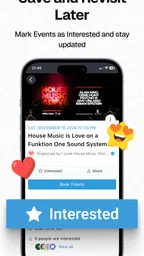
- Save interesting events for later.
- Discover both online and in-person events.
- Browse listings for a range of interests.
- Event details help you plan before attending.
What could be better
- Some listings may have outdated details.
- Event availability depends on your location.
- Popular events can sell out quickly.
- Ticket prices and fees may vary by organizer.
- The app needs location access for nearby suggestions.





