




All Browser review
 Analysis by Appsdrops
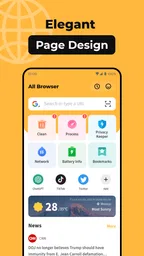
I tend to judge a browser by what it helps me do, not by how many buttons it puts on screen. All Browser makes a modest promise: it is a free tool for browsing the web, with an emphasis on a clean, uncomplicated interface. That makes it worth considering if your current browser feels too busy, but it also means the important question is whether a simpler starting point suits the way you actually browse.
A free tool with a deliberately simple pitch
All Browser is an Android browser from Nullbyte Labs. It is free to install, and its content rating is Everyone. That gives it an easy entry point for someone who wants to try a different browser without first weighing a purchase. Free access is a clear advantage, though it is not a promise about every possible cost or condition beyond getting the app itself.
The app was released on December 27, 2024, and its current version is 1.2.2. It requires Android 8.0 or later, so it is an option for a range of Android devices, including some that may not run the newest system releases. Its audience is sizeable: it has passed ten million installs, with an average rating of 3.8 from around thirty-five thousand ratings. I read that combination as evidence of broad interest, not proof that it will fit every person’s habits.
The basic appeal is easy to understand. A browser is often an app I open for a quick lookup, a link from a message, or a page I need to revisit while doing something else. A cleaner interface can make those routine moments feel less cluttered. But simplicity is valuable only when it helps me get to the page I need; it is not a substitute for features that a more demanding browsing routine may rely on.
What free access is worth here
Because All Browser is free, trying it as a secondary browser is a low-commitment way to see whether its approach suits you. I would start there rather than immediately replacing a browser that already handles passwords, synced tabs, bookmarks, and work or school accounts the way you expect. A few days of ordinary use can reveal whether its uncluttered feel is genuinely helpful or whether you miss the familiar tools you already depend on.
That distinction matters when comparing it with common alternatives. Established browsers often make a stronger case through a connected ecosystem: the same bookmarks or browsing history may be available across devices, or account-based tools may be central to their appeal. All Browser’s known pitch is more restrained, centered on a clean interface. If your main reason for switching is to escape visual clutter, that can be enough to investigate. If you are shopping for a specific advanced capability, do not assume that a simple presentation means that capability is included.
Where a clean interface can help
In everyday use, I find a simple browser most useful for short, intentional sessions. Imagine a friend sends a restaurant menu while I am on the way to meet them. I want to open the link, read the menu, and return to the conversation without navigating a crowded start screen. Or I might search for a product manual while standing beside an appliance, then close the page once I have the instructions. These are small tasks, but they make up a lot of mobile browsing.
Another useful workflow is separating casual browsing from a browser that holds more of your digital routine. You could try All Browser for links that do not need to be part of a long-term collection, while keeping your main browser for saved research or account-heavy tasks. That approach lets you judge the interface on its own merits without risking disruption to a well-established setup. It also makes the comparison practical: notice whether you finish quick tasks with less friction, or whether you keep switching back because something you need is missing.
There is a trade-off in keeping expectations modest. A clean screen may reduce distractions, but it does not automatically make a browser faster, safer, more private, or better at organizing pages. Those qualities depend on specific behavior and controls, not appearance alone. I would choose this app for the experience it visibly sets out to offer, not on the assumption that simplicity guarantees hidden technical advantages.
What I would check before making it my main browser
Before moving important browsing habits over, I would test the tasks that would be inconvenient to lose. Open a page you use regularly, follow a link from another app, and see whether the browser feels comfortable for both a quick visit and a longer read. Then check how easily you can return to a page you need again. This simple routine helps distinguish a pleasant first impression from a browser that works well for your actual day.
If your browsing involves a lot of research, try a realistic comparison rather than judging from one search. Open several related pages, move between them, and see whether you can keep track of the source you meant to revisit. Someone planning a purchase, for example, may need to compare specifications across multiple pages. A browser that feels spare during a single lookup may be less suitable if your usual task depends on maintaining a complicated trail of tabs or saved references.
I would also consider what happens across devices. People who expect their browser to tie together a phone, tablet, and computer should verify that their required workflow is supported before making a switch. If cross-device continuity is essential, a browser already integrated into their other devices may be the more dependable choice. If nearly all browsing happens on one Android phone and the priority is a less busy interface, that ecosystem advantage may matter less.
Who is likely to get the most from it
I can see All Browser appealing to someone who wants a free, straightforward option for everyday links and searches, especially if a feature-heavy browser feels like more than they need. It may also suit a person looking for a secondary browser to handle casual reading or quick errands without changing the setup they use for serious work. The fact that it has attracted over ten million installs suggests many people have been willing to try it, although popularity alone does not tell me whether its particular strengths match your needs.
It is less compelling for anyone choosing a browser chiefly for a specific advanced tool, tightly connected device syncing, or a carefully organized research workflow. In those cases, compare the options by checking the exact functions you rely on rather than assuming all browsers provide the same ones. I would also skip switching in a hurry if your current browser is deeply tied to saved material or daily routines. A free app still asks for time to configure and learn, and a familiar setup can be more valuable than a fresh interface.
The rating gives a mixed but useful signal. An average of 3.8 from around thirty-five thousand ratings is neither a universal endorsement nor a reason to dismiss the app. It tells me to approach it with reasonable expectations: try it for the tasks it appears suited to, and make my own call based on whether those tasks feel easier. Its 376 written reviews add another body of user feedback to consider, but I would look for comments that describe needs like yours rather than treating any single opinion as decisive.
A practical verdict before you switch
My recommendation is to try All Browser if you want a free Android browser with a clean, uncomplicated feel and your everyday browsing is mostly quick searches, incoming links, and casual reading. Use it alongside your current browser first. Pick a few real tasks you repeat, then judge whether the simpler experience saves effort or merely leaves you looking for familiar tools.
For a person who wants a browser to serve as the center of a multi-device setup or a detailed research system, I would lean toward an alternative whose specific features clearly match those needs. All Browser is not a purchase decision—the app is free—but it is still a choice about convenience and habits. The best reason to keep it is that its simplicity genuinely suits your routine; the best reason to pass is that your routine depends on capabilities you need to verify before switching.
Overall, I see it as a low-risk option to test, not an automatic replacement for every browser. Nullbyte Labs has made an app whose appeal rests on a straightforward idea rather than a long list of promises. If that is what you are looking for, give it a fair trial on your own Android device; if you want a browser defined by advanced controls or a connected ecosystem, choose one that makes those strengths central.
What we like
- Combines several browser options in one app.
- Offers a convenient way to compare browser experiences.
- Can reduce the need to install multiple browser apps.
- Provides quick access to web browsing on a mobile device.
- May suit users who prefer a simple browser launcher.
What could be better
- The app may offer fewer features than dedicated browsers.
- Browser availability can vary by device or region.
- Switching between browsers may interrupt browsing tasks.
- Some listed browsers may require separate installation.
- Privacy protections depend on the selected browser.





