




Alarmy - Alarm Clock & Sleep review
 Analysis by Appsdrops
I see Alarmy as a productivity app for a very particular problem: getting out of bed when a normal alarm has become easy to ignore. Its strongest idea is to make dismissing the alarm take an action, rather than just a sleepy tap. That can be genuinely useful if you tend to silence alarms without waking up properly. It is less compelling if you already wake reliably or want a quiet, minimal clock with no extra steps.
In my view, the app’s value comes down to whether a little morning friction helps you. A demanding alarm can interrupt the familiar snooze-and-drift routine, but it cannot replace enough sleep or make an unsuitable schedule sustainable. Treating it as a practical nudge, rather than a cure for poor sleep habits, is the fairest way to judge it.
What makes the alarm harder to ignore
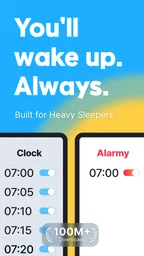
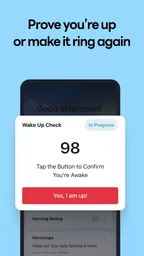
The central appeal is simple: instead of dismissing the sound with one reflexive button press, you can set a task that requires you to become more alert. The store’s focus on heavy sleepers reflects that use, but I would not limit the audience to people who sleep through every alarm. It can also suit someone who hears an alarm yet routinely turns it off and lies back down.
That distinction matters. Many standard clock apps are designed around convenience: set a time, choose a sound, and tap to stop it. Alarmy takes the opposite approach. It makes the act of stopping the alarm part of the wake-up routine. The trade-off is obvious: the more effective the interruption feels, the less pleasant it may be when you are already awake and simply want the noise to stop.
A useful way to approach it is to pick a task that gets you moving without making the morning needlessly stressful. If your first destination is the bathroom or kitchen, for example, a task that makes you leave the bed can help break the physical habit of reaching for the phone and rolling over. A task that feels awkward or takes too long, on the other hand, may make you resent the alarm rather than build a routine.
This is why I would test the setup on a normal morning before depending on it for an important one. An alarm should fit your actual room, schedule, and level of grogginess. Set it up when you have time to understand how it behaves, and choose an approach you can complete safely while half-awake. The best configuration is not necessarily the hardest one; it is the one that reliably gets you upright without turning every morning into a fight.
Where it earns its place in a routine
Consider a realistic weekday: you need to leave early, but you have a habit of silencing your phone and falling back asleep. A conventional alarm may provide sound without changing that sequence. With Alarmy, making dismissal require a little more attention can interrupt the automatic response. Once you are standing and engaged in a task, it is easier to continue toward getting dressed than to sink back into the pillow.
That benefit is most convincing when the problem is a repeated behavior, not an occasional late night. If you are consistently short on sleep, a harsher wake-up process may only make mornings more miserable. I would first look at whether your bedtime and wake time give you a realistic chance to rest. The app can help enforce a decision to get up; it cannot make an exhausted body feel refreshed.
There is also a useful distinction between waking up and starting the day well. A task can help with the first, but the rest of the routine still belongs to you. I would pair the alarm with something simple and repeatable, such as placing the phone where you must get up to reach it or preparing what you need the night before. The less decision-making you face immediately after waking, the more likely a firm alarm is to lead into a workable morning.
For households, roommates, or people with different schedules, the intensity of an alarm deserves thought. A forceful wake-up method may help its owner while disturbing someone nearby. In that situation, a gentler alarm, a wearable vibration alarm, or a different placement for the phone may be a better fit. The right choice is not merely the method that wakes one person; it is the one that works without creating a bigger problem for everyone else.
Practical setup choices that make a difference
My first tip is to make the wake-up task match the room you are actually in. A setup that depends on moving around can be a poor fit in a cramped space, a shared bedroom, or a home where you do not want to wake someone else. Think through the path before choosing a task: can you complete it safely in the dark, and will it still make sense when you are tired? A theoretically demanding setup is not useful if it is unreliable in your real environment.
Second, keep a backup plan for mornings when your phone is unavailable, its battery is depleted, or you need a different arrangement. No phone alarm should be treated as infallible. Charging the device where you can reach it after getting out of bed, while still keeping it far enough away to discourage a reflexive shutoff, is a sensible compromise. If missing a wake-up would have serious consequences, a separate alarm is worth considering rather than relying on a single device.
Third, be deliberate about how much friction you add. If you wake easily on weekends but struggle on workdays, a demanding setup may make sense only for the mornings when you need it. If every alarm becomes an ordeal, you may eventually disable the very feature that was supposed to help. I would aim for the least difficult task that consistently stops you from drifting back to sleep, then adjust only if it is not working.
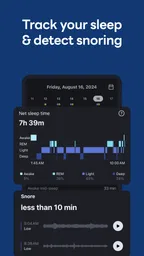
Finally, distinguish a wake-up tool from a sleep-tracking or sleep-health solution. Alarmy is presented as an alarm app, and its main practical purpose is helping you respond to the alarm. If your main concern is understanding sleep patterns, improving a noisy sleep environment, or addressing ongoing fatigue, a dedicated sleep-focused tool or professional advice may be more appropriate. An alarm can reveal that you are struggling to get up, but that alone does not explain why.
How it compares with ordinary alarm options
The usual alternative is the clock app already on your phone. That is often the better choice when you want a quick setup, a familiar interface, and minimal fuss. If you wake to sound reliably, there may be little reason to add another app or introduce a task before you can turn the alarm off. For light sleepers, people with a predictable morning routine, or anyone who dislikes interacting with a phone while drowsy, a basic alarm may be all they need.
Alarmy makes more sense when the standard approach has repeatedly failed for a specific reason: you dismiss it without becoming alert. Its advantage is behavioral rather than magical. It asks you to do more than press a button, which can create a useful pause between waking and choosing to go back to bed. Its weakness is the same design choice. People who want a quiet, frictionless experience may find the extra demand annoying, and a task that is poorly matched to their circumstances can feel like an obstacle instead of support.
It also should not be confused with a full productivity system. Although it belongs to the productivity category, the benefit is narrow and practical: it helps structure one moment at the start of the day. I would not choose it expecting a broad planner, a complete sleep program, or a solution for every morning difficulty. That focused role is a strength for people who need an assertive alarm, but a limitation for anyone looking for a more comprehensive tool.
Who should try it, and who may prefer something else
I would recommend trying it if you routinely turn off alarms while barely awake, have already found ordinary clock alarms too easy to dismiss, and are willing to spend a little time choosing a workable task. It may be especially useful when the consequences of oversleeping are frequent enough that a stronger wake-up routine is worth the inconvenience. The app is free to download, so it is accessible to test, though in-app purchases range from $2.90 to $159.99 per item. I would check the purchase details in the app before buying anything and decide whether the basic experience meets your needs first.
Alarmy is developed by Sleep Tracker & Alarm Clock by Delightroom. It has a 4.7 average from around 2.2 million ratings and more than 50 million installs, suggesting that it has reached a large audience. Those figures tell me it is widely used, not that its approach will suit every sleeper. The app is rated for Everyone, and its current version is 26.42.1; it requires operating system version 9 or later.
I would be more cautious if you share a bedroom, need an exceptionally quiet wake-up, or are easily stressed by a loud or demanding alarm. It may also be the wrong choice if your issue is not dismissing alarms but being chronically tired despite giving yourself enough time in bed. In those cases, a standard alarm, a quieter wearable option, or help addressing the underlying sleep problem may be more useful. The goal is a reliable morning, not the most punishing alarm possible.
A balanced verdict for heavy snoozers
After weighing the trade-offs, I think Alarmy is a worthwhile option for people who need an alarm to do more than make noise. Its defining strength is the way it turns dismissal into a small commitment to wake up. That can make a tangible difference when the usual tap-and-snooze routine is the real obstacle. Its main limitation is that the same friction can become irritating, inconvenient, or unsuitable for a shared space.
I would start with a modest task, test it on an ordinary morning, and change the setup only if you still find yourself returning to bed. Keep your phone charged, consider who else might hear the alarm, and do not expect the app to compensate for an unrealistic sleep schedule. Those small decisions are more likely to make the experience useful than simply choosing the toughest possible wake-up challenge.
Overall, I would recommend Alarmy to a friend who repeatedly sleeps through or reflexively dismisses ordinary alarms and is ready to build a more active wake-up routine. I would not recommend it as a universal replacement for a basic clock. If your current alarm works, simplicity is a real advantage; if it does not, this app offers a distinctive, practical way to make getting out of bed harder to postpone.
What we like
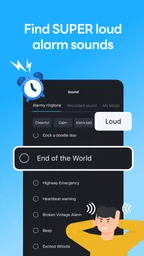
- Loud alarm options make it harder to sleep through the wake-up call.
- Mission-based alarms can encourage you to get out of bed.
- Multiple alarm schedules suit different routines across the week.
- The interface makes it easy to set recurring alarms.
- Sleep-related tools add value beyond a basic alarm clock.
What could be better
- Some advanced features may require a paid subscription.
- Photo missions depend on having a suitable target nearby.
- Frequent prompts may feel intrusive to some users.
- Battery restrictions can interfere with alarms on some devices.
- The variety of settings may take time to configure.





