
AI Video Generator - AI Photo review
 Analysis by Appsdrops
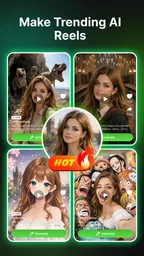
I’m cautious with AI video apps because a playful result can involve personal photos, a face, or a voice-like image that I would not want handled carelessly. AI Video Generator - AI Photo is aimed at turning text and photos into short, trend-oriented dance clips and reels. That makes it appealing for quick social posts, but it also means I would think about the image I choose before I start. My view is that it works best as a creative experiment with material I’m comfortable using, rather than as a place to process anything private.
Creative fun, with a sensible trust check
This is a free video-making app from Kayle AI Solution in the Video Players & Editors category. Its focus is narrower than a full editing suite: the draw is generating an animated result from a prompt or a photo, not building a detailed video from a timeline of clips. I’d reach for it when I want a quick, eye-catching idea, then use a conventional editor if I need precise timing, layered audio, or careful finishing.
The app has an average rating of 4.8 from around 32,000 ratings, and it has passed one million installs. Those figures suggest that plenty of people have tried it, but they do not tell me whether a particular generation will look convincing or whether the app’s workflow will suit me. The more useful question is whether I’m happy with the kind of image-to-video experiment it offers and the choices I can see while using it.
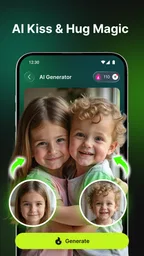
Because the core idea invites people to upload photos, trust is not an abstract concern here. A picture of a pet or a deliberately staged portrait is a different choice from a private family image, a child’s photo, or a picture containing identifying details in the background. I’d begin with a non-sensitive image and inspect the app’s visible prompts and controls before deciding whether to use anything more personal. That is a practical precaution, not a claim about how the app stores or processes files.
What the app is suited to creating
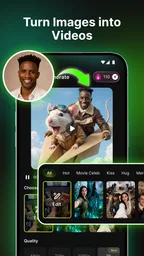
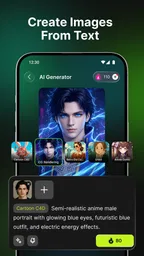
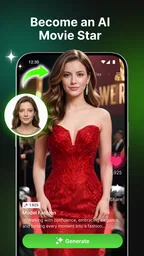
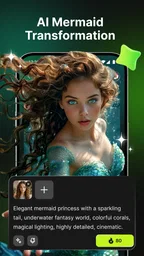
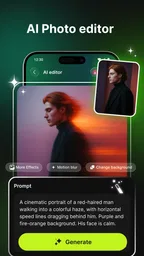
The name, AI Video Generator - AI Photo, points to a simple creative loop: give the app text or an image, then see what kind of short video it can produce. I find that premise most useful when the goal is a quick visual gag, a stylized dance moment, or a social post that is more playful than documentary. It is less suitable when accuracy matters, such as preserving a person’s exact movement, expression, or appearance throughout a sequence.
That distinction matters because AI-generated motion can be charming precisely when it is a little unreal. A result that bends a pose or changes a detail might be entertaining in a meme, but it can look wrong in a keepsake or a professional presentation. I would treat each output as an interpretation rather than a faithful animation of the original photo. If the clip is meant to represent a real person or event, I’d review it closely before sharing it.
A useful everyday scenario is making a lighthearted clip for a group chat. I might choose a photo of myself, write a short, clear idea, generate a result, and watch it once for visual oddities before sending it. For a public post, I would also consider whether anyone else shown in the source image would be comfortable being included. That small pause helps keep an amusing experiment from becoming an awkward surprise.
Visible choices and the limits of what I can judge
For a trust-focused review, I look for the choices an app actually presents: what it asks me to select, what it explains before I continue, and whether I can make a considered decision at each step. I would not treat a polished preview or a simple upload screen as proof of a particular privacy practice. The sensible approach is to read the in-app explanations and the app-store privacy information available on the device before adding sensitive material.
I also avoid assuming that a generated clip is automatically private, automatically public, or retained for a particular length of time. Those are consequential details, and I would rely only on clear statements and controls shown to me rather than guessing from the app’s purpose. If a screen asks for access to photos, I’d choose only the access option that matches what I intend to use, where the operating system offers that choice. If I cannot tell why a requested permission is needed, I would stop and reassess instead of granting it by habit.
This kind of care is especially useful when testing an unfamiliar generator. Start with a picture that contains no address, school logo, workplace badge, or other detail you would not want copied into a clip. Use a short prompt without names or private context, then inspect the result and the available save or share choices. This workflow does not guarantee a particular data outcome; it simply reduces the amount of sensitive material involved in an experiment.
Another practical tip is to separate creation from sharing. I would generate first, review the finished video, and only then decide whether to save it or post it elsewhere. That gives me a chance to catch a distorted face, an unintended background detail, or a visual effect that could be misread. If a generated scene includes someone else, I would ask before publishing it, especially if the result makes them appear to do or say something they never did.
Who should try it—and who may prefer another tool
I can see this app suiting casual creators who enjoy trying ideas quickly and are not expecting frame-by-frame control. It may also appeal to someone who finds a blank editing timeline intimidating: a text-and-photo starting point is easier to approach than assembling clips, transitions, and effects manually. If your aim is to make a few playful variations and choose the one that lands, the format is naturally inviting.
On the other hand, I would skip it for a sensitive portrait, confidential work material, or any image whose use requires strict control over identity and context. I would also choose a traditional editor when I need predictable cuts, captions placed exactly, audio mixing, or a consistent look across a longer project. A conventional editor asks more of the user, but it generally offers a more direct relationship between each edit and the final result. AI generation trades that precision for surprise and speed.
For someone comparing it with other tools in the same broad category, the key difference is the emphasis on generating motion from an input rather than manually editing a finished recording. That can save effort at the idea stage, but it can also mean less control over the exact outcome. I would use it alongside, not instead of, a regular video editor: generate a playful source clip here, then move to a more controllable tool if the final post needs trimming, captions, or a carefully chosen soundtrack.
It is also worth considering the cost model before settling into repeated use. The app is free to download, with in-app purchases ranging from $0.99 to $39.99 per item. I would check the purchase screen carefully before confirming anything and decide whether a paid option is worth it for my own use. If I only want to try a concept once, I would avoid treating an optional purchase as necessary until I understand what it unlocks and whether I actually need it.
Version, audience, and a careful first session
The current version is 32, and the app is listed for devices running Android 8.0 or later. It is rated for Everyone, which is useful context for households, though an age label does not replace a parent’s judgment about sharing photos or using AI-generated images. I would still guide younger users toward pictures they have permission to use and explain that generated movement can make a person appear to do something that never happened.
For a first session, I would keep the experiment deliberately simple: choose a low-risk photo, describe one clear action, and evaluate the result before trying a more elaborate prompt. A concise instruction gives me a better way to judge whether the generator followed the idea, while changing one element at a time makes it easier to learn what produces a useful result. If the output feels off, I would adjust the prompt or source image rather than assuming the app can repair every mismatch.
I would also keep a copy of the original image outside the editing process if I care about preserving it. That is a sensible habit for any creative workflow, particularly one that transforms a still photo into something visually different. Before sharing, I’d check the final clip on the screen where I plan to post it; a small artifact that is easy to miss in a preview can become obvious when watched again at normal size.
My cautious verdict
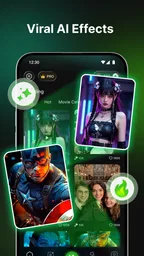
AI Video Generator - AI Photo has a clear appeal: it turns a familiar photo or a written idea into a starting point for a short, shareable visual experiment. I’d recommend trying it with non-sensitive material if you enjoy playful AI effects and can accept that the result may be surprising rather than precise. The free entry point makes that kind of trial accessible, while the in-app purchase range is a reason to check each offer rather than tap through automatically.
My recommendation comes with a boundary. I would not use it casually with private images, and I would not assume anything about storage, deletion, or account controls unless the app clearly explains those choices where I can see them. For a funny clip among friends, it may be a convenient creative detour; for sensitive photos, exact editing, or work that needs predictable results, a different workflow is the wiser choice. Use it for low-stakes creativity, review the visible choices, and share only what you are comfortable putting into an AI-generated video.
What we like
- Creates videos from text prompts with minimal effort
- Turns still photos into short animated clips
- AI tools make creative experimentation accessible
- Useful for creating social media content
- A simple workflow suits beginners
What could be better
- Generated results may not match the prompt exactly
- Video generation can take time
- Some features may require a paid plan
- Results may look inconsistent across generations
- An internet connection is likely needed for AI processing





