



AI Video Editor: ShotCut AI review
 Analysis by Appsdrops
I can see why AI Video Editor: ShotCut AI might earn a place on a new phone: it promises a quick route from loose clips and photos to something shareable, without asking you to learn a desktop editing suite first. The more useful question, though, is whether it remains helpful after the novelty of automated editing wears off. My view is that it can become a handy tool for occasional social videos and personal slideshows, but it is not an automatic replacement for a careful, repeatable editing workflow.
What feels appealing in the first week
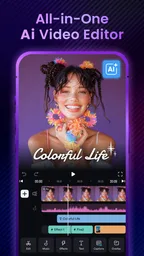
This is a free video-editing app from Shotcut Video Workshop, in the Video Players & Editors category. Its pitch is practical: make videos, slideshows, and movie-style edits with AI-assisted help. That broad focus suits the way many people actually use a phone editor—assembling holiday clips, a birthday montage, or a short update for friends rather than producing a polished film from scratch.
In the first few sessions, the appeal is less about professional control and more about getting past the blank-project problem. When I have a handful of clips but no clear plan, an assisted approach can make starting feel easier. The app’s current version is 3.8.0, and it supports Android 8.0 and later, so it is aimed at a wide range of Android devices rather than only the newest models.
A realistic use case is a family gathering: I might select a few short moments, add photos from the same day, and shape them into a compact recap to share in a group chat. A slideshow can also be more useful than a folder of pictures when the goal is to tell a small story—arrival, the main event, then a closing shot. The important advantage is having video and still images in one editing space, rather than switching between separate tools just to assemble a simple sequence.
For that kind of task, I would treat the AI as a starting assistant, not as the editor-in-chief. Automated choices can help establish a draft, but I still want to check whether the selected moments make sense together, whether the pacing feels rushed, and whether a transition distracts from the content. AI can reduce the effort of beginning, but the final cut still benefits from a human pass.
The app has an average rating of 4.2 from around 395,000 ratings, and it has been installed over 50 million times. Those figures suggest that it has found a broad audience, though popularity alone does not tell me whether its particular workflow suits my habits. It is rated Everyone, which makes it broadly accessible, but that rating is not a promise that every editing choice will be simple for every age or experience level.
Whether it earns a place month after month
Recurring value depends on how often you make short edits. If you regularly turn phone footage into small keepsakes or social posts, having one familiar app for clips, photos, and basic presentation can save the repeated effort of choosing a tool. If you edit only once every few months, the convenience may be less compelling: you may need to relearn where things are each time, and an automated first draft cannot compensate for a workflow you barely use.
I would decide whether to keep it by testing one repeatable project rather than judging it from a single novelty edit. For example, create a short recap after a weekend outing, then use the same general approach for another event later. Notice whether you can find your way back to the tools you used, whether you spend less time assembling the next edit, and whether the results still look like something you want to share. If the second project feels just as awkward as the first, the app may not be building a useful habit.
One practical tip is to plan the edit before opening the project. Pick a clear purpose—“show the trip’s best moments” or “make a slideshow for relatives”—and choose only material that supports it. This is especially useful when AI assistance tempts you to include every available clip. A shorter, deliberate selection usually gives any editor less clutter to manage and makes it easier for you to judge whether the finished sequence has a beginning and an ending.
Another useful habit is to review the edit once with the sound on and once with the sound off. The first pass helps catch audio that feels out of place; the second shows whether the visuals communicate the story without relying on sound. This is not a special feature claim about ShotCut AI, but a sensible check for any mobile edit, particularly one made quickly from mixed photos and clips.
It is also worth thinking about the destination before editing. A clip intended for a quick message has different needs from a keepsake you may revisit years later. For a casual share, a fast and simple result may be enough. For something important, I would spend more time checking the sequence and keeping a copy of the original media. An editing app should not be the only place where irreplaceable photos or footage live.
Maintenance: what you have to keep doing
ShotCut AI’s ongoing burden is mostly editorial rather than technical: you need to choose suitable source material, inspect the automated result, and decide whether the finished piece says what you intended. That makes it approachable for low-stakes edits, but it does not remove the need for judgment. If you expect one tap to reliably produce a personal, well-paced story from a large camera roll, the gap between expectation and result can become tiring.
There is also a cost distinction to keep in mind. The app is free to download, while in-app purchases range from $0.99 to $119.99 per item. I would start with the free experience and identify a specific recurring limitation before spending anything. A broad price range makes it especially sensible to check what an individual purchase offers in the app before committing; I would not pay simply because a first edit was fun.
For a small creator or a person who posts regularly, maintenance can mean developing a consistent routine: gather the footage, remove obvious misses, make a draft, then check it before sharing. That routine is more valuable than chasing a new effect every time. If the app makes that sequence feel manageable, it may justify keeping it installed. If it adds extra decisions without reducing the work you care about, a simpler editor—or the editing tools already familiar to you—may be a better fit.
Where the novelty can turn into fatigue
AI-assisted editing can feel impressive on the first project because it gets something moving quickly. Over time, the same assistance may feel less useful if you find yourself repeatedly correcting selections or wishing you could control timing and structure more precisely. I would not assume that an automated draft understands which moment matters most to you. A technically smooth montage can still miss the emotional point of a family video or leave out the one brief shot that explains the story.
That is where ShotCut AI may be less suitable than a more hands-on editor. If you routinely need detailed control over timing, layers, or a tightly planned sequence, compare its workflow with an editor designed around manual adjustments before making it your main tool. Conversely, if you mainly want a fast first pass and are comfortable making a few human corrections, a heavyweight editing suite can feel like more work than the job requires.
There is a separate fatigue risk in trying to make every ordinary clip look like a production. Not every meal, outing, or quick update needs a movie-style treatment. I would use the app when a sequence benefits from being assembled—an event recap, a photo-and-video memory, or a short announcement—and skip it when a single unedited clip communicates the moment more clearly. The best time-saving tool is sometimes the choice not to edit.
Compared with the usual alternatives in mobile video editing, ShotCut AI’s identity is its AI-led approach and its combination of video, slideshow, and movie-making use cases. A conventional editor may be preferable when you want to place every cut yourself; a lightweight built-in editor may be enough when you only need a quick trim. ShotCut AI sits between those needs: more oriented toward constructing a finished piece than making one tiny adjustment, yet still best judged by how much control it gives you in your own workflow.
Who should keep it, and who should move on
I would recommend giving ShotCut AI a try if you often have several clips or photos that deserve to become one shareable piece, but you do not want to start from an empty timeline every time. It is also a reasonable option for someone exploring mobile editing who wants to see whether AI guidance makes the process less intimidating. Its broad audience and Everyone content rating make it approachable in principle, while its free entry point lets you evaluate the basic fit before considering purchases.
I would skip it as a primary editor if your work depends on exact, repeatable control, or if you already have a tool whose timeline and export routine you know well. It may also be a poor match if you rarely edit: an app can be useful without earning permanent space on your home screen. In that case, keep it only if it proves easier when the next real project arrives, rather than because the first demonstration felt clever.
After the first week, the key test is not whether the AI can make a montage; it is whether the app helps you finish the kinds of videos you actually make. ShotCut AI has enough reach to be worth trying, with 4.9K reviews alongside its larger rating pool, but I would judge it by repeat use, not reputation. My long-term verdict is cautiously positive for casual creators and memory-making: keep it if it turns scattered phone footage into useful, personal edits with less friction. If you find yourself fighting the result, paying for features you do not need, or editing too rarely to build a routine, choose a simpler or more precise alternative instead.
What we like
- AI tools can speed up common video editing tasks.
- A mobile workflow makes quick edits convenient.
- The app may suit creators with limited editing experience.
- Video projects can be edited without desktop software.
- A dedicated editor is useful for preparing social media clips.
What could be better
- AI results may need manual adjustments to match your vision.
- Some features may require a paid plan.
- Export options may be limited by device or subscription.
- Large video projects can use substantial storage and battery.
- The editing experience may vary across phone models.





