
AI Photo Generator: Muselab AI review
 Analysis by Appsdrops
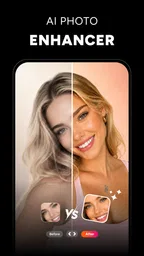
I can see the appeal of an AI photo app in the first few minutes: type an idea, see an image take shape, and try another version without opening a full desktop editor. Muselab AI is built around that quick creative loop, with AI image generation, photo editing, and video creation in one photography app. My first impression is that it is easiest to enjoy when I treat it as a place to experiment, rather than expecting it to replace every tool I use for finished photos.
Quick ideas make the strongest first impression
In its first week, AI Photo Generator: Muselab AI is most inviting for people who want to turn a vague visual idea into something they can look at and revise. That could mean testing a mood for a social post, making a playful image to share with a friend, or exploring a visual direction before spending time on a more involved project. The low-friction promise is the point: you start with an idea rather than a camera roll full of material.
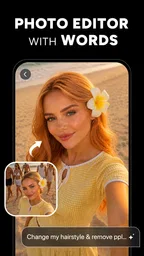
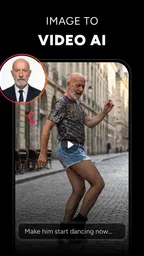
That makes it different from the usual photo editor, which generally begins with an existing picture and offers tools for adjusting it. Muselab AI’s stated scope also includes AI video, so it aims to serve people curious about generated media as well as those who simply want to polish a photo. I would approach it as a creative sketchbook: useful for trying concepts, but not automatically the best place to complete every image.
The app is free to install, rated for Everyone, and developed by Shotcut Video Workshop. Its average rating is 4.6 from around 61,000 ratings, with over 5 million installs. Those figures suggest broad interest, but they do not tell me whether a particular result will fit my taste or whether I will keep returning after the novelty wears off. The current version is 2.1.2, and the minimum operating system is Android 8.0.
Make the first session an experiment, not a test
My practical advice for a first session is to start with one clear visual goal. Instead of asking for something broad like “a beautiful picture,” decide what the image is for: a playful birthday greeting, a poster concept, or a new profile-picture direction. A defined use gives me a better basis for deciding whether the result is useful, even when the generated image is not exactly what I imagined.
I would also keep a simple record of wording that produces a promising direction. This is a useful habit with any generative tool: change one part of the description at a time, such as the setting or mood, rather than rewriting everything after each attempt. It makes the process easier to learn and helps separate a genuinely helpful variation from an image that merely looks different.
That approach matters because AI output is not the same as precise photo retouching. If I need to preserve a person’s exact appearance, match a brand color, or make a small correction to a real photograph, a conventional editor may offer more direct control. Muselab AI looks better suited to open-ended creation and exploration than to tasks where every detail must remain faithful.
What keeps it useful after the novelty fades
Month-to-month value depends on whether generated media becomes part of a real routine. I can imagine returning when I regularly make social content, want visual prompts for a personal project, or enjoy trying different treatments of an idea. In those situations, an app that brings image generation, editing, and video creation together can feel more convenient than switching between separate tools for every experiment.
For someone who only wants to improve holiday snapshots, though, the recurring value may be less obvious. A standard editor is often the more dependable choice for cropping, exposure adjustments, and familiar touch-ups. If my main need is a consistent set of polished photos, I would favor a tool that makes those specific edits quick and repeatable rather than choosing an AI-focused app just because it can create something surprising.
A useful workflow is to separate exploration from delivery. I would use Muselab AI to find a visual direction, then assess whether the result is suitable for the intended audience and format before sharing it. For a casual post, an imperfect but distinctive image may be enough. For a business asset, an event announcement, or anything that must communicate exact information, I would check the output carefully and use a more controlled design or editing tool where needed.
There is also a meaningful difference between using AI to create an image and editing a photo I already own. If I want to preserve the original moment, I should begin with a conventional editing workflow and use AI only where it helps. If I want an illustration-like concept that did not exist before, generation is the more natural starting point. Knowing which of those jobs I am doing can save time and reduce the frustration of asking one kind of tool to behave like another.
Keep an eye on cost and creative expectations
The app is free, but it also offers in-app purchases ranging from $4.99 to $49.99 per item. I would therefore explore the free experience before treating it as a regular creative expense. The purchase range is broad enough that it is worth checking the exact item and terms presented in the app before buying, especially if I only expect to make occasional images.
My rule would be to pay only after identifying a recurring use. If I find myself using the app for a weekly content routine or a continuing personal project, a purchase may make sense to me depending on what it provides. If I am merely curious about AI images, I would hold off until I know that the results and workflow suit me. This is not a judgment about value in general; it is a way to avoid paying for enthusiasm that lasts only an afternoon.
One non-obvious benefit of treating generations as drafts is that it changes what counts as success. I do not need every attempt to be publishable. A result can still be useful if it gives me a color palette, composition, or atmosphere to recreate elsewhere. That makes the app more worthwhile for people who enjoy the creative process itself, while users who expect a finished, exact asset on the first try may find the experience tiring.
Maintenance is mostly about keeping a useful routine
There is no reason to turn an AI creative app into another daily obligation. I would keep it only if it solves a repeated problem: getting unstuck on a visual idea, producing material for a recurring post, or making small creative projects more enjoyable. A sensible routine might be to collect a few ideas, try them in one focused session, and keep only the results that serve a clear purpose. That is more sustainable than opening the app whenever I feel I should make something.
Version 2.1.2 gives the app a concrete current release, but long-term satisfaction is less about a version number than about whether the tools continue to fit my needs. I would revisit my use after a few weeks: am I making images I actually share or keep, or am I generating variations and forgetting them? That question is a better guide to whether the app has earned space on my phone than the excitement of a first session.
For a household, the Everyone age rating makes the audience broad, but I would still guide younger users toward thoughtful use. Generated images can be entertaining, yet it helps to talk about the difference between an invented image and a real photograph. That small bit of context makes sharing more responsible and helps prevent an imaginative result from being mistaken for a record of something that happened.
Where creative fatigue can set in
The main source of fatigue with AI image tools is repetition: producing many options without a clear reason to choose one. When every attempt leads to another attempt, the app can feel busy without helping me finish anything. A practical limit is to decide in advance what I am making and stop once I have a version that serves that purpose. I would rather keep one useful result than spend a long session chasing an imagined perfect output.
Another possible friction is the gap between a prompt in my head and the image I receive. Open-ended generation encourages surprise, but surprise is not always welcome when the task is specific. For example, if I am making a simple birthday image for a friend, a distinctive visual can be a plus; if the design must preserve exact wording or match a precise reference, I would move to a tool built around direct layout and detailed editing. The choice depends on how much control the job demands.
AI video can add another reason to explore, but it can also widen the app’s scope beyond what a casual photo user needs. I would not assume that a feature’s presence means it belongs in every workflow. If I only want to improve portraits, the video side may not affect my decision at all. The better question is whether the combination helps me avoid tool-hopping for projects I actually make, rather than whether the app has the longest list of creative possibilities.
Who should keep it, and who should move on
I would recommend Muselab AI to curious creators who enjoy visual experimentation and want a convenient mobile place to try generated images, explore editing, and consider AI video. It is especially appealing if a rough visual concept is often more useful to me than a technically perfect retouch. The app’s broad reach and 4.6 average rating make it a credible option to try, though personal results and habits matter more than popularity.
I would be more hesitant if I needed predictable, fine-grained corrections to real photos, a strictly controlled design workflow, or a tool that I use only once in a while. In those cases, a traditional photo editor or a dedicated design app may be a better fit. I would also skip paid items until I have a clear reason to return regularly; the free starting point is the sensible way to decide whether the creative loop works for me.
After the first burst of curiosity, this app earns lasting space only if I give it a job. Used as an idea generator and a place to make playful visual drafts, it can add genuine variety to a phone’s photography toolkit. Used without a purpose, it risks becoming a source of endless alternatives. My verdict is positive but conditional: keep it for recurring creative experiments, not as a substitute for every photo tool.
AI Photo Generator: Muselab AI is most compelling when I want to make something that did not exist before, rather than simply tidy up a picture I already have. I would try it freely, build a small workflow around a real project, and let continued usefulness—not first-week excitement—decide whether it stays installed.
What we like
- Creates artwork from text prompts in several visual styles.
- Offers a quick way to explore creative concepts without drawing skills.
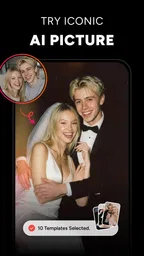
- Can transform personal photos into AI-generated images.
- The interface makes starting a generation straightforward.
- Generated images can provide inspiration for social posts or projects.
What could be better
- Results may differ from the details or style described in a prompt.
- Image generation may require an internet connection.
- Free access may be limited by credits or daily usage caps.
- Some images may contain visual artifacts or distorted details.
- Review subscription terms carefully before starting a paid plan.





