





AI Mirror: AI Photo & Video review
 Analysis by Appsdrops
I’m most interested in AI Mirror when I want to turn an ordinary photo into something playful rather than make a careful, realistic edit. It’s a photography app from POLYVERSE INC. built around AI-assisted image and video effects, and its appeal is the quick jump from a familiar portrait to an anime-style look, a dance clip, or a restored and enhanced image. That variety makes it feel more like a creative playground than a traditional photo editor.
The important trade-off is that AI-heavy editing can involve waiting and a dependable connection can matter at the point when an effect is being prepared or processed. I’d treat it as an app for experimenting when I have a little time, not as a guaranteed instant tool for a last-minute post. If you enjoy trying imaginative transformations and can tolerate occasional friction, it has a clear purpose; if you need precise, predictable retouching, a conventional editor may suit you better.
What the creative tools are best at
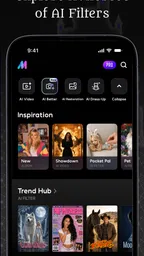
AI Mirror puts several kinds of transformation under one roof. Anime filters are aimed at changing the character of a picture, while AI dance video tools take the idea beyond a still image. The app also covers restoration, enhancement, and photo editing, so it can serve both a playful social post and a practical attempt to improve an older or less polished image.
That breadth is useful, but it also changes how I’d approach the app. Rather than expecting one editing screen to handle every job with professional precision, I’d choose a specific outcome first: a stylized portrait, a short visual gag, or a cleaner-looking photo. Keeping that goal in mind helps avoid spending time browsing effects that don’t fit the image or the occasion.
For a profile picture, for example, I’d start with a clear, well-lit face and compare a few restrained transformations before trying the most dramatic style. AI effects can make a picture more striking, but they can also alter the details that make a person recognizable. If the result is meant to represent you professionally, subtle enhancement or a standard editor is usually the safer route.
Where the app sounds most at home is casual creativity: making a friend laugh with an anime treatment, testing a dance effect on a suitable photo, or giving a personal image a different mood. Its tools invite experimentation, but the best result still depends on choosing a source image that suits the effect. A crowded, dim, or heavily cropped photo gives the transformation less to work with than a clean portrait.
How connectivity affects the process
AI processing is the part of the experience where connection quality can become noticeable. An effect that depends on remote processing may take longer to return than a simple local adjustment, and a weak signal can turn a quick experiment into a wait. I’d avoid beginning an important edit while moving between unreliable networks, especially if I need the finished image immediately.
A practical workflow is to select the source photo and decide what you want to try before starting a transformation. That reduces wasted attempts when a connection is slow and makes it easier to judge whether a result is worth keeping. For repeated experiments, I’d also make one change at a time: compare a few distinct styles rather than submitting near-identical versions without a clear reason.
It’s worth distinguishing that kind of AI effect from familiar adjustments such as cropping or changing brightness. Traditional edits are generally more immediate and predictable; generative transformations can take longer and may produce a result that needs another attempt. I wouldn’t assume every tool behaves the same way, so I’d test the specific effect I care about before relying on it for a deadline.
Using it in everyday mobile situations
The app is a better fit for a relaxed phone session than for editing in a rush. Imagine taking a portrait at a get-together and wanting a funny anime version for a group chat. I’d choose a sharp photo, try a small number of styles, and review the result before sharing it. That simple sequence makes the app’s playful side useful without turning the moment into a long editing project.
On a commute or while waiting somewhere, I’d be more selective. A stable connection and enough time to review the output make experimentation less frustrating; patchy service makes it harder to know whether a delay is normal or whether the request needs another try. If I already know I’ll have poor reception, I’d save the transformation for later rather than repeatedly tapping through effects.
There’s another useful distinction between creating something for yourself and creating something to publish. A novelty result can be entertaining even when it doesn’t preserve every facial detail, while a post meant to look natural calls for closer checking. I’d zoom in on the face, hair, and edges of the subject before sharing. AI styling can look convincing at a glance but feel less natural when viewed closely.
For older photos, the restoration and enhancement angle gives the app a more practical role. I’d keep the original image untouched and compare any improved version against it, rather than assuming the AI has recovered details exactly as they were. Enhancement can make an image easier to view, but a plausible-looking result is not necessarily a faithful historical record.
When an effect stalls or misses the mark
When an output takes longer than expected, my first move would be to check whether the phone has a stable connection, then give the current attempt a moment rather than starting several versions at once. Repeated submissions can make it harder to track which result belongs to which choice, and may waste time if the underlying issue is simply poor reception.
If an effect completes but looks wrong, I’d change the input before blaming the tool. A different crop, clearer lighting, or a less busy background can give the transformation a better starting point. For face-led styles, keeping the face unobstructed is a particularly useful test. If the same photo still produces an unsuitable result, I’d switch to another effect instead of expecting every style to interpret the image equally well.
For anything I care about, I’d preserve the original before editing and inspect the finished file before deleting or replacing anything. That’s especially sensible when using restoration or enhancement, where the goal is to improve an existing picture rather than invent a new look. I’d also avoid making the app part of a time-critical workflow until I’ve tried the particular effect under the same conditions I expect to use later.
Making sensible choices about use and sharing
Because this app works with personal photos and AI-generated treatments, I’d be deliberate about which images I choose. A private portrait, a child’s photo, or someone else’s picture deserves more care than a generic snapshot. I’d only use images I’m comfortable editing and sharing, and I’d think about whether the final result could be mistaken for an unaltered photo.
Connectivity is relevant here too: if a tool sends a request for processing, the act of using it may involve more than changing pixels on the phone. I’d review the app’s current privacy information and permissions in the app store and on the device before uploading sensitive material. That’s a sensible habit for any AI photo service, not a claim about a particular policy.
The app is free to download, with in-app purchases ranging from $0.99 to $99.99 per item. I’d explore the available experience before paying, then check the purchase screen carefully so I understand what a selected item offers and whether it suits how often I’ll use the app. Occasional users may find that casual experimentation is enough; people who expect to create frequently should decide whether the paid options are worthwhile for their own routine.
Who will enjoy it, and who may prefer another editor
AI Mirror is most appealing if you like visual surprises and don’t mind judging each result individually. Its anime and dance-video direction gives it a more playful identity than a standard editor focused on exposure, color, and cropping. The additional enhancement and restoration tools broaden its usefulness, though I’d still treat those as creative assistance rather than a promise of perfect recovery.
It may not be the right choice if you want detailed manual control, consistent skin retouching, or a fast batch workflow for many photos. A conventional photo editor is usually better for precise crops, dependable color corrections, and repeatable results. A dedicated restoration tool may also be a better match if preserving the appearance of a damaged photograph matters more than applying an imaginative transformation.
People who dislike waiting for AI processing may also find the experience less satisfying, particularly on an unreliable mobile connection. I’d recommend it to someone who sees the process as part of the fun and is willing to try different source images. I’d skip it as a primary work tool if every edit needs to be accurate, fast, and consistent across a large set.
Availability and my overall take
AI Mirror is rated for Mature 17+, so it isn’t an app I’d choose for a younger user without first checking whether it’s appropriate for them. It has a 4.2 average from around 223,000 ratings and more than 10 million installs, which suggests a substantial audience, though popularity alone doesn’t tell me whether a particular effect will suit my photos.
The app was released on March 6, 2023, and version 7.1.4 is the current version. It requires Android 7.0 or later. Those details make it easier to judge basic compatibility, but I’d still check the app store on my own device before installing, especially if the phone is older or has limited storage.
My recommendation is conditional but positive: AI Mirror is worth trying if you want quick, expressive AI transformations and are comfortable experimenting around occasional network delays. I’d use it for playful portraits, social clips, and low-stakes improvements, while keeping originals and checking results before sharing. For controlled retouching, confidential images, or edits that must finish immediately, I’d reach for a more conventional tool instead.
What we like
- Turns selfies into stylized portraits with little manual editing.
- Offers creative effects for experimenting with different looks.
- Makes it easy to create images suited to social media posts.
- Supports video effects as well as photo transformations.
- A simple interface helps newcomers get started quickly.
What could be better
- Some effects may require a paid subscription.
- Results can vary depending on the source photo.
- AI processing may take longer on older devices.
- Access to personal photos may raise privacy concerns.
- Frequent use of advanced tools may depend on an internet connection.





