
AI Face Aging - Photo Editor review
 Analysis by Appsdrops
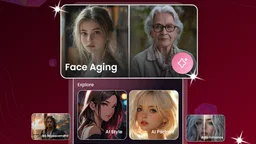
I’m careful with face-editing apps because a photo can be more personal than an ordinary picture, and an aging effect can invite people to upload images they would not share casually. AI Face Aging - Photo Editor is a free photography app from Willson Studio, built around AI-assisted face aging. My overall view is that it makes sense as a playful, occasional experiment, but I would treat it differently from a general-purpose photo editor: the appeal is a specific transformation, while the decision to use it should depend on your comfort with the image and the choices the app actually presents.
What the app is for—and what trust means here
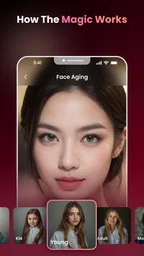
The name sets a narrow expectation: take a face photo and see an older-looking version. That is a fun idea for a family chat, a personal curiosity, or a lighthearted portrait project. It is not the same job as retouching a whole photo, organizing a library, or making precise changes to a portrait. If you want one quick visual effect, the focused purpose is a plus; if you need detailed editing controls, a broader editor is likely to suit you better.
The app sits in the photography category and has an average rating of 4.0 from around 6,500 ratings, with over 5 million installs. Those figures suggest that many people have tried it, but they do not tell me how it handles a particular face or what happens to an image after processing. I would not use popularity as a substitute for checking the app’s visible choices or deciding whether the photo is suitable to use.
It is rated for Everyone, so the experience is presented as appropriate for a general audience. That does not remove the need for care with someone else’s portrait. Before using a friend’s or relative’s face, I would ask first, especially if I planned to share the result. The effect may be intended as a joke, but an altered portrait can still feel personal to the person in it.
The app was released on February 3, 2026, and its current version is 1.1.1. I would keep it updated through the app store, then pay attention to the screens shown when opening it and selecting a photo. Those are the places where a user can judge the actual experience rather than assume that a simple effect has no meaningful choices attached.
What I would check before choosing a photo
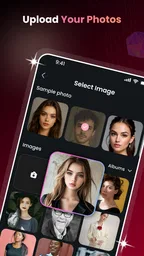
I would first look at the app’s permission prompts and grant access only when needed. If the operating system offers a way to select particular photos instead of giving broad library access, choosing a single image is the more cautious workflow. Permission behavior can vary by device and operating-system version, so I would follow the prompts on my own phone rather than assume every installation behaves identically.
I would also read any privacy or processing explanation that the app itself displays before sending a face through an AI effect. I cannot infer from the app’s purpose alone whether processing happens locally or online, how long an image is retained, or whether an account is involved. If the app asks for a choice I do not understand, I would pause and inspect the wording before proceeding. That is a more useful trust check than guessing from the word “AI.”
Controls worth noticing during a first session
My first session with a face-aging tool would be deliberately low-stakes: choose a photo that is already easy to replace, try the effect, and inspect the result before sharing or deleting anything. I would look for clear ways to choose or change the image, review the finished edit, and leave the flow without committing to an unwanted action. The important point is to use only controls that are visibly offered, not to assume that every editing app provides the same save, undo, or account options.
When a prompt requests access or asks me to continue, I would distinguish what is necessary for the task from what is optional. A photo effect needs an image to work on, but that does not by itself tell me what other access is needed. If the app presents a permission that seems unrelated to selecting or processing a portrait, I would deny it first and see whether the core task remains available. If it does not, I would decide whether the feature is worth that trade-off rather than accepting automatically.
For an image I might want to keep, I would make a deliberate choice about where the original and edited versions belong. I would avoid treating the generated result as a replacement for the original: keep the source separately if I care about it, and review the edited copy before sending it to anyone. This is a simple safeguard against losing the version I actually wanted, and it also gives me a chance to notice an awkward or overly dramatic result before it leaves my phone.
Why the photo itself matters
Face effects are sensitive to the source image. For a fair test, I would choose a clear, front-facing portrait with the face unobstructed and reasonably well lit. A tiny face in a group shot, a strong side angle, sunglasses, hair across the eyes, or harsh shadows can make it harder for an automated tool to interpret the features consistently. This is not a promise about how this app handles every case; it is a practical way to avoid blaming the effect for a source photo that gives it little to work with.
A useful workflow is to try one portrait, check the result at full size, and only then experiment with another. If the transformation looks strange, I would change the source photo before repeatedly retrying the same one. That helps separate a poor input from a limitation in the effect and avoids spending time chasing a perfect result from an unsuitable image.
I would be especially cautious with children’s portraits, medical or identity documents, and any image that could embarrass someone if it were circulated. An age transformation can be harmless fun, but the resulting picture still contains a recognizable face. For those cases, I would either skip the experiment or use an image whose owner has clearly agreed to it and whose sharing would not create a problem.
Where it fits among photo-editing alternatives
Compared with a full-featured editor, a focused aging app should be judged by how quickly it gets to the intended effect, not by the number of tools it offers. A general editor is the better choice when I need cropping, color correction, blemish cleanup, or careful control over the final look. A face-aging app is more convenient when the goal is simply to explore an older-looking portrait without building the effect manually.
There is also a difference between a playful AI result and a realistic portrait edit. If I need a faithful representation for a serious project, I would not rely on an entertainment-focused transformation without checking it closely. AI-generated details can look convincing at a glance yet still change facial character in ways that matter to the subject. For a joke or a private comparison, that looseness may be part of the fun; for a professional or sensitive use, it is a reason to choose another approach.
One practical comparison is the cost of friction. AI Face Aging - Photo Editor is free, which makes a quick trial easy, but “free” does not answer questions about privacy or optional prompts. I would evaluate the actual session: whether I can reach the effect without confusing detours, whether the result is easy to inspect, and whether I feel comfortable with the choices presented. If those choices do not feel clear, there are plenty of reasons to stop rather than press through just to see an output.
Who I would recommend it to
I would recommend trying it to someone who is curious about seeing a playful older version of a portrait and is comfortable checking permissions and on-screen explanations before using a face photo. It is also a reasonable fit for a casual group activity: for example, at home, a family might pick a consenting adult’s clear portrait, make one transformation, and decide together whether the result is funny enough to share. Keeping the experiment voluntary and private until everyone approves is a better use than uploading someone else’s face as a surprise.
I would skip it if I needed dependable, fine-grained editing, if I was uncomfortable with the app’s visible data or permission choices, or if the portrait was too sensitive to use in an AI workflow. I would also avoid it when a person has not agreed to the transformation. In those situations, a standard editor that works on a photo without a face-aging effect—or no edit at all—is the more respectful choice.
Willson Studio’s app is currently at version 1.1.1 and supports Android 8.0 and later. That makes it accessible to many Android users, though I would still check that my own device can install the current release before planning to use it. Its broad audience and free price lower the barrier to trying the effect, but they do not make it a must-have for someone who rarely edits portraits.
My cautious verdict
AI Face Aging - Photo Editor is best understood as a narrow, curiosity-driven photography tool rather than a complete editing suite. I like the clarity of its central idea: use a face portrait to explore an older appearance. The main trade-off is that a face is sensitive material, so the experience is only worthwhile when the user feels informed about the app’s visible permissions and choices and is comfortable using that particular image.
My recommendation is to try it with a low-stakes, consenting portrait, review the result privately, and stop if any prompt or data explanation leaves you uneasy. That approach lets you enjoy the novelty without assuming more about the app’s data handling than its screens actually tell you. If your goal is a polished portrait, a more controllable editor is a better fit; if you simply want a quick aging effect and are happy with the choices in front of you, this app is worth a cautious look.
What we like
- Offers a quick way to preview an older version of your face.
- Simple controls make it easy for first-time users.
- Results can be saved for sharing with friends.
- Useful for creating playful portraits and social posts.
- Works as a lighthearted photo-editing tool.
What could be better
- Age predictions are artistic rather than scientifically accurate.
- Some effects may require watching ads or making a purchase.
- Output quality can vary with lighting and image sharpness.
- Uploaded face photos may raise privacy concerns.
- A clear front-facing portrait is needed for the best results.





