2026 Calendar Launcher review
 Analysis by Appsdrops
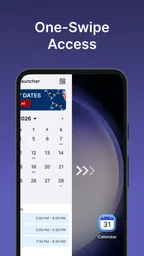
I think of 2026 Calendar Launcher as a home-screen-first way to keep dates and reminders close at hand, rather than as a calendar I would open only when I need to plan ahead. That distinction matters: a launcher-style calendar can make checking the day part of the ordinary rhythm of using a phone, but it also means the experience depends on how comfortably it fits into the way you already use your home screen. For people who regularly lose track of appointments between apps, that everyday visibility is the main reason to give it a try.
Keeping the calendar close to the home screen
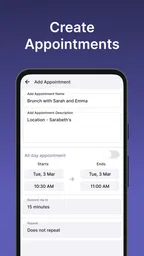
This is a free productivity app from AtomApplications, aimed at organising events, reminders and appointments around a calendar for 2026. Its stated age rating is Everyone, and its current version is 2.22.4. I would consider it for personal scheduling, errands and routine commitments, especially if I wanted a calendar to feel like part of the phone’s starting point rather than another destination buried in a folder.
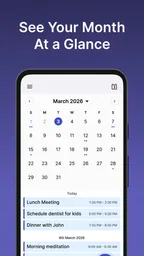
There is a practical difference between having a calendar installed and actually noticing what is coming up. A conventional calendar app often works well when I deliberately open it to plan a week. A launcher-oriented approach is more useful for quick, repeated checks: what is today, what should I remember, and do I have an appointment later? That can lower the small amount of friction that causes people to postpone checking their schedule.
Still, a calendar being close by does not automatically make it a better planning system. If your current routine already depends on a work calendar, shared family schedules or a task manager, the key question is whether this app can fit alongside those habits without making you maintain the same information twice. I would decide that before moving important commitments into a new calendar.
When the network enters the picture
Connectivity shapes calendar use most noticeably when plans change. A reminder or appointment is only helpful if the information shown is current at the moment I need it. For a simple personal plan, checking the day may be enough; for a meeting that has just moved or an appointment coordinated with someone else, the freshness of the information matters much more. I would make a habit of checking the relevant event before leaving, rather than assuming that a home-screen view must reflect every recent change instantly.
That is especially worth remembering when moving between places with uneven reception. If I am about to board a train, enter a large building or head into an area where my connection may be unreliable, I would check the day’s schedule beforehand and note any details I cannot afford to forget. This is a sensible planning habit, not a claim about how the app behaves without a connection. I would not build a critical workflow around an offline capability unless I had confirmed it directly on my own device.
For someone who mostly manages a personal routine, this caution may be minor. If a calendar is part of a team’s live coordination, it becomes more important to understand where event information comes from and how updates reach the screen. I would test the exact way I plan to use it before relying on it for a time-sensitive shared commitment.
Useful in short mobile moments
The strongest use case I see is the quick glance between other activities. Imagine getting ready in the morning, checking the phone before heading out, and spotting an appointment that changes which errands can fit into the day. A calendar-oriented launcher can make that check feel natural because it brings scheduling into the home-screen routine. It is less about elaborate planning and more about catching a conflict early enough to do something about it.
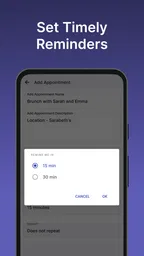
Another good fit is the person who remembers tasks when a relevant moment appears, rather than during a dedicated weekly planning session. If I need to remember a small appointment while arranging the day, having reminders and calendar planning in the same general experience may be more convenient than switching between separate tools. I would keep entries clear and specific: an event name that tells me what it is, with the relevant time and any essential note included where the app allows it. That makes a glance more useful than a crowded list of vague labels.
There is a trade-off on a busy phone. A launcher is part of the visual environment I encounter repeatedly, so it can either make the day easier to read or add another layer of clutter. I would try it with a normal week rather than judging it on the first screen. If I find myself ignoring the calendar view, or if the layout competes with the shortcuts I use most, the launcher angle may not suit me even if the scheduling idea is appealing.
For travel or a day with several stops, I would use the calendar as a prompt to review the sequence, not as a replacement for navigation or detailed trip planning. Before setting off, I would check the appointments and leave enough room for the practical parts that a calendar entry cannot predict, such as delays or time spent getting between places. That is a useful way to avoid treating a neat schedule as a guarantee that the day will unfold neatly.
What I would do when something goes wrong
Calendar problems can be easy to misread. If an event appears to be missing or an expected reminder does not catch my attention, I would first check the event details and the date I entered, then confirm that I am viewing the schedule I intended to use. I would also check whether the phone’s own notification settings allow the app to alert me. Those are general troubleshooting steps, not a promise that every issue has the same cause or that a particular setting is available in the same place on every device.
For an important appointment, I would not make a single app my only safety net while I am still learning it. I might keep the confirmation message or another trusted record until I have verified that the event is visible and that reminders behave as I expect. Once the routine is dependable, there is less reason to duplicate everything. The useful lesson is to test a low-stakes reminder first, rather than discovering a mismatch on the day of an important commitment.
If the phone’s launcher setup is already customised, changing how the home screen works can also be a bigger decision than installing a standard calendar. I would make the change when I have time to adjust, check that my usual shortcuts remain convenient, and give myself a chance to switch back if the new arrangement feels distracting. A launcher-led calendar is only an improvement if it helps me act on the schedule instead of making basic phone use less comfortable.
Choosing a sensible data routine
Calendar entries can reveal a lot about someone’s routine, even when each individual item seems ordinary. I would keep notes focused on what I need to remember and avoid putting sensitive personal details into event titles just for convenience. For example, a neutral label can be enough to prompt me without displaying more context than necessary when I glance at my phone in public.
Connectivity is relevant here too, because syncing and access can affect where information travels and how current it is. I would review the app’s permissions and privacy information on my device before entering anything sensitive, and I would avoid assuming that a calendar is private simply because it is for personal use. If I need to share confidential scheduling details, I would choose a service whose sharing and privacy controls I understand clearly.
There is also a practical data-conscious habit: do not add every passing thought as a calendar event. I would reserve the calendar for things tied to a date or time and keep flexible to-dos in the tool I already use for tasks. This keeps the schedule readable and makes a launcher view more useful at a glance. It also reduces the chance that an important appointment gets lost among reminders that do not actually belong on a calendar.
How it compares with familiar alternatives
Compared with a standard calendar app, the distinctive appeal here is the launcher framing: it puts the day’s organisation closer to the place where I begin using the phone. A regular calendar may be the better choice if I prefer a focused planning screen, rely on established calendar habits, or need a workflow built around services and shared schedules I already use. I would not switch simply because a launcher sounds more visible; visibility only helps when the information is the right information.
Compared with a task manager, a calendar is better suited to commitments anchored to a date or appointment time. A task list is usually more comfortable for a collection of flexible actions that can move around the day. I would use this app for appointments and reminders that belong on a schedule, while keeping longer projects and unscheduled chores elsewhere. Trying to turn every task into a calendar entry can make the day look overbooked and harder to interpret.
The app has an average rating of 4.4 from around eleven thousand ratings, with about 2,400 written reviews, and it has been installed over a million times. Those figures suggest that it has found an audience, but they cannot tell me whether its home-screen approach will match your habits. The best test is whether you naturally check it during an ordinary day and whether it reduces, rather than adds to, the effort of staying organised.
Who should try it, and who may prefer something else
I would recommend trying 2026 Calendar Launcher if you want a free way to bring calendar planning and reminders into your everyday phone routine, and if a visible schedule would help you catch commitments earlier. It is particularly plausible for someone managing personal appointments, regular errands and a few reminders without needing a complex project system.
I would be more cautious if your scheduling depends on live collaboration, a particular workplace calendar, or reliable access during periods without connectivity. In those cases, first check that the app fits the services and conditions you actually rely on. Someone who wants a conventional calendar interface, detailed task management, or a carefully controlled shared-calendar workflow may be happier staying with a familiar specialist tool.
Overall, I see this as a practical option for people who want the calendar to meet them on the home screen rather than wait inside an app folder. Its value depends less on adding every possible plan and more on making a few important dates easier to notice. I would try it with a normal week, test a reminder that does not carry high stakes, and judge whether the launcher layout genuinely improves my routine. If it does, it can become a useful daily prompt; if it creates clutter or does not fit your connected calendar habits, a standard calendar may be the simpler choice.
What we like
- Combines calendar access with the familiar Android home screen.
- Can make upcoming dates easier to spot without opening a separate app.
- Launcher customization can help tailor the home screen to daily routines.
- A calendar-focused layout may reduce time spent searching for schedules.
- Useful for people who prefer date information at a glance.
What could be better
- Calendar features may be limited compared with dedicated calendar apps.
- Switching launchers can change the feel of your Android home screen.
- Calendar access may require granting permission to personal schedule data.
- It may not suit users who prefer a minimal home screen.
- Availability and feature support can vary across Android versions.





