Type Sprint: Typing Games review
 Analysis by Appsdrops
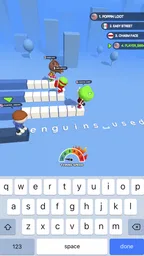
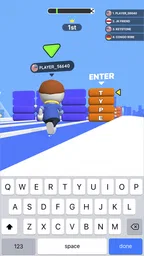
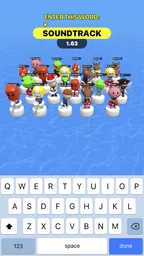
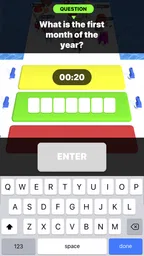
I like quick games that give a spare few minutes a clear purpose, and Type Sprint makes typing itself the competition. Instead of answering trivia questions or matching tiles, you race by entering text: the quicker and more accurately you type, the more effectively your runner moves. That simple connection between keyboard input and a 3D race gives the game an immediate hook, especially when two people in the same room want a short, easy-to-understand challenge.
As a trivia game from Masterskaya DK, it takes a different route from the category’s usual knowledge quizzes. There is no need to brush up on facts before a round; the skill being tested is how smoothly you can type under pressure. I would describe it as a casual typing race with a trivia label, rather than a conventional quiz. The game is free, rated for Everyone, and has a 4.5 average from around 127,000 ratings, which suggests it has found a broad audience for this straightforward idea.
Why it works for quick shared play
The strongest household use case is a brief head-to-head session when people are already nearby and want something more engaging than taking turns on a solo puzzle. The race format makes the goal visible: type the prompt and try to get ahead. A younger player can understand the basic contest without needing a long explanation, while an experienced typist can enjoy the pressure of keeping a steady pace.
For example, I can imagine opening it during a short wait at home, letting one person take a turn, then handing the device to someone else for a rematch. The appeal is not that it turns a family evening into a deep game night; it is that the activity can fit between other things. Because the core challenge is typing, differences in familiarity with a keyboard matter more than differences in general knowledge. That can make the contest funny and lively, but it may also make a race feel uneven if one player types far faster than everyone else.
That trade-off is worth considering before treating it as a fair test between people of very different ages or typing habits. A child who is still learning to find letters may have a harder time than an adult who types every day, even if both understand the text equally well. I would keep the mood light and focus on improving a personal run rather than presenting every result as a meaningful comparison.
The game has reached over 10 million installs, but scale alone does not tell me whether it suits a particular household. What matters more is whether everyone is comfortable typing on the device being used. On a phone, the keyboard takes attention and screen space; on a shared device, each player may also have a different grip or preferred way of entering text. A quick test round is a sensible way to see whether the controls feel comfortable before starting a longer session.
Keep the device handoff simple
On a shared phone or tablet, I would decide in advance who is playing and when the device changes hands. That is not a special game feature; it is simply a practical way to avoid someone accidentally continuing another person’s session or interrupting a race. The game’s short-session premise suits this kind of turn-taking, but the device itself remains the boundary between players.
If several people share one screen, make sure each person has a comfortable chance to read and type rather than rushing the handoff. A small adjustment in where the device is held can help a younger player see the text and reach the keys. For players using an on-screen keyboard, keeping the device steady matters: a wobble or awkward angle can make a typing challenge feel harder for reasons unrelated to skill.
I would also separate “playing together” from “sharing an account.” A household can take turns on a device without assuming that every player has an individual profile or that progress is organized for multiple people. If keeping personal results distinct is important, check what the current app experience offers before relying on it for that purpose. For casual races, simply agreeing whose turn it is may be enough; for a family tracking improvement, unclear boundaries could become frustrating.
There is another small but useful coordination point: agree on whether a round is a practice run or a proper contest. A player who has not yet settled into the keyboard may need a few attempts to understand the pace. Treating that first try as warm-up reduces the chance that the fastest typist immediately dominates and everyone else loses interest. It also makes the game more welcoming without pretending that typing speed is equal across the group.
Typing skill is the real difficulty setting
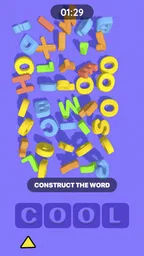
Unlike a standard trivia quiz, Type Sprint does not primarily reward remembering facts. It asks players to convert visible text into keystrokes quickly, so reading fluency, familiarity with the keyboard, and accuracy all affect the experience. That makes it a useful casual activity for people who enjoy typing challenges, but it is not a substitute for a structured typing course. I would use it for a lively change of pace, not as a dependable way to measure typing ability.
A practical tip is to focus on a rhythm rather than pecking at the keys in a panic. When a race begins, trying to go as fast as possible can lead to mistakes and broken concentration. I find the more interesting challenge is keeping a pace that remains controlled as the text changes. Even without treating the result as formal training, that mindset can make repeat attempts more satisfying: the goal becomes a cleaner run, not just frantic speed.
It may also help to choose the right moment. If someone is tired, distracted, or uncomfortable typing on a touchscreen, a fast race can feel like a test they did not ask to take. In that situation, a relaxed word game or a conventional trivia quiz is a better fit. Type Sprint is most enjoyable when players are willing to concentrate briefly and accept that errors are part of the contest.
The 3D runner presentation gives the typing a visible payoff, which helps distinguish it from a plain typing practice tool. That visual layer is useful for making the contest feel like a game, but it is not the main reason to stay. The core loop still depends on entering text. Players who want a story, a broad set of trivia subjects, or a strategy-heavy race should look elsewhere; the attraction here is the direct link between typing and movement.
Age, trust, and realistic expectations
The Everyone age rating makes the game a plausible option for a mixed-age household, but age suitability is not the same as a guarantee that every child will find it comfortable. A child needs to be able to read the displayed text and operate the keyboard well enough to enjoy a race. Younger players may benefit from a patient adult nearby, especially at first, while older children can likely grasp the basic contest quickly.
For parents, I would approach it as a game to try together rather than assume it is automatically a learning app or a fully managed family activity. Its typing-based play can create a useful moment to talk about careful input and persistence, but the experience is still a race. If a child finds timed challenges stressful, there is no reason to insist; a slower word puzzle may be a kinder choice.
Because the device may be shared, household expectations matter too. Decide whether children can play whenever the phone is available or only when an adult is present, and whether turns should end after a race or a short session. Those boundaries come from the family, not from an assumption about controls inside the game. The same applies to keeping personal information separate: use ordinary device and account habits rather than expecting a typing game to manage household identities for you.
Type Sprint is free, which makes trying it with a household low-commitment in the purchase sense. It is rated for Everyone and has accumulated around 2,000 written reviews alongside its ratings. I would still judge it by the actual fit: whether the text is comfortable to read, the keyboard feels manageable, and players enjoy competing on typing rather than knowledge.
How it compares with other trivia and word games
Compared with a typical trivia app, this game puts less weight on what you know and more on how quickly you can enter what you see. That is a meaningful distinction for group play. A general-knowledge quiz can leave one player behind because of unfamiliar topics; a typing race can leave a slower typist behind even when they understand the prompt. Neither format is automatically fairer, but they reward different strengths.
Compared with a conventional typing tutor, the race framing gives each attempt a more immediate sense of competition. The trade-off is that someone seeking lessons, detailed correction, or a step-by-step curriculum should choose a tool designed for practice. Likewise, a word-search or anagram game is better for players who want to think through language without a speed contest. I would pick Type Sprint when the group wants a brisk, visual challenge and switch to those alternatives when the priority is learning or calmer play.
The current version is 1.14.2, and the game was released on June 15, 2021. It supports Android 7.1 and later, so it can be considered on devices running that minimum or a newer system. If you are choosing a shared household device, checking that its software meets the requirement is a straightforward first step. The developer is Masterskaya DK; the title’s broad install base is reassuring as a sign that many players have tried it, though it does not replace checking whether its specific style suits your family.
Who should try it—and who should pass
I would recommend giving it a try if you enjoy short races, like typing challenges, or want a simple activity that can be passed around among people in the same room. It can work well as a quick break between chores or while waiting for something to finish, provided everyone is comfortable using the device’s keyboard. Its clearest strength is the easy-to-grasp connection between typing well and getting ahead.
I would skip it if your household is looking for a knowledge quiz, a calm game with no pressure, or a dedicated way to teach typing. I would also choose another option if one player’s typing speed is so far ahead that the rest no longer enjoy competing. In that case, a turn-based puzzle or a trivia game where players answer independently may keep the group involved more evenly.
My household verdict is that Type Sprint is a good fit for occasional, informal play when the shared-device rules are clear and the group treats results as fun rather than a serious ranking. It is not a universal family game, and the typing requirement narrows who will enjoy it, but that same focus gives it a distinct identity among trivia and word-based alternatives. If you want a quick contest built around reading and typing, I think it is worth trying; if you want deeper quiz content or a structured learning path, another game will serve you better.
What we like
- Quick rounds make it easy to play during short breaks.
- Different modes add variety to repeated typing practice.
- Timed challenges encourage faster responses.
- Simple controls are easy for new players to learn.
- Scores give players a clear way to track performance.
What could be better
- Fast-paced rounds may frustrate beginners.
- Timed play can feel stressful for some users.
- Replaying similar challenges may become repetitive.
- Small phone keyboards can make accuracy harder.
- Progress may depend heavily on typing skill.







