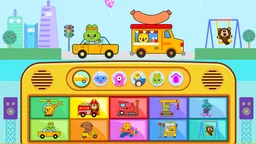
Toddler Piano and Music Games review
 Analysis by Appsdrops
I see Toddler Piano as a small, approachable music game for introducing young children to tapping out sounds, rather than as a piano course or a competitive game. Its appeal is easy to understand: a child can explore a keyboard on a phone or tablet without needing to know music theory first. That makes it a handy option for a short, supervised play session, especially when a child is curious about music but not ready for formal lessons.
My recommendation comes with a clear boundary. This is best treated as a playful first encounter with musical sounds, not a promise of structured learning or instrument practice. If you want a simple activity to share with a toddler, it could fit well. If you are looking for lessons, a deep song library, or tools for measuring musical progress, I would choose something designed specifically for those needs.
A first musical activity, not a piano lesson
Published by Toy Tap LLP, this free music game is rated for Everyone. It has a 4.3 average from around 7,600 ratings, and more than 10 million installs suggest that many families have tried it. Those figures offer useful context, but they cannot tell me whether every child will enjoy its style or whether it suits a particular family’s expectations.
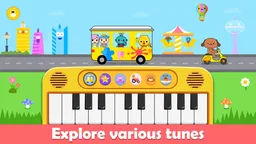
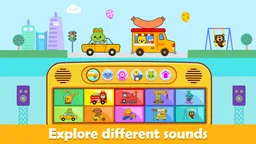
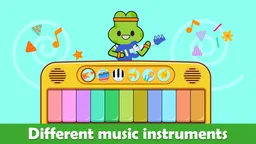
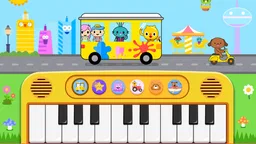
The key question is what “piano” means in this setting. For a young child, a screen keyboard can make cause and effect immediate: tap a key, hear a sound, tap another, and notice the change. That kind of exploration can be engaging even when the child has no interest in following a tune. I would let a toddler discover the keys freely before expecting them to play a song or follow instructions.
A practical way to use it is to sit together for a few minutes and make a little game of listening. You might take turns tapping one key at a time, pause to hear the sound, then try a short sequence together. The point is not to produce a polished melody. It is to make attention, listening, and playful experimentation part of the activity.
I would also set expectations around what a touchscreen can teach. It can invite a child to notice that different taps make different sounds, but it does not replace the feel of a real keyboard or the guidance of a teacher. Children who are ready to learn notes, hand position, rhythm notation, or a practice routine will need a more structured resource.
Where it fits in an everyday routine
A realistic use case is a quiet moment at home when an adult needs a brief activity to share with a young child. Rather than handing over a device and expecting a long stretch of independent play, I would bring it out as a short, shared experiment: the child chooses a sound, the adult copies it, and then they swap roles. This gives the session a natural stopping point and keeps the adult involved in how the device is used.
That distinction matters because toddlers often move quickly from curiosity to frustration or distraction. A simple keyboard can be welcoming, but it may not hold a child’s attention in the same way every time. I would not rely on it as a guaranteed way to calm a child, occupy them for a long journey, or replace other forms of play. It is more useful as one option among books, toys, and hands-on music-making.
For families comparing it with a real toy piano, the trade-off is straightforward. A screen-based game is convenient to open and easy to put away, while a physical instrument gives a child something tangible to press and explore away from a display. For children who enjoy handling objects, a toy piano may be the more satisfying first choice. For a family that already has a device nearby and wants a quick musical activity, this app may be more convenient.
Spending, versions, and sensible expectations
The game is free to download, with in-app purchases listed at $1.99 to $4.99 per item. That is the clearest spending context I can give a parent: there may be optional paid items, so it is worth reviewing purchase settings and supervising device use before a child plays. I would not assume that every activity is included in the free experience, nor would I tell a family that a purchase is necessary. Whether the free portion is enough depends on what the child wants to do and what appears in the app during use.
This is a useful place to make a deliberate choice rather than buy something in response to a child’s tap. If you are testing whether your toddler likes the idea of a digital piano, begin with the free download and observe how they engage. If a purchase prompt appears, pause and decide as an adult whether the item adds value for your household. A child’s interest in the keyboard itself is a better guide than the assumption that spending will make the experience educational.
The current version is 8.0, and the listed minimum operating-system requirement is version 7.0. The game was released on September 10, 2019. For a parent choosing a device, the practical step is to check that the operating system meets the requirement and that the app store offers the current version for that device. An older release date alone does not tell me how the game feels today, so I would base the decision on the current app experience rather than on age as a proxy for quality.
Progress without pressure
I would avoid turning this into a test of whether a child can repeat a song correctly. In a toddler-focused music game, exploration can be valuable in its own right: a child may enjoy making a sound, repeating it, or changing the order of taps. Adults can support that curiosity by copying the child’s pattern and leaving space for them to lead, rather than correcting every unexpected note.
That approach is also a useful way to judge whether the app is working for your child. Look for signs of interest such as returning to the keyboard, listening to the sounds, or inviting you to join. If the child simply taps rapidly without engaging with the sound, that does not mean they have failed; it may mean the activity is not the right fit at that moment. Put the device away and try again another day, or switch to singing and a physical instrument.
There is no reason to treat the game as a race or a measure of talent. I would not compare one child’s play with another’s, and I would not expect a screen activity by itself to produce steady musical progress. For a child who wants more challenge, an adult-led song, a basic keyboard, or a lesson app with clear instruction is likely to be a better next step. This game makes more sense at the exploratory end of that path.
Fairness and the limits of the comparison
Competitive fairness is not really the central issue here: Toddler Piano is a music game for children, not something I would approach as a contest between players. Its value is better judged by whether the child enjoys making sounds and whether the adult finds the experience appropriate for their household. There is no reason to choose it for rankings, prizes, or a level playing field against other players.
Compared with general-purpose music and piano apps, the title is aimed at a much younger audience. A full learning app may be better for a child who wants guided exercises, deliberate practice, and a clearer route from one skill to another. A general music-making app may suit an older child who wants more control over composition. A physical instrument is preferable when tactile play and freedom from screen time matter most. Toddler Piano’s likely role is narrower: an accessible digital introduction to tapping and listening.
I also would not use the rating or install count as proof that the app is educationally superior to those alternatives. Popularity can help reassure a parent that it is not an obscure choice, but it does not answer the more personal questions: does your child like the sounds, can you supervise the session, and are you comfortable with the purchase options? Those are better decision points than comparing it as if every music app served the same age group.
What parents should check before handing over the device
Because the game is intended for young children, I would review the app’s current screens and device settings before letting a toddler explore alone. In particular, check how purchase prompts are handled on your device and decide whether purchases require adult approval. That is a general precaution for any child-facing app with in-app purchases, not a claim about a specific control or policy inside this game.
I would also choose the device and setting with the child in mind. A larger screen may make it easier for a small child to tap keys accurately, while an adult can keep the device stable and nearby. Keep the first session short enough that you can see whether the child responds to the sounds or becomes distracted by the device itself. If the keyboard is hard to use or the child is more interested in swiping away from it, a physical toy may give a better experience.
Age rating is a useful starting point, but it is not a substitute for family judgment. Even with an Everyone rating, parents should decide whether the content and on-screen experience suit their particular child. I would play alongside a toddler at first, both to guide the activity and to notice any prompts or interactions that might change how the app is used.
Who I would recommend it to
I would suggest giving Toddler Piano a try if your young child is drawn to keyboards, enjoys cause-and-effect play, and benefits from an adult joining in. It may also suit a parent who wants a no-cost starting point before deciding whether a child is interested in musical play at all. The most useful approach is to keep the activity light, make sounds together, and treat the screen as a supplement to singing and hands-on toys.
I would skip it if you expect a structured course, reliable progress tracking, serious piano practice, or a long-lasting substitute for a real instrument. I would also look elsewhere if your child is not interested in screen-based play or if you prefer to avoid apps with optional purchases altogether. In those situations, a physical toy piano, singing games, or a dedicated teaching tool would be a more direct fit.
My overall view is that this is a modest, child-oriented way to explore musical sounds, with a sensible free entry point and optional spending to keep in mind. The developer is Toy Tap LLP, and the app’s broad reach is encouraging, but I would still judge it by how my child responds in a supervised session. Use it as a short invitation to listen and experiment, not as a replacement for lessons or real musical play. With that expectation, Toddler Piano can be worth trying; without it, families may be disappointed by what a simple screen keyboard can teach.
What we like
- Colorful keys make notes easy for young children to identify.
- Simple touch controls are suitable for small hands.
- Short activities can fit into brief play sessions.
- Music games encourage curiosity about sounds and rhythm.
- The playful design can help keep toddlers engaged.
What could be better
- Toddlers may need an adult nearby to navigate the app.
- Repeated melodies can become tiring for parents.
- Some activities may offer limited challenge as children grow.
- Bright visuals and sounds may overstimulate sensitive children.
- Accidental taps can interrupt a game or change activities.







