

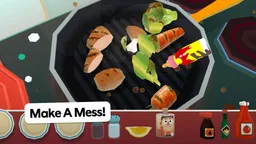






Toca Boca Jr Kitchen NETFLIX review
 Analysis by Appsdrops
The first thing I’d keep in mind with Toca Boca Jr Kitchen is that it is meant to make pretend cooking approachable for children, not teach a structured cooking course. It is an educational game from Netflix, Inc., built around a simple kitchen-play idea. That makes it a natural fit for a child who likes serving up imaginary meals, and for an adult looking for a playful activity that does not require real ingredients or kitchen equipment.
What the kitchen game is like
At its best, this kind of play gives a child room to choose, experiment, and make a meal in their own way. I would approach it as imaginative screen time rather than a lesson with a fixed outcome. The useful question is not whether a child can follow a recipe, but whether the kitchen theme gives them an inviting starting point for pretend play.
The game’s focus is narrow, which can be a strength for a first-time player. A child does not need to understand a complicated story or learn a large set of rules before engaging with the cooking premise. An adult can introduce it in a sentence—“Let’s make something in the kitchen”—then let the child explore. That simple handoff is especially helpful when a young player is not yet comfortable with games that demand reading or precise instructions.
It is listed as free and rated for Everyone, so the basic decision to try it is straightforward for families. Still, I would treat the age label as a broad content guide, not a guarantee that every child will find the controls or pace comfortable. A younger child may benefit from sitting with an adult at first, while an older child who wants goals, progression, or a more realistic cooking simulation may find the concept too light.
Set up for a calm first try
Before handing over the device, I’d make sure the game is installed on a compatible device: the listed minimum operating system is 10. Then I’d open it myself once, not to pre-play the whole experience, but to see how it begins and whether the child will need help getting past an opening screen. That small check prevents the first session from turning into a troubleshooting exercise.
For a first introduction, keep the session short and sit close enough to observe how the child responds. Rather than explaining every possible action, invite them to try one thing and describe what they see. This gives you a quick read on whether the controls make sense to them without turning play into a test. If they become frustrated, pause and demonstrate a single action, then hand the device back.
A practical tip is to decide in advance what “finished” means. For a young child, that might simply be making one pretend dish and telling you about it. Having a small endpoint can make it easier to transition away from the screen, especially if the child tends to resist stopping an open-ended activity. It also gives the game a purpose beyond filling time.
Make the first success about the child’s idea
I’d define a successful first session as the moment a child makes a choice and feels ownership of it—not as completing a particular task. Try asking, “What are you making for me?” Once they answer, follow their lead. If they change their mind midway through, that is part of the play, not a mistake to correct.
This works well in an everyday situation such as waiting for dinner to finish cooking. A child can play chef while an adult prepares the real meal nearby, then explain their imaginary creation at the table. The connection between pretend and real cooking can prompt conversation about foods, choices, and helping in the kitchen, without suggesting that the game itself teaches food preparation or safety. Keep the real cooking tasks with an adult.
Another useful approach is to let the child narrate. Ask what they are doing, what they would serve, or who the meal is for. These questions add interaction without relying on extra game features. They also help an adult notice whether the child is enjoying the activity or simply tapping through it. If the child prefers quiet exploration, there is no need to turn every moment into a lesson.
Where confusion can creep in
Because the premise sounds familiar, adults may expect the game to behave like a recipe app or a step-by-step cooking simulator. I would avoid that assumption. Its educational-game framing and kitchen theme are a starting point for play; they are not a reason to promise practical cooking instruction. If your goal is to help a child learn real kitchen routines, an adult-led activity with safe, age-appropriate tasks is the better choice.
Another possible mismatch is expecting a deep progression system. Children who enjoy repeating a favorite kind of pretend play may be perfectly happy returning to a familiar kitchen activity. A player who needs increasingly difficult challenges, clear levels, or a strong sense of accomplishment may want a different game. This is a matter of temperament: some children value freedom to improvise, while others want a visible target to reach.
It can also help to separate an app’s age rating from a child’s ability to use it independently. A game can be suitable for Everyone and still require an adult to help a particular child understand what to touch or how to move on. Watch the first few minutes rather than assuming that the rating settles the question. If the child keeps asking you to take over, the experience may be more enjoyable as shared play than as a solo activity.
How it compares with other cooking games
Compared with cooking games built around speed, orders, and managing a busy restaurant, this title is better approached as child-oriented pretend play. Those alternatives can suit older players who enjoy time pressure and clear objectives, but they may turn cooking into a task-management challenge. A young child who wants to invent a meal at their own pace is more likely to benefit from a gentler kitchen concept.
Compared with a real cooking activity, the game is easier to start and does not involve handling food or utensils. The trade-off is that screen play cannot replace the sensory and practical parts of preparing something together. I’d use it as a bridge to conversation or imaginative play, not as a substitute for cooking with an adult when the child is ready.
There is also a difference between this focused premise and broad creative-play apps. A general sandbox may offer more kinds of activities, but a specific kitchen theme can help a child settle into one recognizable role. That focus is useful when a child already loves playing chef; it is less compelling if they quickly tire of cooking and want a wider range of pretend scenarios.
Who should try it—and who may prefer something else
I’d consider it for a child who enjoys kitchen pretend play, benefits from a simple theme, or wants a quiet activity to share with an adult. The free price makes it easy to try, and the Everyone content rating makes its intended audience clear. The game has a 3.6 average from around 1,800 ratings, alongside over 1 million installs, so it has found an audience, though those figures do not tell me whether it will suit a particular child.
I’d be more cautious if the child is easily frustrated by unfamiliar touch controls, expects every game to have a clear win condition, or is looking for realistic cooking lessons. In those cases, try it together first, or choose an activity with more explicit instructions and goals. The current version is 1.0.2; for a new user, the more useful test is still whether the child understands the opening experience and wants to keep playing.
As a parent or caregiver, I would also set expectations about screen time before opening the game. A simple agreement—one pretend meal, then move on—can preserve the fun without making the end of play a surprise. That is particularly useful with open-ended imaginative activities, where a child may feel they are not “done” just because an adult has reached a time limit.
A sensible next step after the first session
If the first try goes well, ask the child to tell you about the meal they made, then invite them to choose a related real-world activity: setting the table, naming ingredients in dinner, or helping with a safe task under supervision. Keep that follow-up optional. The value is in connecting the child’s idea to a conversation, not in turning a game into homework.
Overall, I see Toca Boca Jr Kitchen as a focused, low-pressure way to invite children into kitchen-themed pretend play. Its strongest use is a short, shared session where the child gets to lead and an adult can gently extend the play. It is not the best pick for demanding challenges or hands-on cooking instruction, but for a first-time user who wants an easy starting point, I’d install it, explore alongside the child, and judge it by whether it sparks their own little kitchen story.
What we like
- Kid-friendly cooking play encourages experimentation without strict rules.
- Bright visuals make ingredients and kitchen tools easy to recognize.
- Short activities suit quick play sessions.
- Simple touch controls are accessible to young children.
- No real-world cooking skills are required to enjoy the game.
What could be better
- A Netflix membership is required to access the game.
- The open-ended play may feel repetitive over time.
- Young children may need help navigating the app.
- Some activities offer limited challenge for older players.
- Availability may depend on your device and region.







