



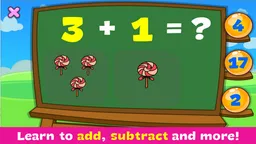
Coloring & Learn review
 Analysis by Appsdrops
I like children’s games that can hold a child’s attention without turning every spare minute into a contest or a shopping prompt. Coloring & Learn sits in a useful middle ground: it combines digital coloring with educational mini-games, so a child can switch between quiet creative play and simple learning activities. My overall impression is that it suits short, relaxed sessions best. It is not a substitute for drawing with real materials or a structured lesson, but it can be a handy option when a child wants something colorful to do on a phone or tablet.
Coloring and little learning breaks in one place
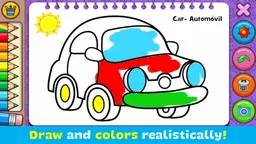
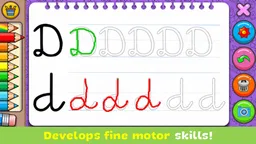
Made by Orange Studios Games, this is a free educational game for children, with an Everyone age rating. Its appeal is the mix rather than any single elaborate activity: the coloring side offers a large collection of drawings, while the game side adds learning-focused play. That variety gives a parent a practical way to offer a child a choice without jumping between separate apps.
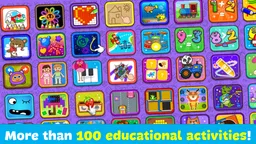
The collection is described as having more than 250 drawings and over 70 educational games. Those are generous counts, but I would not treat quantity as a promise that every item will suit every child. A younger child may gravitate toward familiar pictures and straightforward activities, while an older one might want more challenge or a stronger sense of progression than a broad collection of short activities provides.
In a typical everyday situation, I can see this working during a quiet wait at a café or while a parent finishes a short task at home. A child can pick a drawing, spend a few minutes coloring, then move to a learning game when their attention shifts. That change of pace is the practical strength: it gives the session more than one kind of activity without requiring a new app each time.
The best use of Coloring & Learn is as a flexible, low-pressure activity, not as a complete teaching plan. It can make a short break more engaging, but children still benefit from drawing on paper, talking through what they are learning, and playing away from a screen. I would use it as one option in a varied routine rather than leave it running as a default distraction.
What the mix does well—and where it can feel limited
Coloring offers an easy entry point because a child does not need to understand rules before beginning. The educational games add a reason to explore beyond the pictures, and the combination may help when a child gets restless with one activity. For a caregiver, having both modes in one place is more convenient than keeping a coloring app and a separate collection of child-focused mini-games open.
There is a trade-off, though. A collection built around many drawings and short games can offer breadth without necessarily delivering the depth of a dedicated art tool or a single carefully sequenced learning program. If your child wants precise drawing controls, open-ended creative tools, or a curriculum you can follow lesson by lesson, I would look for a more specialized alternative. Coloring & Learn is better suited to casual exploration than to those specific goals.
It also helps to set expectations about what “educational” means here. The game’s educational focus makes it relevant for children, but I would not assume that tapping through activities alone will teach a particular skill reliably. Sit with a younger child at first, ask what they are doing, and connect an activity to something familiar. That small bit of interaction can make the screen time more purposeful without asking the app to do a parent’s job.
Choosing activities without turning play into a chore
With a large selection, the choice itself can become friction for a child who is easily overwhelmed. I would make the first session simple: let the child choose between coloring and a game, rather than asking them to browse everything. Once they find an activity they enjoy, they can return to it or try another one when ready. This keeps the app feeling like play instead of a menu to work through.
A useful approach is to match the activity to the moment. Coloring makes sense when the goal is a calmer pause; a short educational game may fit when the child is alert and wants a more active task. If an activity starts to frustrate them, switching modes is more sensible than insisting they finish. That flexibility is one of the reasons the combination works better for brief sessions than a single-purpose game might.
Parents deciding whether it fits should also think about the child’s age, patience, and preferred way to play. A child who enjoys choosing colors and exploring simple activities is a natural match. A child who wants competitive challenges, advanced drawing features, or a tightly guided sequence may be happier elsewhere. I would introduce it together first, then see whether the child can find and enjoy activities independently.
Spending, fairness, and what can be judged
The game is free to download, with in-app purchases listed at $3.49 per item. That is the clearest purchase context I can give: the existence of paid items means families should check the purchase controls on their device and talk with children about asking before buying. I would not assume that every activity is free, or that a purchase is necessary to enjoy the game, because those details are not established here.
For a child’s app, fairness is less about competitive advantage and more about whether spending changes the experience in a way a family finds acceptable. Coloring & Learn is not described as a competitive multiplayer game, so I would not frame its purchases as a way to gain an edge over other players. The sensible household rule is straightforward: treat the free version as the starting point, review any purchase prompt together, and only spend if the specific item seems worthwhile to you.
The game has an average rating of 4.3 from around 292,000 ratings, and it has passed 100 million installs. Those figures suggest that many families have tried it, but popularity cannot tell me whether its activities fit one particular child or whether a paid item is worth buying. I would use the broad adoption as context, not as a substitute for trying the free experience and watching how your child responds.
There are also limits to what a responsible review can conclude about spending. The listed price per item is useful, but it does not reveal which items are offered, how often prompts appear, or whether purchases unlock particular content. I would avoid making a decision based on assumptions about those details. Check the current purchase screen in the app store and on the device before handing the game to a child unsupervised.
How it compares with other children’s options
Compared with a basic coloring app, Coloring & Learn offers more than pictures to fill in because it also brings educational games into the same experience. That makes it a better fit when a child’s interest changes quickly. On the other hand, a dedicated coloring app may be preferable for a child who wants a more focused art session, while a structured learning app may be the stronger choice when a parent wants a clear progression around one subject.
Compared with physical coloring books, the appeal is convenience and variety: a device can keep several kinds of activity together. The exchange is familiar and worthwhile to consider. Screen-based coloring does not give the same feel as crayons, paper, or the freedom to draw anywhere on a page. I would not present the digital version as a replacement for those materials, especially for a child who enjoys tactile play.
For families who want an activity that can shift between creative and educational play, the combination is distinctive enough to try. For families avoiding screens, or for children who become upset when asked to stop, the app may not be the right answer to a waiting-room problem. A book, a small drawing pad, or a non-screen activity could be a better fit in those cases.
Compatibility and a sensible first try
The current version is 2.30, and the minimum Android requirement is version 6.0. It was released on July 19, 2016, so it has been around long enough to attract a broad audience, though a release date alone does not tell me how well it will run on a particular device. Before installing, I would check that the device meets the operating-system requirement and has enough room for another game.
For a first try, I would open it with the child rather than simply handing over the device. Watch which mode draws them in, whether they can navigate the choices comfortably, and whether any purchase prompt appears. Then decide on a simple boundary—such as using it for one short break—before the child begins. This gives you a realistic sense of its fit without assuming that a large collection automatically means sustained interest.
The game’s Everyone rating makes it broadly suitable for children, but an age label cannot replace a parent’s judgment about a particular child’s screen habits or needs. If your child is very young, staying nearby is useful both for help with navigation and for keeping the activity social. If they are older and want more demanding play, you may find that the simple, varied format is not enough to hold their attention.
My verdict for families
I would recommend Coloring & Learn to parents looking for a free starting point that brings digital coloring and child-focused games together. It is especially practical for short waits, quiet breaks, or moments when a child wants to choose between making something colorful and trying a learning activity. Its appeal is variety and convenience, not a promise of deep instruction or sophisticated art tools.
I would skip it if your main goal is a structured course, a highly capable drawing studio, or a screen-free activity. I would also be cautious about leaving a child alone with any app that includes in-app purchases until you have checked the device’s purchase settings and explained your household rules. Those are manageable considerations, but they matter more than the game’s popularity when deciding whether it belongs on a child’s device.
Overall, I see it as a useful, casual option rather than an essential educational tool. Try the free experience with your child, pay attention to which activities genuinely hold their interest, and keep real-world play in the mix. If the child enjoys moving between coloring and simple learning games, the app has a clear place in a family’s collection; if they need depth, guidance, or tactile creativity, another option will serve them better.
With its 4.3 average rating and broad reach, Coloring & Learn is clearly a familiar choice for many families, but I would still judge it by how your own child uses it. Its balance of creative and educational activities is appealing, and its free entry point makes it easy to test. My recommendation is measured: give it a supervised try, keep spending decisions with an adult, and use it as one small part of a child’s play rather than the whole plan.
What we like
- Offers a relaxed way to explore colors through interactive activities.
- Suitable for young children who are learning to recognize colors.
- Simple touch controls make activities easy to start.
- Creative coloring lets children experiment with different shades.
- Can provide a quiet activity for home or travel.
What could be better
- Some activities may feel repetitive after extended play.
- Young children may need help navigating the menus.
- Small details can be difficult to color on compact screens.
- The educational content may be too basic for older children.
- Access to some features may depend on ads or in-app purchases.







