



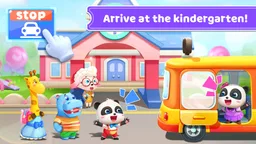
Baby Panda's School Bus review
 Analysis by Appsdrops
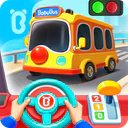
I would look at Baby Panda's School Bus as a small, child-focused driving game rather than a lesson app with a fixed curriculum. Its appeal is easy to grasp: children get to take the wheel of a school bus in a bright 3D setting. That simple premise may suit a young player who likes vehicles and pretend journeys, but it also means parents should judge it as entertainment with an educational label, not as a substitute for structured learning.
BabyBus makes the game, which sits in the educational-games category. It is free to download, rated for Everyone, and has an average rating of 4.5 from around 338,000 ratings. More than 100 million installs suggest that it has reached a very broad audience, though popularity alone cannot tell you whether its controls or pace fit your child. I would treat those figures as context, then watch how a particular child responds to the play itself.
What the bus-driving setup makes easy to understand
The school-bus theme gives children an immediate role: they are not navigating an abstract menu or solving a worksheet, but imagining a familiar kind of trip. In my view, that is one of the game’s most useful qualities for an early player. A child can understand the basic idea through the vehicle and setting before an adult has to explain what the game is about.
That clarity can help with independent exploration, but it should not be confused with fully self-explanatory navigation. A young child may know they want to drive and still need help working out where to tap, what an on-screen prompt means, or how to return to a previous screen. I would plan to sit alongside the child the first time, especially if they are not yet comfortable with touch-screen games.
For a parent, a useful first session is less about testing whether the child can “win” and more about noticing where they hesitate. Do they recognize the interactive parts? Can they follow the visual direction without a running explanation? Do they become frustrated when they make a mistake? Those observations will tell you more about fit than the broad age label does.
The version currently listed is 8.76.16.70, and the game requires Android 6.0 or later. Those details matter when choosing a device, but they do not guarantee that every older phone or tablet will feel smooth or that every child will find its interface comfortable. If you are installing it on a shared family device, check the experience yourself before handing it over.
Readable scenes are not the same as effortless navigation
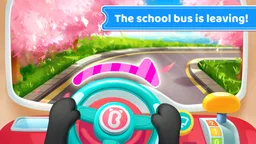
Three-dimensional presentation can make a bus and its surroundings feel more concrete than flat icons, particularly for children who enjoy visual pretend play. At the same time, a 3D scene can ask a child to interpret several things at once: the vehicle, the route, the controls, and any prompt on screen. A child who has trouble sorting visual details may need an adult to point out what matters first.
I recommend keeping the first try short and talking through one action at a time. Rather than explaining every possible screen, let the child explore, then offer a simple cue if they get stuck. This gives you a practical sense of whether the visual presentation supports them or becomes busy. It also avoids turning a casual game into a lesson that feels like work.
Because the game is built around driving, it may be more appealing to a child who enjoys movement and vehicle play than to one who prefers quiet matching or drawing activities. That is not a flaw; it is a matter of interest. If your child regularly abandons games when instructions are visual rather than spoken, stay close and see whether the prompts are enough for them to continue.
Touch, pace, and different ways of playing
A driving game naturally puts emphasis on touch input and coordinating an action with what appears on screen. For a child with steady, confident taps, that can feel direct and satisfying. For a child who has limited fine-motor control, tremor, fatigue, or difficulty distinguishing small targets, the same interaction may be tiring. I would test it on the device the child will actually use rather than assume that a game suitable for one screen will feel equally manageable on another.
One useful approach is to offer the device in a stable position and let the child use whichever hand or finger feels comfortable. Avoid coaching them toward a “correct” grip unless they ask for help; the aim is to see whether they can participate in their own way. If they repeatedly miss controls or need you to take over, that is a strong sign that this particular driving format may not be the right choice at the moment.
Sensory preferences also vary. The bus theme and 3D visuals may be engaging for a child who likes colorful, active scenes, while visual motion or a lively presentation could be too much for someone who gets overwhelmed by screen activity. I would start with a calm, brief session and observe the child rather than trying to push through discomfort. A child who turns away, becomes tense, or asks to stop is giving useful feedback.
For a practical everyday use, imagine a short wait at home while dinner is being prepared. This can work as a small, supervised activity if the child already understands the controls and is content with the visual style. It is less suitable as an automatic way to occupy a child who is upset, overstimulated, or struggling to use the screen, because the driving task may demand more attention than a very simple, low-input activity.
I would also avoid presenting it as a reward that must be earned through perfect performance. A child who finds touch controls hard can easily experience repeated mistakes as personal failure, even when the difficulty is really about the interface or their current motor skills. Keeping the tone playful—and being willing to switch activities—makes the experience fairer.
Choosing the right moment and device
The game is most likely to work well when a child has enough time to explore without being hurried. If you are about to leave the house or need the device back in a minute, starting a driving game may create friction when the child is asked to stop. I would introduce it during a relaxed window and give a clear warning before ending play, especially for a child who finds transitions difficult.
For shared-device use, check the screen brightness and sound level before the child begins, and keep the device within easy reach. These are simple adjustments rather than special accessibility features, but they can make a meaningful difference to comfort. If a child uses visual aids or needs a particular display setup, make sure the game remains legible with that arrangement before relying on it as an activity.
Parents may also wonder whether a free game is entirely cost-free in practice. The download is free, but the game offers in-app purchases ranging from $0.49 to $29.99 per item. I would review purchase settings on the device and make the family rule clear before a child plays. That is especially useful for younger children, who may not distinguish a game prompt from a necessary step.
Where it fits among children’s games—and where it falls short
Compared with a basic puzzle or coloring app, this game asks for more active participation: the child is taking part in a vehicle-centered scenario instead of simply selecting or filling in an image. That can be a better match for a child who wants to pretend to drive. On the other hand, a quieter alternative may be more appropriate for a child who needs minimal movement, fewer visual demands, or an activity that can be paused without losing the thread.
It also differs from a conventional learning app that emphasizes letters, numbers, or step-by-step practice. The central draw here is the school bus and the experience of driving it, so I would not choose it when the goal is targeted practice in a specific academic skill. If you want a child to work on a particular learning objective, a focused educational activity is likely to be a more direct option.
The audience is broad: the Everyone content rating makes it accessible in age terms, but that does not mean every age or ability will find it equally easy. A preschooler may need help understanding the controls, while an older child who expects complex challenges may find a simple, child-oriented driving game limited. I would use the child’s interests and confidence with touch controls as the deciding factors rather than the rating alone.
There are trade-offs around the educational label, too. I see the game as a playful setting for exploration, not evidence that a child will gain a measurable skill simply by playing. An adult can make the outing more engaging by asking the child to describe what they are doing or imagine where the bus is going, but that conversation is something you add; it should not be mistaken for a built-in teaching plan.
The biggest practical barrier is uncertainty about personal fit. A child may love the bus theme yet dislike touch-driven play, or enjoy the visuals but need more guidance than a caregiver can provide at that moment. Since the game is free to install, a brief supervised trial is a reasonable way to find out. Keep the session short, notice whether the child can make progress without repeated rescue, and stop if the experience becomes frustrating.
My inclusive verdict for families
I would recommend Baby Panda's School Bus to families looking for a free, vehicle-themed game for a child who enjoys pretend driving and can comfortably use a touch screen, with an adult nearby for the first session. BabyBus has made a premise that is easy to explain, and its broad reach—along with its 4.5 average—shows that many families have chosen to try it. Neither fact guarantees an accessible experience for an individual child, so a hands-on trial matters more than popularity.
I would skip it, or choose a calmer alternative, if your child is sensitive to active visuals, has trouble with touch controls, or needs a game with a clear academic goal. I would also avoid handing it over unsupervised until you have checked how the child handles navigation and whether purchase prompts could cause confusion. These are manageable concerns, but they are worth addressing before the game becomes part of a routine.
Overall, I see it as a specific kind of option rather than an all-purpose children’s app: a playful bus-driving experience that can suit the right child in the right moment. Try it when there is time to explore, keep the device comfortable to use, and let the child’s response guide you. If they can follow the on-screen experience and enjoy taking the role of the driver, it may make a pleasant short activity; if not, there is no reason to force the fit.
What we like
- Bright visuals make the bus rides appealing to young children.
- Simple touch controls are easy for preschoolers to learn.
- Short activities suit brief play sessions.
- Familiar school bus themes can encourage imaginative play.
- The game can entertain children without requiring advanced reading skills.
What could be better
- Some activities may feel repetitive after several play sessions.
- Young children may need adult help to navigate menus.
- In-app promotions may distract from the activities.
- The game may take up noticeable storage space on older devices.
- Gameplay offers limited appeal for older children.







