



Pepi City: Hospital Life review
 Analysis by Appsdrops
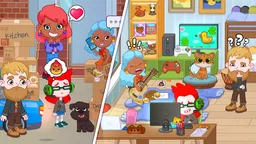
I’d describe Pepi City: Hospital Life as a small, open-ended pretend-play world rather than a lesson-based medical game. You can take the role of a doctor or a patient and make up stories around a city hospital. That makes it easy to start playing without learning a complicated set of rules, but it also means the fun depends on a child’s willingness to explore and invent. I think it works best when a grown-up is happy to join in now and then, rather than expecting the game to guide every moment.
Getting started without turning play into a task
Pepi City: Hospital Life is an educational game from Pepi Play, aimed at everyone and available free to install. Its central appeal is role-play: children can imagine what happens when someone visits a hospital, then swap perspectives and create a different story. It is a gentler proposition than a quiz or a game built around scores. There is no need to treat play as a test of medical knowledge; the value is in experimenting with roles and situations.
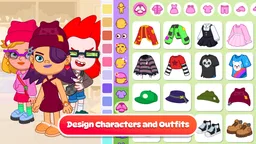
That open approach is a strength, especially for children who like making their own characters and narratives. It can also be the first point of friction. A child expecting a clear mission, a step-by-step introduction, or a steady stream of instructions may wonder what to do next. I would introduce it as a place to play hospital, not as a game that will tell them exactly how to complete a task. A simple prompt from an adult—“Who needs help today?”—can be enough to get a story moving without taking control away from the child.
The game has a 4.3 average from around 252,000 ratings, alongside about 4,600 written reviews and over 100 million installs. Those figures suggest it has found a broad audience, but they do not tell me whether a particular child will enjoy its loose, imaginative style. If your child prefers puzzles with unmistakable goals, that popularity should not outweigh the difference in play style.
For a first session, I’d keep expectations modest and let the child explore at their own pace. It may help to take turns choosing who is the doctor and who is the patient, then ask what the characters might do next. That gives the game a little structure without pretending it is a formal lesson. If the child is content to invent scenes, an adult can step back; if they stall, a small role-play prompt is more useful than repeatedly tapping around on their behalf.
What the hospital setting does—and does not—promise
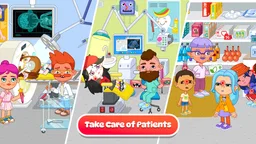
The hospital theme gives children a familiar setting for pretend play, and switching between patient and doctor offers two different ways into the same imaginary situation. I see that as more useful than simply presenting medical objects to inspect: children can act out both asking for help and offering it. Still, a hospital-themed game should not be mistaken for health advice or a substitute for talking through a real medical concern. It is play, and I would keep that boundary clear with younger children.
Compared with many educational games that rely on correct answers, timed challenges, or repeated drills, this one seems better suited to storytelling and shared play. That is a meaningful trade-off. A child who learns best through direct instructions may get more from a guided activity or an adult-led conversation, while a child who likes to make up scenes may find a quiz format restrictive. The right choice depends less on the word “educational” and more on whether open-ended play holds your child’s attention.
Small checks before a play session
If the game does not launch or feels sluggish, I’d start with the ordinary checks that apply to any mobile game: confirm that the device meets the minimum operating-system requirement, close other demanding apps, and try again after restarting the device. Pepi City: Hospital Life requires Android 7.1 or later. That is a compatibility threshold, not a guarantee that every supported device will feel equally responsive; older hardware can still make an otherwise compatible game less pleasant to use.
It is also sensible to check that the game has finished installing and that the device has enough free space for normal use. If a child is about to play, I would open it first and make sure it reaches the play area before handing over the device. This is a simple way to avoid turning a short free moment into a troubleshooting session. If something is wrong, note what happens—such as whether the game closes immediately or gets stuck while opening—before trying a basic restart. That makes it easier to tell a one-off hiccup from a persistent problem.
The game is free, but it offers in-app purchases priced from $0.69 to $17.99 per item. I would review purchase controls on the device before letting a child play independently, especially if the device is shared. That is useful preparation for any free-to-start children’s game: it avoids an unexpected interruption and makes it clear that installing the game does not necessarily mean every optional purchase is included. I would also explain that a purchase prompt is a reason to ask an adult, not something to tap through.
The current version is 3.17.2. If you are checking compatibility or trying to work out why the game behaves differently after an update, compare the installed version with the one available through the app store and use the normal update route there. I would avoid deleting the app as a first response to a minor issue, since reinstalling can create extra work and may not address a device-level cause. A restart and a version check are more sensible early steps.
Getting play moving again when a session stalls
Open-ended play can run out of steam even when the game itself is working correctly. Rather than repeatedly tapping the same area, I’d change the story: have the patient arrive with a new concern, let the doctor ask questions, or swap roles and replay the scene from the other side. These prompts are not hidden game mechanics; they are practical ways to help a child get more from a pretend-play format that does not depend on a checklist of objectives.
A useful approach for a short session is to set a small imaginative frame before handing over the device: one character needs help, another decides what to do, and then they switch roles. This creates a natural beginning and ending without adding pressure to “finish” anything. It can also help a child who is curious about the hospital setting but unsure how to turn exploration into a story. If they prefer to play independently, leave the prompt behind and let them take the narrative in another direction.
If a session freezes or responds inconsistently, I would pause, close the game normally if possible, and reopen it. If the issue returns, restart the device and check for an available update. Avoid rapid repeated taps while the screen is unresponsive; they make it harder to judge whether the game has recovered and can frustrate a child. If the problem persists across restarts, the app store’s support route is a more useful next step than assuming the child has done something wrong.
For families sharing one device, it helps to agree on a simple handoff routine: finish the current pretend scene, exit the game, and then pass the device along. That is not a special feature of the game, but it prevents a new player from inheriting a confusing half-started story or mistaking an interruption for a broken game. It also gives a parent a natural moment to check for purchase prompts before a younger child continues.
When the problem may be the device or the play style
Not every frustrating session points to a fault in the game. A device that is running low on resources, has a pending update, or is struggling with several apps open can affect performance. I would test after a restart and with other apps closed before deciding the game itself is the problem. If the same issue appears in unrelated apps too, that is another reason to look at the device rather than repeatedly reinstalling one game.
There is a different kind of mismatch that no troubleshooting step can fix: some children simply want more direction. If your child keeps asking what the correct answer is or loses interest without a clear goal, Pepi City’s pretend-play approach may not be the best fit for that moment. A structured educational game, a book, or a real conversation with an adult may serve them better. Conversely, a child who enjoys assigning roles and narrating what happens may find the freedom refreshing.
I would also choose a different activity when the goal is to explain an actual illness, prepare a child for a real appointment, or teach specific health procedures. The game can provide a starting point for imaginative conversation, but I would not rely on it to answer those questions. An adult can use the pretend scenario as a gentle opening—“What do you think a doctor might ask?”—then give age-appropriate, accurate explanations outside the game.
Who is likely to enjoy it
I’d recommend it most readily to children who enjoy pretend play, familiar everyday settings, and making up their own dialogue. It can suit a quiet stretch at home, a shared play session with a parent, or a moment when a child wants to act out a doctor-and-patient story rather than watch a video. The everyone age rating makes it broadly accessible, but younger players may still benefit from an adult helping them get started and managing purchase settings.
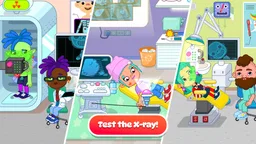
It is less compelling for children who want a strong progression system, explicit learning goals, or constant direction. It may also disappoint someone expecting a detailed simulation of hospital work. The central question is whether your child enjoys creating the activity rather than being led through it. I would try a short session first and watch what happens: do they invent roles and continue the story, or do they quickly ask what they are supposed to do? That response is a better guide than the educational label alone.
My practical verdict
Pepi City: Hospital Life is a free, approachable choice when the aim is imaginative hospital role-play, not a structured course. Pepi Play has made a concept that is easy to explain to a child, and the ability to imagine both doctor and patient gives a shared story more than one angle. Its biggest strength is also its main limitation: freedom can invite creativity, but it can leave children who need clear goals unsure where to begin.
I’d install it for a child who likes inventing characters and would enjoy taking turns in a hospital story, while checking purchase controls and device compatibility before handing over the phone or tablet. I would skip it—or pair it with a more guided option—if the child expects puzzles, detailed instruction, or accurate answers about real healthcare. The game is rated 4.3 on average and has attracted over 100 million installs, but my recommendation is simpler: choose it for pretend play, give a hesitant child one small story prompt, and let their own imagination decide whether the hospital is a place they want to revisit.
What we like
- Kid-friendly activities make hospital role-play easy to enjoy.
- Colorful rooms and characters invite imaginative storytelling.
- Many interactive objects reward curious exploration.
- Simple touch controls suit younger players.
- Hospital scenarios can introduce everyday healthcare settings.
What could be better
- Some rooms and characters may require in-app purchases.
- Open-ended play offers little structured guidance.
- Repeated activities can feel familiar over time.
- Young children may need help navigating the available content.
- The experience may be less engaging for players seeking clear goals.







