


Toca Boca Hair Salon 4 review
 Analysis by Appsdrops
I think Toca Boca Hair Salon 4 works best as a shared creative toy: one person can start a look, another can suggest a change, and the result can become a small project rather than just a quick tap-through. That makes it a useful option for a quiet stretch at home, especially when a child wants to show an adult what they have made. It is an educational game from Play Piknik, but its appeal is less about formal lessons and more about experimenting with appearance, making choices, and seeing how those choices fit together.
In a household, the main question is not whether everyone can play at once, but whether the game suits the way your family shares a device. I would treat it as an activity to take turns with, not as a family account or a collaborative workspace. A child can hand over the device for a second opinion, then keep making decisions themselves. That small rhythm can make the salon feel social without requiring an adult to direct every step.
Making a salon session work on a shared device
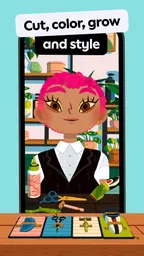
The game’s basic premise is easy to understand: create a character’s look through hair and styling choices, then keep adjusting until the result feels right. The store’s short description is simply “Toca Boca Hair Salon 4,” while the experience itself gives children room to try ideas without needing to know salon terminology. I find that approachable starting point important for younger players, since the fun can begin with choosing and changing rather than reading instructions first.
A realistic use is a short turn-taking session at the kitchen table. One child chooses a direction for the look, an adult or sibling offers a suggestion, and the player decides whether to use it. That last step matters: the game is more satisfying when the child gets to make the final call. If several people are sharing one device, agree beforehand whose turn it is and whether the next person will continue the same look or start fresh. That simple boundary avoids the familiar argument over who changed someone else’s work.
There is also a useful way to make a session feel more purposeful without turning it into a lesson. Ask the player to choose a theme—such as a cheerful, dramatic, or unusual style—then let them explain which choices support it. This invites planning and description while keeping the game playful. I would avoid setting a “perfect result” as the goal; the better payoff is seeing how a child tests an idea, revises it, and decides when they are finished.
Set expectations before handing over the phone
For shared-device use, I would establish a few practical boundaries outside the game. Decide whether the device is being used for one short session, whether the player may make purchases, and whether an adult needs to be present when the app store or payment prompts are involved. The game is free to install, but it includes in-app purchases ranging from $0.99 to $79.99 per item, so “free” should not be mistaken for “nothing can ever cost money.” An adult should handle purchase decisions rather than leave that choice to a child.
I also recommend separating the game session from access to the rest of a shared phone or tablet. Handing a device to a child can expose them to other apps, notifications, or saved account activity, depending on how that device is set up. Those are household settings to think about before play, rather than safeguards I would assume the game provides. If the device belongs to more than one person, make sure everyone knows whose account and payment settings are in use.
One small but useful routine is to let the current player finish a look before passing the device along. That gives the child a clear stopping point and reduces the chance that a sibling will alter something mid-session. If the family wants to revisit a creation later, check what the current version supports together rather than promising that a particular look will be saved or recoverable. I would make the handoff plan simple: finish, show, then pass the device.
Coordination without turning play into a contest
This is not the sort of game I would choose when a group needs a structured multiplayer activity. Its strength is individual creative control, so a group can enjoy watching and suggesting, but the person holding the device remains the one shaping the result. That distinction helps set expectations: it can bring people together around one screen, yet it is not a substitute for a game built around simultaneous turns or team objectives.
For siblings, I would use a “director and stylist” arrangement only if both children enjoy that kind of play. One can describe an idea while the other operates the game, then they can swap roles for a new look. If the suggestions become a stream of competing instructions, narrow the collaboration: let the player choose one suggestion to try, or give the helper a turn afterward. This keeps the activity from becoming a tug-of-war over the device.
Adults can contribute without taking over by asking open questions: “What are you trying next?” or “Which part do you want to change?” Those questions give the child room to explain their decisions. I would not use the game as a test of artistic skill or ask a child to reproduce a specific real-world style. Its value is in low-pressure experimentation, and that value disappears if every choice is judged against an adult’s idea of what looks good.
Compared with a drawing app, the salon’s appeal is more focused: the player is working on a character’s appearance rather than making a blank-page picture. A general dress-up game may offer a broader range of outfit-based play, while a more instructional art app may provide lessons and guided exercises. I would pick this one when the child is drawn to hair and styling choices; I would pick those alternatives when the goal is open-ended drawing, a structured curriculum, or a different kind of character customization.
Age, trust, and adult involvement
The game is rated Everyone, which makes it a reasonable candidate for family consideration, but an age label is not a replacement for an adult’s judgment about a particular child. A younger player may need help with device navigation or with understanding purchase prompts. An older child may simply want uninterrupted time to experiment. I would introduce it in a shared room first, see how the child responds, and then decide whether it fits the household’s usual screen-time routine.
Trust matters most around the boundary between play and spending. Because purchases are available, I would explain clearly that the child should ask before tapping anything that appears to cost money. If the device is used by several family members, adults should also check that the purchase process reflects the right account and household rules. That is sensible device management, not a special family feature I would attribute to the game.
The developer is Play Piknik, and the game has an average rating of 3.8 from around 176,000 ratings, with roughly 7,300 written reviews. It has passed 50 million installs, suggesting that many players have tried it, but popularity alone does not tell me whether it will suit a particular child. I would use those figures as context, not as a promise that every family will enjoy the same experience.
What to expect from the app itself
The game was released on March 11, 2020, and its current version is 3.1. It is free to download, rated for Everyone, and requires Android 7.0 or later on Android devices. Those details are useful when checking whether an older household phone or tablet can run it. If you are considering an iPhone or iPad, check the app store on that device for compatibility before planning a shared session.
In practice, I would think of it as a focused activity rather than a deep salon simulation. Its value comes from making and revising visual choices, not from teaching professional techniques or providing a long sequence of challenges. That makes it easy to pick up for a brief creative break, but it may feel limited to children who want a detailed career mode, competitive goals, or a more elaborate makeover system.
Another trade-off is that a free starting point can lead to questions about what is included and what costs extra. Before a child plays independently, I would explain that the game contains optional purchases and agree on a rule: do not buy anything without an adult. If you want a completely purchase-free activity, choose a suitable alternative or manage the device’s purchasing settings before handing it over. I would not assume that a child will understand the difference between trying a game and paying for an added item.
It is also worth choosing the moment carefully. The game suits a child who likes to linger over details and make several revisions. It is less useful when you need a quick, tightly timed group activity or a game that naturally rotates everyone through equal turns. For a calm waiting period, a single player can explore at their own pace; for a busy family gathering, I would choose something with clearer shared objectives.
Who I would recommend it to
I would recommend Toca Boca Hair Salon 4 to children who enjoy styling characters and to adults who want a low-pressure way to join in without needing to be the expert. It can work especially well when a child likes explaining choices, showing a finished look, or inviting a sibling to suggest one change. The educational angle is informal: the player practices making decisions and expressing an idea, rather than following a course or learning a guaranteed set of skills.
I would skip it if the child is likely to be frustrated by a narrow focus on appearance, if the household wants a no-purchase environment without changing device settings, or if the main goal is cooperative play with equal control for several people. A drawing app may be a better fit for a child who wants to invent scenes from scratch, and a structured learning game may be better for someone who expects explicit lessons. There is no need to treat one as universally superior; they serve different kinds of play.
For families sharing one phone or tablet, my practical recommendation is to start together, set the purchase rule, agree on turns, and let the child lead the creative decisions. The game is free, has in-app purchases, and is intended for a general audience, so a little adult setup makes the experience clearer. With those expectations in place, it can make an enjoyable small salon session at home—not a complete family game night, but a friendly creative activity worth keeping in rotation.
What we like
- Creative tools let players design colorful hairstyles and looks.
- The character editor supports a wide range of personal styles.
- Simple touch controls make the salon easy for children to explore.
- Open-ended play encourages experimentation without a fixed storyline.
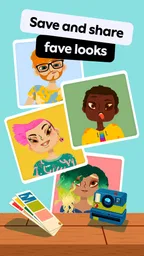
- Players can save creations to revisit or share later.
What could be better
- Some items and features require in-app purchases.
- The free version offers fewer styling options than the full game.
- There is no guided tutorial for every salon tool.
- Repeated animations may feel limited during longer play sessions.
- The game offers little challenge for players seeking goals or levels.







