
Times Table - Learn Math review
 Analysis by Appsdrops
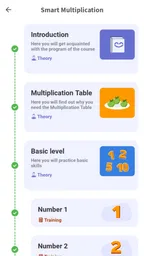
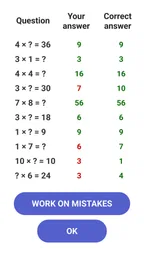
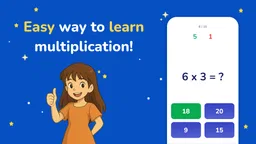
Choosing a multiplication game sounds simple until you try to find one that helps a child remember facts rather than just tap through cheerful screens. Times Table - Learn Math is aimed squarely at that task: it turns multiplication practice into a game, with a straightforward focus that may suit learners who need repetition without opening a full maths course. I see its strongest appeal in that narrow purpose, not in offering a broad set of lessons or replacing a teacher.
What to consider before choosing a multiplication game
Before installing a times-table app, I would ask what the learner actually needs. A child who is just beginning multiplication benefits from seeing how facts relate to one another; someone who already understands the method but hesitates on answers may need quick, repeated recall practice. These are different jobs, and a game focused on multiplication is more useful for the second than a general educational app that spreads attention across many subjects.
I would also consider how the child responds to practice. Some learners enjoy short rounds and a sense of play; others become more interested in the score than in remembering the arithmetic. In my view, the best way to use a game like this is as a brief, regular practice option, with an adult occasionally asking the child to explain how they worked out an answer. That keeps speed from becoming the only measure of progress.
There is also a practical question: does the app fit the learner’s age and device? This game is rated Everyone, and it is listed for Android devices running version 7.0 or later. It is free to install, although in-app purchases range from $0.99 to $19.99 per item. I would check the purchase options with a parent before handing over a device, especially if a child will use it independently.
A focused tool rather than a complete maths course
Developed by BrainSoft Apps, this educational game keeps its subject matter tightly centered on multiplication tables. That makes it easier to understand what you are choosing: it is for practicing multiplication, not a general program for arithmetic, problem solving, or classroom instruction. The current version is 2.2.8, and the game has been available since January 21, 2019.
That focus is a plus when the goal is specific. If a learner is working on multiplication facts at school and needs extra practice at home, opening a focused game can feel less like starting another lesson. On the other hand, if the difficulty is understanding multiplication itself—why three groups of four make twelve, for instance—practice alone may not be enough. I would pair it with objects, drawings, or an adult’s explanation rather than expect a game to teach every underlying idea.
Where this game makes the most sense
The main advantage is the combination of a clear subject and a playful format. Instead of asking a child to work through a worksheet every time, a parent can offer a short game session as a change of pace. That can help when a learner knows the facts in a quiet setting but needs more repetition to recall them comfortably.
One useful routine is to practice after homework, but stop before the child gets tired. For example, a parent might let a child play for a short stretch, then ask them to say aloud how they solved a couple of problems. The point is not to turn every session into a test. It is to connect the quick response demanded by a game with the understanding needed for schoolwork.
Another good use is filling small gaps in the day. A few minutes while waiting for dinner or before leaving for an activity can be easier to manage than setting aside a full extra study period. I would keep the session purposeful: choose multiplication practice when that is the current learning goal, and switch to a different activity if the child is frustrated or simply guessing.
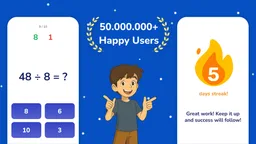
The game has substantial reach, with more than 50 million installs, and its average rating is 4.5 from around 267,000 ratings. Those figures suggest that it has found a large audience, though they cannot tell you whether its style suits a particular child. I would treat them as a useful sign of broad interest, not a guarantee that every learner will enjoy it.
How it compares with common alternatives
Compared with printed flashcards, a multiplication game can make practice feel less repetitive and may be easier to start without an adult preparing materials. Flashcards, however, are excellent for a parent who wants to control the pace, pause after a difficult fact, or ask a child to explain an answer. They also avoid the distraction of switching between play and other phone activities.
Compared with a general maths-learning app, this title’s narrower purpose is both its strength and its limit. A broad learning app may be a better fit when a child needs help with several topics or wants guided lessons that build from concepts to exercises. For someone whose immediate goal is multiplication-table recall, a dedicated game can be more direct and less cluttered by unrelated material.
Worksheets and teacher-assigned practice remain better choices when a child needs to show written working or prepare for a specific classroom task. A game can encourage repetition, but it should not be mistaken for a record of what a child can explain on paper. I would use the app alongside school materials rather than as a substitute for them.
There is a trade-off with any screen-based practice: the game may make it easier to persuade a child to begin, but it can also shift attention toward play. If the learner rushes through questions or becomes upset by mistakes, a calm adult-led review may be more effective. The right alternative depends on whether the obstacle is boredom, weak recall, or a missing understanding of multiplication.
What to expect from the free option and purchases
The app is free to download, but it also offers in-app purchases, priced from $0.99 to $19.99 per item. I would not assume that every feature or activity is included at no cost. Before a child uses it, an adult should review the purchase prompts and decide whether any optional spending is appropriate. That small step can prevent an otherwise simple practice session from turning into a request to buy something.
For a family comparing options, the important question is not just whether the initial download is free. It is whether the available practice meets the child’s needs without making the experience confusing or interrupting study. I would try the free app first, observe how the child uses it, and only consider a purchase if there is a clear reason to do so. There is no need to spend just because a paid option is offered.
Making practice useful without turning it into a chore
A practical way to judge the game is to watch what happens after a session. Can the child answer a few multiplication questions without the device? Do they seem more willing to practice, or do they only want to continue playing? Those observations matter more than the amount of time spent in the app. If the game gets a learner started but does not carry over into recall, add a quick spoken review or use physical objects to revisit the tricky facts.
I would also avoid using speed as the only goal. Fast answers can be satisfying, but a child who pauses to think may still be learning well. If mistakes lead to guessing, slow things down and ask the child to describe the multiplication as equal groups. This makes the app one part of a learning routine, rather than a scoreboard that decides whether practice was successful.
For parents, another helpful approach is to agree on a simple endpoint before starting: finish a brief practice session, then put the device away. That can make transitions easier and keep the game from expanding into an open-ended screen break. If a child is already tired after school, a worksheet or a conversational review may be kinder than another round of digital practice.
Who should choose it—and who may prefer something else
I would recommend this game to families looking for a focused, approachable way to give multiplication facts more repetition. It is especially worth considering when a child enjoys learning through play and needs a change from paper exercises. The fact that it is free to install makes it easy to try, while the Everyone age rating gives parents a basic indication of its intended audience.
I would look elsewhere if the learner needs step-by-step explanations, support across several maths topics, or carefully controlled practice led by an adult. A textbook, teacher’s materials, hands-on counters, or a broader educational app may be a better match in those cases. Likewise, if screen games tend to distract or frustrate the child, using flashcards together may produce a calmer and more useful session.
With around 1,200 written reviews alongside its large rating count, Times Table - Learn Math is clearly a well-established choice for multiplication practice. Still, popularity is only a starting point. The best test is whether your child finds the game inviting and whether the practice helps them recall facts away from the screen.
My recommendation
I would try it when multiplication-table fluency is the specific goal and the learner responds well to game-based practice. Keep sessions short, check purchase options in advance, and occasionally follow play with a simple question that asks the child to explain an answer. That combination gives the game a clearer educational purpose than leaving a child to tap through it without discussion.
My overall view is positive but deliberately focused: this is a practical option for adding variety to multiplication practice, not a complete maths-teaching solution. If your child needs repeated exposure and enjoys learning through play, it is worth trying. If they need deeper instruction, written problem solving, or less screen time, choose a different tool and use this kind of game only as an occasional supplement.
What we like
- Clear multiplication practice helps reinforce times table recall.
- Short activities make it easy to fit practice into a daily routine.
- A focused design keeps attention on basic multiplication skills.
- Useful for children who are beginning to learn multiplication facts.
- Repeat practice can help learners build speed and confidence.
What could be better
- The narrow focus may not suit learners seeking broader math topics.
- Repeated drills can feel monotonous over longer sessions.
- Learners may need adult guidance to stay motivated.
- Practice alone may not explain why multiplication answers are correct.
- It may offer limited value once times tables are already mastered.







