
Spelling & Phonics: Kids Games review
 Analysis by Appsdrops
When I hand a young child a spelling game, I want the first few minutes to feel inviting rather than like a test. Spelling & Phonics: Kids Games is an educational game from RV AppStudios built around early reading skills: hearing and working with sounds, recognizing simple word patterns, and practicing spelling. Its focus makes it a useful place to begin if a child is curious about letters but not ready for long lessons. I would treat it as a short practice activity alongside reading together, not as a replacement for an adult’s guidance.
What to expect from the first session
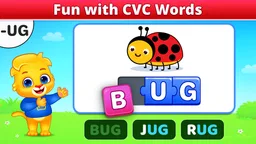
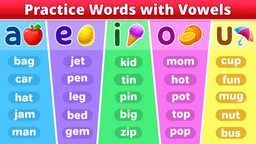
The game is aimed at children learning basic words, phonics, and CVC patterns—the consonant-vowel-consonant structure found in simple words such as “sun.” That gives it a more specific purpose than a broad preschool activity app: the goal is to connect letters and sounds with the spelling of words. In my view, that focus is most helpful when a child is beginning to sound out words, or needs repetition to make familiar letter patterns stick.
At first, keep expectations modest. A child may recognize a word by its picture or by remembering a previous answer before they can reliably sound it out. That is still useful practice, but it is not the same as independent reading. I would sit nearby and ask, “What sound do you hear first?” or “Which letter makes that sound?” Those small prompts help turn a tap into a learning moment without taking over the activity.
The game is free and rated for Everyone, which makes it an easy candidate to try with a family device. Its reach is substantial: it has more than ten million installs, and its average rating is 4.7 from around thirty-two thousand ratings, with 688 written reviews. Those figures suggest many families have tried it, but they cannot tell you whether its pace or presentation will suit your particular child. A brief, supervised first session is a better test.
Who is likely to enjoy it
I would start with children who are learning letter sounds, practicing simple spelling, or beginning to combine sounds into short words. It may also suit a child who resists a worksheet but is willing to try a few game-like tasks. The best fit is someone who can focus for a short stretch and is comfortable exploring a touch screen, with an adult available to help when a word or instruction is confusing.
It is less suitable as a standalone reading course for a child who needs structured instruction, detailed explanations, or a personalized progression. It is also not the first choice for a confident reader looking for longer stories, richer vocabulary, or open-ended creative play. In those cases, a decodable book read with an adult, a teacher-led activity, or a broader literacy app may do more. This game’s value is in focused practice, not in covering every part of learning to read.
Make the first try calm and useful
Before opening the game, choose a moment when the child is not already tired or rushing. There is no need to turn the first visit into a full lesson. Let the child look at the activity and make an attempt, then offer help only if they get stuck. If you are using a shared phone or tablet, stay close enough to guide them and keep the session focused on the game rather than switching between unrelated apps.
A helpful first goal is simply to complete one activity with understanding. If the child selects a letter or spelling answer, ask them to say the sound or word aloud. If they cannot, model it once and invite them to try again. That gives you a better sense of whether they are connecting sounds and letters or just tapping quickly. It also creates a small success that can make a return visit feel familiar rather than intimidating.
Keep the session short enough that the child remains willing to try. I would stop while they are still engaged, especially if they begin guessing or tapping without listening. Ending after a clear, successful attempt is often more productive than pushing through frustration. The point is not to collect a long run of answers; it is to leave the child with one useful connection between a sound, a letter, and a word.
Turn an answer into a reading habit
One practical way to get more from the game is to connect a word on screen to something in the room. If the activity brings up a familiar short word, ask the child to find an object that starts with the same sound. For a word like “sun,” you might compare its first sound with “sock” or “sand.” This takes only a moment, but it helps the child notice that sounds matter beyond the screen.
Another useful routine is to ask the child to say the word slowly before choosing an answer. For a simple CVC word, listen for whether they can separate the first, middle, and final sounds. You do not need to correct every attempt immediately; give them time to think, then gently repeat the word if needed. This makes the app a prompt for spoken practice rather than a silent sequence of taps.
For a first-time user, that is also a reassuring way to judge progress. Success does not have to mean that the child suddenly reads independently. It can mean they pause to listen, identify a sound they already know, or try a spelling again after a hint. Those small changes are easier to notice when an adult is present and can compare the child’s spoken reasoning with the answer they select.
Where children and parents can get confused
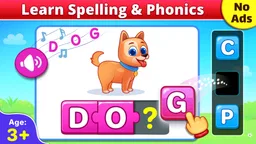
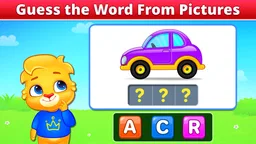
Early spelling games can blur the line between recognizing a picture and reading a word. A child may choose correctly because the image gives away the answer, then struggle when asked to spell or pronounce it. Rather than assuming the game has failed, use that moment to ask what the letters say. If the child cannot explain, offer the sound and let them repeat it; the extra conversation is part of the value.
Another common snag is expecting every child to move at the same speed. Some children know letter names but not their sounds, while others can hear a word’s first sound but find the middle vowel harder. CVC practice can expose those uneven skills. If a child repeatedly hesitates on the vowel, pause and work on that sound with spoken examples instead of urging them to guess. A game can provide repetition, but an adult is better placed to notice exactly where the confusion begins.
It is also worth watching for frustration when a child gets an answer wrong or does not understand what a task asks them to do. I would explain the instruction in plain language and demonstrate one example if needed, then let them try. If they still seem unsure, take a break rather than turning practice into a test. The right response depends on the child: some need a little prompting, while others benefit from returning another day.
How it compares with familiar alternatives
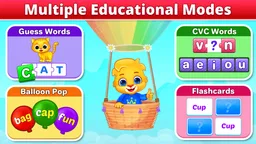
Compared with flashcards, this game offers a screen-based way to practice rather than asking an adult to prepare and present each prompt. That can make it easier to fit a few attempts into a quiet moment. Flashcards still have an advantage when you want to choose exactly which letters or words to practice, or when you want to keep the device away. A picture book has a different strength: it puts words into a story and gives an adult room to talk about meaning and context.
Compared with a broad early-learning app, the emphasis here is narrower. That is a strength if your child needs work on sounds and basic spelling, because the activity has a clear literacy purpose. It is a limitation if you want one app to cover a wide range of subjects or provide a deep, step-by-step reading curriculum. I would use it as a supplement to shared reading and conversation, not as the only learning resource.
There is a trade-off in any touch-screen practice: a child can sometimes move quickly without thinking carefully. I recommend asking them to say each answer aloud before tapping, then asking what clue helped them choose it. That small change makes the activity more deliberate and gives you a chance to catch a guess that looks like mastery. If your child prefers hands-on learning, use the game briefly and follow it with letters written on paper or words spotted in a book.
When to continue, and when to choose something else
If the child can stay interested, attempts the sounds, and is willing to try again after a mistake, I would bring the game back as a short routine rather than a long daily assignment. A useful next step is to notice one sound or spelling pattern the child found difficult and revisit it later in conversation or while reading together. You do not need to make a formal scorecard; a quick note to yourself about what felt easy or tricky is enough to choose a sensible follow-up.
If the child is already reading simple words comfortably, you may get more value from books that build fluency and comprehension. If they are not yet ready to connect letters with sounds, start with relaxed spoken games and shared picture books before expecting spelling practice to click. And if screen time tends to cause conflict in your household, paper activities may be the better choice even if the game’s subject is a good match.
As an educational game, Spelling & Phonics: Kids Games has a clear role: it can give young learners approachable practice with early spelling and sound patterns, while giving parents an easy opening for a few minutes of guided conversation. I like it best when an adult turns each answer into a question about the sounds, rather than leaving the child to tap through alone. Try one calm session, watch how the child approaches the words, and continue only if the practice feels encouraging and useful for them.
What we like
- Covers letter sounds alongside spelling practice.
- Short activities suit young learners with limited attention spans.
- Visual prompts make early word recognition more approachable.
- Can support independent practice at a child's own pace.
- Offers a playful way to reinforce foundational literacy skills.
What could be better
- Some children may need adult guidance to understand the activities.
- Repeated practice can feel predictable for older learners.
- The learning experience may not match every child's reading level.
- Screen-based practice cannot replace conversation or hands-on reading.
- Parents should check whether the content suits their child's age.







