

Spelling Bee: Spelling Quiz review
 Analysis by Appsdrops
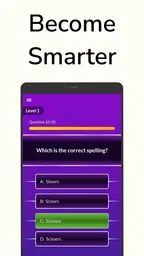
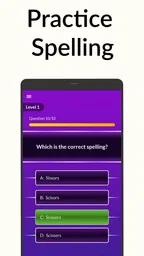
I can see Spelling Bee: Spelling Quiz fitting naturally into a shared household routine: someone has a spare moment, another person wants to test a tricky word, and a quick spelling challenge becomes a small, low-pressure activity. It is a free trivia game from Happy-verse, built around English spelling rather than broad general-knowledge questions. That focus is its appeal, but it also sets a clear boundary: it is best for people who want to practise written English, not for anyone seeking a full language course.
How it works as a shared spelling break
The idea is easy to understand even if not everyone in the household has the same English level. One person can try a word, then pass the device to someone else or compare answers aloud. I like this kind of use because spelling is naturally social: people often know a word when they hear it but disagree about how to write it. A short quiz gives that debate a concrete answer to work toward.
The game’s trivia format makes it more inviting than opening a dictionary or a formal lesson. A learner can approach it as a challenge rather than homework, while a more confident English speaker can use it to check whether familiar-looking words are actually spelled correctly. For a parent, older sibling, or housemate helping someone practise, the useful role is discussion: ask what part of a word feels uncertain before settling on an answer.
That said, I would not treat a shared-device session as a structured class. The game is designed around spelling practice, not a teacher’s plan or a household learning dashboard. If several people take turns, it is sensible to keep track of who is playing and what each person wants to work on outside the game. That simple habit avoids confusing one person’s practice with another’s progress, without assuming the app provides separate household profiles.
What a useful practice session looks like
A realistic moment might be a family member waiting for dinner or a student taking a short break between assignments. They can play a few rounds, note a word that caused hesitation, and later write it in a personal notebook alongside a sentence. This turns a quiz encounter into recall practice instead of relying on the satisfying but fleeting feeling of getting an answer right.
One practical tip is to sort mistakes by cause. A word might be difficult because of an unusual letter pattern, a silent letter, or confusion between similar sounds. Even without turning the game into a lesson plan, identifying the reason for a miss gives the next practice session a purpose. Another useful approach is to have a stronger English speaker explain the spelling pattern rather than simply announce the correct form; that makes turn-taking more helpful to the learner.
For households where English is not everyone’s first language, expectations matter. A person may understand spoken English well and still find spelling challenging, because hearing a word does not always reveal its written form. I would use the quiz as a friendly supplement, not a measure of someone’s overall fluency or intelligence. That distinction makes a shared session encouraging rather than competitive in an unhelpful way.
Keeping shared use comfortable
On a device used by several people, the main boundary to establish is whose turn it is and whether the session is practice or casual play. I would avoid assuming that a shared screen automatically means shared results or a shared learning history. If different people care about their own progress, they should agree on a simple routine, such as taking turns in separate sessions and keeping personal notes outside the game.
The game is free to download, with in-app purchases listed at $4.90 to $19.00 per item. That makes it worth explaining to younger users that optional purchases can exist inside a free app. I would check the device’s purchase settings and talk through the household rule before handing it over, especially if children can access the account used for app purchases. This is a sensible device-level precaution, not a claim about a particular purchase prompt or family-control feature in the game.
For an adult who simply wants a quick spelling diversion, the free entry point is straightforward. For a household that prefers to avoid in-app spending altogether, the relevant decision is whether the device is configured to prevent unintended purchases. The listed price range is broad enough that I would not treat every item as a trivial add-on; check the purchase screen carefully before confirming anything.
Age, trust, and realistic expectations
The content rating is Everyone, so the game is presented for a general audience. That is a useful starting point for households choosing an activity that children and adults can share, but it does not mean every spelling challenge will be equally suitable for every learner. A child who is just beginning to read may need an adult nearby to explain unfamiliar words, while an older learner may prefer to work independently.
I would also keep the word quiz in its proper place. It can encourage attention to English spelling, but it should not be mistaken for a complete course in vocabulary, grammar, pronunciation, or conversation. If someone needs systematic instruction, feedback on written assignments, or practice speaking with another person, a dedicated language-learning resource or a teacher is a better fit. The strength here is narrower: making spelling a game-shaped activity that is easy to pick up.
Children may enjoy the challenge, but an adult should still set expectations around shared devices and purchases. The Everyone rating does not itself tell a household how to manage accounts or separate one player’s activity from another’s. I would therefore make the decision based on the child’s reading level and the device’s existing settings, rather than treating the age label as a substitute for supervision.
Where it sits among spelling and trivia options
Compared with broad trivia games, this title gives up variety in exchange for a more focused purpose. If your group wants questions about history, sport, science, or pop culture, a general quiz game will probably hold attention longer. If the actual goal is to notice and practise English spelling, a spelling-focused quiz is more direct and less likely to drift into subjects that do not help with that task.
Compared with flashcards or a word list, the game has a more playful framing, which can make a short practice break easier to start. Flashcards, however, are usually better when a learner wants to choose exact words, repeat a difficult set, or build a carefully ordered study routine. A dictionary is the better choice when the main question is meaning or usage. I see the quiz as one part of a toolkit: useful for prompting attention, not a replacement for reference material or deliberate review.
It is also worth being honest about the limits of a quiz format. Recognising the right spelling in a game is not the same as producing it accurately in a message, school assignment, or work document. To bridge that gap, I would write down troublesome words after playing and use them in original sentences. That small step turns recognition into active recall, which is the more valuable skill when the app is closed.
Who will enjoy it, and who may want something else
I would recommend it to English learners who want a light way to focus on spelling, to confident speakers who enjoy word challenges, and to households looking for an activity that can spark conversation without requiring everyone to know the same trivia topics. It may also suit someone who wants a quick break from a longer study session, provided they understand that a game is a supplement rather than a full curriculum.
I would skip it if you want detailed grammar teaching, listening and speaking practice, personalized lessons, or a guaranteed way to keep different household members’ learning separate. I would also choose another activity for a group that mainly wants varied general trivia. Those are not shortcomings in every context; they are simply consequences of the app’s spelling-first focus.
The app has a 4.5 average from around 4,400 ratings, with 284 written reviews, and has been installed over 500,000 times. It is rated for Everyone, runs on Android 6.0 or later, and its current version is 6.0. Those details suggest a substantial audience for a focused spelling game, but popularity does not change the practical question: does your household want to practise English spelling in a casual, quiz-like way?
My household verdict
Spelling Bee: Spelling Quiz is most useful when I treat it as a small, shared prompt for learning rather than a complete teaching solution. It can turn spare minutes into a spelling challenge, give family members a reason to compare how they approach words, and help a learner notice gaps worth reviewing later. Its free starting point lowers the barrier to trying it, while the in-app purchase range makes basic purchase awareness worthwhile on a shared device.
For a household, I would set a simple routine: agree who is playing, keep personal practice notes separate if that matters, and turn difficult answers into a short follow-up exercise. If you want broad trivia or a structured course, another option will serve you better. But if the aim is approachable English spelling practice that can be enjoyed alone or discussed together, this focused trivia game is a reasonable one to try.
What we like
- Short quiz rounds make it easy to play during breaks.
- Word challenges can help build spelling confidence.
- The simple format is approachable for younger players.
- Repeated practice can reinforce familiar spelling patterns.
- A quiz game offers a more engaging alternative to worksheets.
What could be better
- Some words may be too difficult for beginners.
- Repeated questions can make longer sessions feel repetitive.
- Players may need outside help to understand unfamiliar words.
- Spelling practice alone does not teach every word's meaning.
- The quiz format may not suit players who prefer open-ended games.







