Real Piano For Pianists review
 Analysis by Appsdrops
I approached Real Piano For Pianists as a quick way to spend time with a virtual keyboard, rather than as a replacement for a real instrument or a structured piano course. That distinction matters: a music game can make it easier to pick up a tune for a few minutes, but it should not be judged by whether it teaches the same skills as lessons. My overall impression is that this one is most appealing to curious beginners and casual players who want a piano-themed activity close at hand.
What the free entry point is worth
The game is free to install, with in-app purchases listed at $4.99 per item. That makes it easy to try before deciding whether it deserves a place in your routine. I would treat the free access as the main reason to give it a chance, not assume that every part of the experience is included or that a purchase is necessary. If you do spend money, consider the value of the specific item at the point of purchase rather than treating the listed amount as a guaranteed total cost.
That distinction is useful because “free” can mean different things in mobile games. Here, the confirmed purchase detail tells you that optional paid items exist; it does not by itself establish what each one unlocks. I would check the in-app purchase screen carefully before paying, especially if you only want a basic piano experience. For someone who is testing whether tapping a keyboard on a phone is enjoyable, spending nothing at first is the sensible approach.
Real Piano For Pianists is a music game from RhythmMakers Studio. It has an average rating of 3.8 from around 3,900 ratings, and it has been installed over 5 million times. Those figures suggest that many people have tried it, while the rating is a reminder not to expect universal satisfaction. I read that as a reason to keep expectations practical: the app may suit casual use, but popularity alone cannot tell you whether its interaction style will feel right on your device.
A pocket piano, not a promise of piano lessons
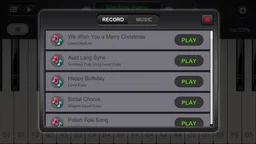
The clearest value is convenience. A phone is often already nearby, so a piano-themed game can be a low-effort way to explore notes or enjoy a few minutes of musical interaction without setting up an instrument. The store’s short description calls it “Real Piano,” but I would not take that phrase as evidence that the app reproduces the feel, sound, or learning structure of an acoustic piano. A touchscreen is a different instrument: your fingers meet glass, and the experience depends on tapping rather than pressing physical keys.
That difference is not automatically a flaw. It simply affects what the game is good for. If you want a small, accessible musical diversion, a virtual piano can be an inviting starting point. If you are trying to build precise finger strength, improve touch control, or practice at a full keyboard, the phone format is a compromise. The app is best understood as a casual music game with a piano focus, rather than a substitute for a keyboard, a teacher, or a dedicated lesson plan.
One useful way to test whether it fits is to set a tiny goal before opening it: spend a short break exploring the keyboard, or see whether you enjoy following a musical prompt when one is offered. If you find yourself tapping without knowing what you want from the session, the novelty may fade quickly. A simple intention makes the experience easier to evaluate and helps you decide whether the free version is enough for your needs.
Where it can fit into an ordinary day
I can picture using this during a quiet wait, such as while sitting at home before dinner or passing a few minutes between errands. It is the sort of situation where pulling out a full instrument would be impractical, but a phone-based music game is easy to try. I would keep the session short and treat it as play, not as a serious practice block. That makes the app’s convenience its strongest practical advantage.
A second useful scenario is sharing a quick musical activity with a child or a friend who is curious about piano. The game is rated Everyone, which makes its age classification broadly accessible, though that does not guarantee that every child will find the controls comfortable or the experience engaging. I would still try it together first and see whether the screen size and tapping feel work for the person using it. A larger phone or tablet can make a touchscreen keyboard easier to interact with than a compact display, but the app’s suitability will depend on the device and the player.
For someone who already owns a keyboard, I see a narrower role: it might be an occasional diversion when the instrument is unavailable, but it is unlikely to replace hands-on practice. If your goal is to learn a song accurately, build two-handed coordination, or get feedback on technique, a keyboard with lessons or a structured practice app is a better match. Real Piano For Pianists makes more sense when the goal is to engage casually with piano sounds and play rather than follow a curriculum.
Tradeoffs that affect the experience
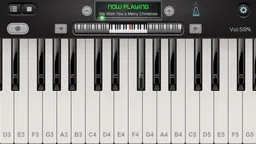
The main tradeoff is the touchscreen itself. On a real piano, key width, resistance, and physical spacing help your hands understand where they are. On a phone, those cues are reduced, and fingers can cover neighboring areas or feel cramped. This matters more when you want deliberate, accurate playing than when you are simply exploring. If the keys feel too small, try rotating the device or using a larger screen if the app supports your device layout; if that still feels awkward, a virtual keyboard may not be the right format for you.
There is also a difference between casual musical play and reliable practice. A game can make short interactions appealing, but the fact that it is in the music category does not mean it teaches reading notation, explains technique, or tracks long-term progress. I would avoid choosing it on the assumption that it will provide those things. For a beginner who wants guidance, look for an option that clearly presents lessons or practice goals; for someone who mainly wants to tap a piano interface, this game’s lighter purpose may be enough.
The 3.8 average rating points to a mixed rather than standout response. That does not reveal why individual players liked or disliked it, so I would not use the number to predict a specific problem. It does, however, reinforce a sensible approach: install it because the free entry point is low risk, then judge the keyboard interaction and overall enjoyment yourself. If the first session feels fiddly or repetitive, there is little reason to keep going simply because millions of people have installed it.
Version 9.0 is the current version, and the game was released on October 24, 2022. It requires Android 7.0 or later. Those details are useful when checking whether it fits an older Android device, but a compatible operating system does not guarantee that the app will feel comfortable on every screen. Before relying on it for a particular occasion, I would open it on the device you actually plan to use and check that the controls are easy to reach.
How it compares with other music options
Compared with a conventional piano-learning app, Real Piano For Pianists seems the better fit for someone who wants an informal, low-commitment activity. A lesson-focused alternative is preferable if you want a sequence of exercises, explanations, or a clear route from beginner skills to more confident playing. Compared with a physical keyboard, this game wins on portability and ease of access, but loses the tactile response and space needed for realistic hand placement.
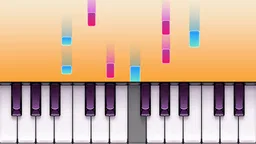
It is also worth separating this from rhythm games that use a stream of timed prompts. The name and piano emphasis make a keyboard-oriented experience the natural expectation, but the information available does not establish a specific song library, timing system, lesson mode, or collection of extra features. I would not choose it based on assumptions about those details. Instead, decide whether a virtual piano game itself sounds appealing, then use the free access to see how the actual experience feels.
One practical tip is to compare it against your real reason for downloading. If you want a quick musical break, convenience may matter more than realism. If you want to improve your playing, ask whether the app gives you the kind of instruction and feedback you need before spending on any item. And if you are looking for entertainment built around recognizable songs or competitive timing, check the game’s current in-app presentation first rather than assuming those elements are included.
Who is likely to get the most from it?
I would recommend trying Real Piano For Pianists if you are new to virtual piano apps, enjoy music-themed games, or want something casual to explore during spare moments. It is especially easy to justify as a no-cost experiment because you can begin without paying, then decide whether the experience is worth keeping. Its broad age rating also makes it a reasonable candidate for a family member who is simply curious, provided the screen controls suit them.
I would steer dedicated learners toward a real keyboard or a clearly structured teaching tool. The same goes for players who care about nuanced touch, dependable finger spacing, or practice that transfers directly to an instrument. If you dislike tapping on small screens, or if you want a game with a clearly defined rhythm challenge, another option in the music category may serve you better. This is a case where matching the format to your goal matters more than the word “piano” in the name.
For people who do decide to try it, I suggest beginning with a brief session and resisting the urge to buy anything until you know what you actually use. Notice whether the keys feel manageable, whether you return to the app naturally, and whether its style matches the kind of musical interaction you wanted. Those are more useful tests than installing it and hoping it will somehow become a full learning system.
My verdict on trying it
Real Piano For Pianists is worth a no-cost trial if you want casual piano-themed play, but it is not the choice I would make for serious instrument practice. Its strongest value is being easy to try and available as a portable music game; its central limitation is that a touchscreen cannot provide the feel or learning support of a physical keyboard or a dedicated course. The listed $4.99-per-item purchases mean I would inspect each offer carefully and pay only when I understand what it adds.
In short, I would suggest it to a friend who is curious about tapping out a little music during spare time, especially if they are comfortable treating it as entertainment rather than instruction. I would suggest a different app or a real keyboard to someone with specific learning goals. Start free, judge the controls on your own device, and keep it only if the experience feels enjoyable enough to return to.
What we like
- Touch-responsive keys support expressive playing.
- Headphones let you practice without disturbing others.
- Useful for learning melodies by ear.
- A virtual keyboard is easy to take on the go.
- No physical piano is needed to get started.
What could be better
- Small screens can make accurate finger placement difficult.
- The touchscreen lacks the feel of weighted piano keys.
- Built-in speakers may not reproduce rich piano tones.
- Long practice sessions can drain your device battery.
- Ads may interrupt use in the free version.







