




Pop Piano: Music Games review
 Analysis by Appsdrops
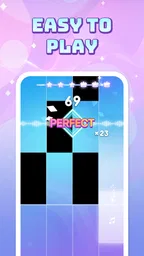
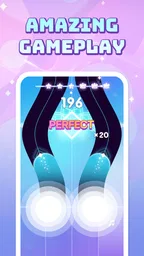
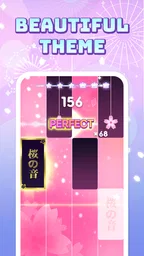
Pop Piano: Music Games is a music game for quick bursts of play: you follow along with popular songs, aiming to keep your attention on the notes rather than learn piano technique. I’d consider it when I want a lightweight musical distraction, especially if K-pop is part of my listening rotation. It is less suited to someone looking for a realistic keyboard, structured lessons, or a way to practise pieces on a real instrument.
Where the first session can get stuck
The basic appeal is easy to understand, but rhythm games can feel less straightforward once timing enters the picture. A familiar song may make you want to tap by ear; that is not always the same as following the game’s on-screen cues. I find it helps to watch the play area closely for a moment before settling into a rhythm, rather than assuming that knowing the tune is enough.
Another common point of friction is expectation. The word “piano” can suggest keys, notation, or lessons, while this is best approached as a tap-along music game. If you open it expecting a piano-learning tool, the experience may seem shallow even if you enjoy the songs. Thinking of it as a rhythm game makes its purpose clearer and gives you a fairer way to judge it.
Popular music can also raise expectations about song choice. The game’s focus includes K-pop, but that does not mean every player’s favourites will be represented. I’d treat the music selection as part of the game’s appeal, not as a promise that it will match a particular playlist. If a specific artist or track is essential to your decision, check the current app-store presentation before installing rather than relying on the broad description.
It is also worth separating a difficult run from a technical problem. Missing notes can happen because your attention drifted, the timing felt unfamiliar, or you were playing one-handed while distracted. Before changing settings or reinstalling, try a short, focused attempt and see whether the same issue persists. That simple comparison can save time and makes it easier to tell a genuine interruption from an ordinary learning curve.
Set expectations before you play
The game is free, which makes trying it a low-commitment choice, but “free” does not tell you what the moment-to-moment experience will feel like. I would start with a short session and decide whether the song-based tapping is enjoyable on its own. Avoid treating the first round as a test of musical skill: the useful question is whether following the cues feels satisfying enough that you want another go.
Pop Piano is made by Cobby Labs, and its current version is 0.5.4. It was released on September 19, 2025, and its minimum operating-system requirement is Android 7.0. Those details matter when you are checking compatibility, particularly on an older device. The game is rated Mature 17+, so it is not a title I would casually hand to a younger player without first checking the age guidance in the app store.
Setup checks that prevent avoidable frustration
Before blaming the game for a failed download or an unresponsive session, I’d check the basics: confirm that the device meets the stated operating-system requirement, that the app has finished installing, and that the device is not struggling with several demanding tasks at once. If the game opens but feels interrupted, closing other active apps and trying again is a sensible first step. These are general device checks, not special fixes for a particular hidden feature.
For a rhythm game, the way you hold the phone can affect how comfortably you follow what is happening. I prefer to settle the device on a stable surface or hold it securely before starting, rather than shifting grip mid-song. That small adjustment reduces accidental taps and lets me keep my eyes on the cues. A quiet moment can help too: competing audio or conversation makes it harder to judge whether a miss came from timing or distraction.
If the first launch feels sluggish, give the device a moment and avoid repeatedly tapping the same control. Restarting the app is a reasonable basic recovery step if it appears stuck. If the problem returns, restart the device and check whether other apps are also behaving poorly. When several apps show the same slowdown, the phone itself is a more likely place to investigate than one music game.
The game has an average rating of 4.6 from around 33,000 ratings, and it has passed 10 million installs. That level of uptake suggests it has found an audience, but popularity cannot tell you whether its song mix or tapping style suits you personally. I use those figures as context, not as a substitute for trying a short session and judging the feel for myself.
Recover your rhythm without overcorrecting
When a run goes badly, my first adjustment is to simplify what I am paying attention to. Instead of trying to anticipate every note from the melody, I focus on the visible cues and let the song become background support. This is a useful distinction for familiar tracks: knowing the chorus can tempt you to tap ahead, while following the game keeps your timing anchored to what is on screen.
If you miss several cues in a row, pause mentally between attempts instead of immediately repeating the same rushed approach. A brief reset gives you a chance to notice whether the issue was grip, distraction, or simply unfamiliar pacing. This is not a secret mode or advanced setting; it is a practical way to make each retry informative rather than turning the session into repeated guesswork.
Likewise, if the audio or visual presentation seems out of step, do not assume at once that the game is broken. Check whether the phone’s sound is playing normally elsewhere, then close and reopen the game. If only this app continues to behave oddly after a restart, use the app store’s support route for further help. I would avoid deleting and reinstalling as an early reflex, especially if you are unsure whether any local progress could be affected.
One useful everyday workflow is to use the game as a short break rather than leave it running while doing something else. For example, I might play a few attempts while waiting for a meal or taking a pause between tasks, then stop when my attention is needed elsewhere. Rhythm games reward focus; splitting attention between tapping, messages, and conversation makes the experience feel less fair and offers little insight into whether the game itself is enjoyable.
Know when the app may not be the cause
Touchscreens are not identical, and a phone that registers taps inconsistently in other apps may create the same impression here. If taps seem unreliable, test the screen in an ordinary app before deciding the game is at fault. Clean the screen and remove anything that might interfere with touch input, then try again. If other apps also fail to respond accurately, troubleshooting the device is more useful than repeatedly replaying a song.
Audio can be misleading too. Low volume, connected headphones, or sound routed through another device can make it harder to follow a track, even when the game is running normally. Check the phone’s output and volume first. I would not make precise timing judgements from a session played amid noisy surroundings or with audio that is difficult to hear; the conditions themselves can make a simple rhythm challenge feel unfair.
Connection trouble may also affect downloading or other online-dependent activity, but I would not assume that every pause or loading delay proves a network fault. See whether other apps can access the internet, then retry when the connection is stable. If the problem appears only in this game, restarting it and checking for an available update through the app store are reasonable next steps. Avoid changing unrelated device settings without a clear reason.
There is a broader limitation that no troubleshooting can fix: a song-based tapping game is not a substitute for learning piano. It may help you pay attention to rhythm and make familiar music interactive, but that is different from practising hand position, reading notation, or building technique on a keyboard. If those are your goals, a piano-learning app or an actual instrument is the better choice. If you want a score-driven rhythm challenge, a more traditional rhythm game may also suit you better than a piano-themed presentation.
Who will enjoy it, and who should skip it
I can see this working well for someone who likes pop and K-pop, wants music to be the centre of a casual game, and is happy to learn the timing through play. It may also suit a player who wants a quick, self-contained activity rather than a long campaign or a demanding practice routine. Its musical framing gives it a different mood from action or puzzle games, even though the useful skill during a session is still focus and timing.
I would skip it if you need a particular song, dislike tapping along to on-screen cues, or want a tool that teaches an instrument. It is also not a good choice for a child if the Mature 17+ age rating conflicts with your household’s rules. And if you prefer games where progress comes from strategy, exploration, or a story, a song-focused format may feel repetitive once the novelty of playing along wears off.
Compared with a conventional piano-learning app, this one asks for less commitment to study but offers less instruction. Compared with a general rhythm game, its appeal is more directly tied to popular songs and its piano-game identity. That trade-off is the key buying decision: choose it for music-led tapping, not for comprehensive music education or the broad variety of challenges found in other genres.
My practical verdict
After weighing what it is designed to do, I’d recommend Pop Piano: Music Games to a friend who wants a free, casual music game and is curious about its pop and K-pop focus. I would suggest trying a brief session in a quiet setting, using a comfortable grip, and judging the timing after a few focused attempts rather than deciding from a distracted first run. Those small steps make it easier to tell whether the game’s rhythm feels rewarding to you.
The strongest reason to give it a chance is its straightforward musical premise; the biggest reason to pass is that the same simplicity may not hold your interest if you want deeper instruction or a wider range of gameplay. With an average rating of 4.6 and a Mature 17+ rating, it has a clear audience, but neither popularity nor presentation overrides personal fit. My verdict is positive for casual song-based play, with a firm caveat: it is a music game to enjoy, not a piano course to rely on.
What we like
- Tap notes in time with familiar pop songs.
- Simple controls make it easy for beginners to start playing.
- Short rounds suit quick play sessions.
- A broad song selection can keep music fans engaged.
- Rhythm challenges can help build timing and coordination.
What could be better
- Some songs may require an internet connection.
- Ads can interrupt the flow between rounds.
- Unlocking more tracks may take time or in-app purchases.
- Fast note patterns can feel difficult for new players.
- The available song catalog may vary by region.







