

Play N Guess: Earn Money review
 Analysis by Appsdrops
Play N Guess: Earn Money is a trivia game from InventBros that pairs quick knowledge challenges with the possibility of real rewards. I’d consider it for a spare-moment game rather than a serious study tool: the appeal is the mix of answering questions and having something beyond a score to aim for. That combination makes it more intriguing than a plain quiz, but it also means I’d approach the reward side with sensible expectations and read the in-game terms before committing time.
Quick rounds suit short breaks
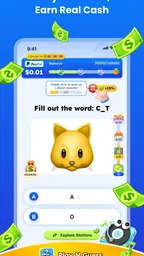
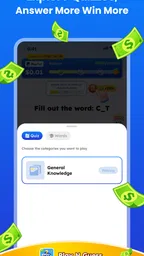
The game’s core idea is easy to understand: answer trivia and try to earn rewards. That straightforward premise is a good fit for a short break, such as waiting for a friend or winding down after dinner. You don’t need to arrange a group or prepare a topic list, as you might with a traditional board-game quiz. I’d keep it in the same casual-play category as other mobile trivia games, while remembering that the reward angle changes what some players will expect from each round.
InventBros has a recognizable, uncomplicated concept here, and the game is free to download. Its current version is 1.0.3, so I’d check the app store’s version information if I were troubleshooting or deciding whether to install it on an older device. The listing shows a 4.5 average from around 2.2 thousand ratings, with over 100 thousand installs. Those figures suggest that people are trying it, but they can’t tell you whether its questions suit your interests or how consistently the reward experience will meet your expectations.
One practical way to try it is to treat the first session as an orientation rather than a mission to earn something. Notice how questions are presented, how much attention each one takes, and whether the pace feels comfortable. That small test helps you decide whether it works for the kind of downtime you actually have. Trivia is less relaxing when you’re trying to answer while crossing a street, handling a work task, or carrying on a conversation, so I’d save it for a moment when I can focus.
Why the reward angle changes the decision
In a conventional quiz app, I judge the experience mainly by question quality, clarity, and whether I enjoy improving my knowledge. Here, the prospect of real rewards gives the game an additional reason to keep playing, but it also makes it important to distinguish entertainment from dependable income. I wouldn’t plan a budget around a trivia game or assume that time spent automatically translates into a particular payout. If rewards are the main reason you’re interested, read the conditions shown in the game carefully before investing a long session.
This distinction is useful when comparing it with familiar alternatives. A general knowledge quiz is usually the safer pick if you simply want a broad collection of questions and a score to beat. A multiplayer trivia game is better when the social competition is the point. Play N Guess is most relevant if you’re curious about a solo trivia experience that adds a reward incentive. That’s a narrower appeal, and whether it’s a good match depends on how much you enjoy answering questions even when the reward itself isn’t the main event.
Make a little time work better
For an everyday use case, I’d open it during a quiet coffee break and decide in advance how long I want to play. That keeps the game in its proper place: a light diversion, not a task that takes over the afternoon. It also makes it easier to notice whether the questions are engaging enough on their own. If I’m enjoying the challenge, the reward element is a bonus; if I’m only continuing because I expect a particular result, I’d pause and reassess rather than play on autopilot.
A second useful habit is to avoid splitting attention between trivia and another demanding activity. Questions ask you to retrieve information and make a choice, so playing while distracted can turn a quick game into a frustrating one. I’d also avoid relying on a single session to answer every question I have about rewards. Instead, check the relevant details as they appear and make a calm decision about whether the effort feels worthwhile. That’s a better way to judge a reward-based game than letting the promise of a reward dictate your time.
What to expect from speed and stability
Trivia is naturally suited to short bursts, but that doesn’t prove how quickly a particular game will load or how smoothly it will run on every phone. I wouldn’t promise instant starts or uninterrupted play without testing on your own device and connection. If a session feels slow, first distinguish between a delay in loading the game and a pause while content or reward information is being displayed. That simple check can help you decide whether the issue is temporary or whether the experience just isn’t a good fit for your routine.
For reliability, I’d judge it by what happens across several ordinary sessions rather than by one unusually smooth or rough attempt. Notice whether you can return to the game after setting your phone aside, whether your progress is clear, and whether the reward-related steps are understandable. These are sensible checkpoints for any trivia game with an incentive attached. If anything seems unclear, I’d stop before making assumptions about what has been earned or what action is required next.
Heavy-use moments deserve a little care. A longer stretch of play can make small friction points more noticeable: repeated question styles, a pace that feels tiring, or uncertainty about how much time is worth spending for the reward. I’d take breaks and check in with myself instead of treating continued play as automatically productive. This is especially important if you’re playing because you hope to earn something; the game should still be enjoyable as trivia, not just a promise you chase.
Device fit and age suitability
The minimum operating-system requirement is Android 7.0, which gives owners of older compatible Android phones a clear starting point when checking device eligibility. Compatibility alone doesn’t guarantee that every device will feel equally responsive, though. Available storage, other apps running, and the phone’s general condition can affect the experience of mobile games. If your device is older or already struggles with everyday apps, I’d try a brief session first rather than assume performance will match that of a newer phone.
The game is rated Mature 17+, so it isn’t a recommendation I’d make for younger players. I’d take that rating seriously and check the app store’s age guidance before installing it for someone else. Adults who are comfortable with the rating can decide whether its style of trivia and reward-oriented premise suit them. If you want a family quiz for mixed ages, a clearly family-focused alternative would be a more sensible choice.
It’s also worth keeping expectations grounded about phone resources. A trivia game doesn’t automatically make heavy demands, but I can’t infer battery use, data consumption, or storage needs from its category alone. If those details matter to you, check your phone’s app information after installation and pay attention during a short trial. That’s more useful than guessing based on the fact that the game consists of questions.
Who will enjoy it—and who should pass
I’d recommend giving Play N Guess a look if you enjoy casual trivia, want something you can pick up during a quiet moment, and find a reward incentive motivating without needing it to be a dependable source of money. The strongest fit is someone who likes answering questions for its own sake and is willing to inspect the reward conditions before spending much time. Its free price makes trying it straightforward, but free access is not, by itself, a reason to overlook how the reward process works.
I’d skip it if you want a deep, carefully structured learning course, a quiz built around playing with friends, or a predictable way to earn money. Those are different needs, and a standard educational quiz, a group trivia game, or a more transparent option designed for a specific purpose may serve you better. I’d also pass if the Mature 17+ rating is unsuitable for you, or if you dislike games where incentives are part of the pitch.
There are around 192 written reviews, which can help you spot what other players emphasize, but I’d read recent comments for practical patterns rather than treating any one opinion as a guarantee. Look for whether people describe the question experience clearly and whether their expectations around rewards seem realistic. That’s a more useful approach than relying on a headline rating alone, because the feature that attracts one person may be exactly what another finds distracting.
My performance verdict
My overall take is that Play N Guess has a clear niche: casual trivia with a reward-focused reason to keep answering. I’d approach it as a lightweight game, test it in a short session, and decide whether the questions hold my attention before giving the incentive much weight. Its 4.5 average and growing audience make it look worth considering, but they don’t settle the practical questions of device feel or whether its reward terms suit you.
In performance terms, the sensible verdict is cautious rather than dramatic. I’d expect a trivia format to work best in focused, brief sessions, but I would verify speed and stability on my own phone instead of assuming they’re guaranteed. Try it when you have a calm few minutes, check the game’s reward details, and stop if the process feels unclear or the play itself isn’t enjoyable. For the right adult player, that makes it an easy-to-test diversion; for anyone seeking reliable earnings, a social quiz, or a learning tool, another kind of app is likely the better choice.
What we like
- Quick rounds make it easy to play during short breaks.
- The guessing format is simple for new players to understand.
- A range of challenges can help keep repeat sessions varied.
- The game can be played without advanced gaming skills.
- It offers a casual way to test word and general knowledge.
What could be better
- Cash rewards may depend on eligibility and regional availability.
- Earnings can be small compared with the time required to play.
- Frequent ads may interrupt the flow of a round.
- Reward redemption rules may include minimum payout thresholds.
- Some questions may feel repetitive after extended play.







