






Piano Tiles 2™ - Piano Game review
 Analysis by Appsdrops
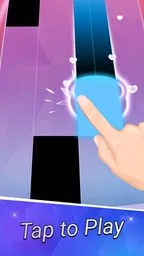
I like rhythm games that ask for quick attention without demanding a long session, and Piano Tiles 2™ is built for exactly that sort of break. Its appeal is easy to understand: follow a song’s rhythm, tap the piano tiles, and try to keep a clean run going. The simple premise makes it approachable, but timing and concentration still matter. I’d recommend it to someone who wants a music-themed arcade challenge, rather than a detailed piano lesson or a full music-making app.
Where a quick session can go wrong
The first thing to get used to is the gap between understanding the idea and getting comfortable with the rhythm. Tapping a tile as soon as it appears may feel natural, but the game is about responding in time, not simply tapping as fast as possible. When I lose a run, I try to notice whether I rushed, hesitated, or let my eyes drift ahead of my fingers. That small distinction makes practice more useful than repeatedly restarting without changing anything.
Because the play depends on visual attention and touch, the phone itself can become part of the challenge. A cramped grip, a screen covered by a thumb, or a surface that moves while I play can make accurate taps harder. I get a better feel for the timing when I hold the device steadily and keep my hands relaxed. If I’m playing around other people, I also make sure I can see the screen clearly rather than trying to play while walking or juggling something else.
Another common source of frustration is expecting every session to feel equally easy. A song or sequence that seems manageable once may be harder when I’m tired or distracted. I treat a missed tap as a cue to reset my focus, not proof that the game is unfair. That approach is especially useful for a short arcade game: a brief pause can be more productive than pushing through several careless attempts.
The game’s music identity is central, but it is still an arcade experience. If you want lessons that explain notes, technique, or how to play a real keyboard, this is not a substitute. I enjoy it for matching taps to rhythm and chasing a more controlled run. That difference matters when deciding whether to download it: choose it for quick musical reflex play, not for structured instruction.
Make the first attempt a fair test
Before judging the controls, I make sure I’m holding the phone in a way that leaves the playing area visible. If a case edge or my grip makes a part of the screen awkward to reach, changing my hand position is a sensible first check. I also avoid testing it in a setting where notifications, conversation, or movement are likely to interrupt me. A quiet minute gives a much better read on whether the timing feels comfortable.
It helps to begin with the goal of learning the rhythm rather than setting a personal record immediately. I pay attention to the pattern and keep my taps deliberate. If I find myself staring at one spot, I try to follow the next tile with my eyes while keeping my hands ready. This is a practical adjustment, not a hidden control or special feature; it simply makes the basic play easier to read.
Simple setup checks before blaming the game
Piano Tiles 2™ is free to download and is listed for Android devices running version 7.0 or later. Before installing, I would check the phone’s operating system and make sure there is room for another game. The current version is 1.13.5, and Kooapps Games | Fun Arcade and Casual Action Games is the developer. Those details are useful when checking compatibility or identifying the correct game in an app store.
If the game opens but feels awkward to control, I first check whether my screen is clean and whether my fingers are landing where I expect. A smudge can make a small target harder to see, while an unstable grip can turn a simple tap into a slip. I also close distractions and try again when I can focus. These basic checks are worth doing before concluding that the game itself is responding badly.
If an installation or launch does not go smoothly, I would take the usual cautious steps: confirm the device meets the minimum operating-system requirement, check that the download has completed, and restart the app or device if it appears stuck. If the issue continues, checking for an available app update through the store is a reasonable next step. I would avoid deleting anything or changing device settings without first considering whether that could affect other apps or saved information.
Recover a session without turning it into a chore
When I make a mistake, I try to identify one cause before starting again. Was I tapping too early? Did I lose sight of the pattern? Was I holding the phone in a way that made one side harder to reach? Picking one adjustment gives the next attempt a purpose. Changing everything at once makes it difficult to tell what helped, and can make a quick game feel more frustrating than it needs to be.
For a short break, I set a simple limit for myself: a few focused attempts, then a pause if my timing starts to slip. This is more effective than playing on autopilot. The game suits small pockets of time, such as waiting for a friend or taking a break between tasks, but those moments can also bring interruptions. If I know I’ll be distracted, I save it for later rather than treating a broken run as a meaningful test of my ability.
If a session is interrupted by the phone or another app, I don’t assume the game has lost progress or that something is broken. I return to the game and see whether it is ready for another attempt. If it is not behaving normally, I close and reopen it, then check for an update if needed. These steps are deliberately basic: they can help with common app hiccups without pretending every problem has the same cause.
One useful trade-off is that quick retries encourage practice, but they can also tempt me to repeat the same mistake. I get more out of the game when I treat each try as a small timing exercise. That makes the experience less about chasing a perfect run and more about improving control. It is a simple habit, but it turns a repetitive loop into something I can enjoy for longer without feeling stuck.
When the phone, setting, or expectations are the issue
Not every awkward session points to a fault in the game. Low attention, a moving bus, a bright reflection, or a phone held at an uncomfortable angle can all make visual timing more difficult. I would try again in a calmer setting before deciding the controls are the problem. If taps remain consistently difficult on a clean, stable screen, checking the device’s touch response in other apps can help distinguish a broader phone issue from a game-specific one.
Sound can add to the sense of rhythm, but the game should not be mistaken for a music player or a way to learn songs on an instrument. If you prefer a deeper musical activity, a dedicated learning app or a real keyboard will be a better match. If you want a casual challenge that borrows the look and feel of piano keys, this is much closer to the mark.
The game is rated Everyone, which makes its basic audience broad, but that does not mean every person will enjoy its pace. Someone who dislikes quick reactions, repeated attempts, or screen-focused play may find it tiring. I would also skip it if the main goal is to relax without concentrating: its musical theme may sound soothing, but the play asks for attention.
How it compares with other music games
Compared with music apps built around learning an instrument, Piano Tiles 2™ is much lighter and more immediate. There is no need to approach it as a course or to set aside a long practice block. Compared with music games that center on elaborate setups, it is appealing precisely because its basic interaction is easy to grasp. The trade-off is that players seeking detailed musical control or instruction will find those alternatives more rewarding.
I can see it working well at a casual gathering, too. One person can hand the phone to a friend for a short attempt, then pass it along; the rules are easy to explain without a tutorial speech. That is a practical use case rather than a promise about any particular party mode. For a group that wants a shared screen experience or a way to play together at once, a game designed specifically for that would be a better fit.
It has a 4.1 average from around 76,000 ratings, and has passed 10 million installs. I take that as a sign that the simple rhythm-game idea has reached a wide audience, not as a guarantee that it will suit every player. The app is free, though it offers in-app purchases ranging from $0.99 to $299.99 per item. I’d keep that in mind if a child will use the device, and check purchase settings before handing over a phone.
Who I’d recommend it to
I’d suggest it to friends who enjoy quick reflex challenges, music-themed arcade play, and the satisfaction of making a more accurate attempt after a mistake. It fits especially well when there is a spare minute and I want a game I can understand immediately. Its 1.13.5 version and Android 7.0 minimum are practical details to check before downloading, while the Everyone age rating makes its intended audience clear.
I would not recommend it as a piano tutor, a way to compose music, or a calm background activity. People who need longer, more strategic sessions may prefer a different kind of game, and anyone who finds rapid tapping uncomfortable should trust that preference rather than force themselves to adapt. It is also worth remembering that the free download includes optional purchases, so the store’s purchase controls matter if spending needs to be limited.
My practical verdict
What I like most is the low barrier to getting started: the musical theme and tapping challenge are immediately understandable, while improving your timing gives the game a reason to keep returning. My main reservation is that repeated attempts can become frustrating if I play while distracted or expect it to teach real piano skills. The best way to enjoy it is to keep sessions short, hold the phone steadily, and make one small adjustment after a missed run.
For a free, casual music game, Piano Tiles 2™ is an easy recommendation if you want focused rhythm play in short bursts. I’d choose it for a quick challenge with friends or a brief solo break, and choose a music-learning app or a more involved rhythm game when I want depth beyond tapping in time.
What we like
- Quick rounds make it easy to play during short breaks.
- Simple tap controls are easy for beginners to learn.
- Increasing speed keeps later stages challenging.
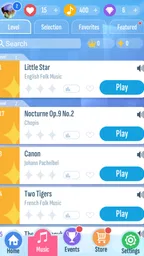
- A wide song selection adds variety to repeated play.
- Offline play is available for many parts of the game.
What could be better
- Ads can interrupt play or appear between rounds.
- Some songs and features require in-app purchases.
- Fast sequences may feel difficult on smaller screens.
- Mistimed taps can end a run abruptly.
- Progress may rely on an internet connection for some features.







